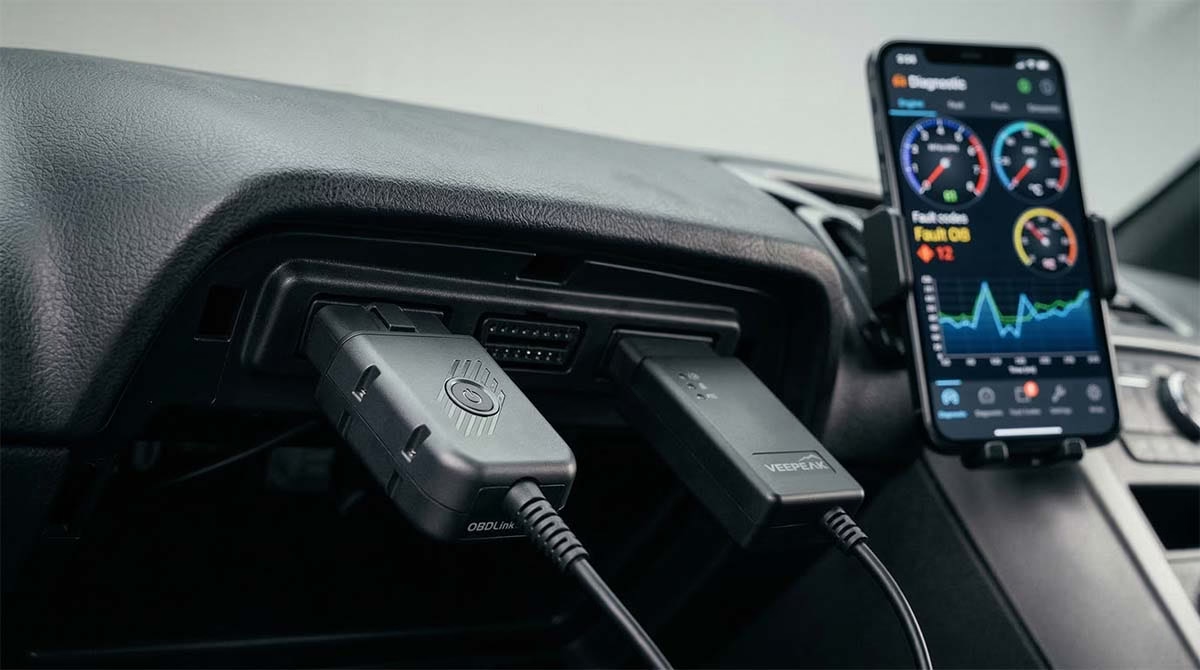
Two names stand out in this crowded market: the OBDLink MX+ vs Veepeak OBDCheck BLE+. If you are searching for a comparison of obdlink mx+ vs veepeak, you are in the right place. This guide will break down everything you need to know. We will look at specs, real user stories, and price points. By the end, you will know exactly which tool belongs in your glove box.
Quick Overview

OBDLink MX+
- Blazing Fast Data Speed (100 PIDs/sec)
- Supports Ford SW-CAN & GM MS-CAN
- 3-Year Warranty & Secure Pairing
- Automatic Sleep & Wake Mode

Veepeak OBDCheck BLE+
- iOS & Android Dual Compatibility
- Supports BimmerCode & Dr. Prius
- Cost-Effective & Reliable Connection
- Compact “Sandwich” Design
What Is an OBD2 Scanner Anyway?
Before we dive into the battle of obdlink mx+ vs veepeak, let’s cover the basics. OBD stands for On-Board Diagnostics. Every car sold in the US since 1996 has an OBD2 port. Usually, it is located under the driver’s side dashboard.
This port is a direct line to your car’s computer. It knows how the engine is running. It knows if the transmission is hot. It knows exactly why that Check Engine light is on. An OBD2 scanner plugs into this port. It talks to the car. Then, it sends that info to your smartphone.
Think of it as a translator. Your car speaks a complex digital language. The scanner translates that into plain English on your phone screen. But not all translators are created equal. Some speak fast. Some speak slow. Some know more dialects than others. That is where our two contenders come in.
Meet the Contenders
The Veepeak OBDCheck BLE+: The Reliable Everyman
First up is the Veepeak OBDCheck BLE+. This little device is a fan favorite. It sits in the “sweet spot” of pricing. It is not a cheap, unreliable toy. But it is also not a professional tool with a crazy price tag.
It is small, compact, and unassuming. It does not have a screen. It does not have buttons. It is simply a bridge. It connects your car to your phone. It uses Bluetooth to do this. It supports both iOS (iPhone) and Android. This is a huge plus. Many households have mixed phone types. With Veepeak, it does not matter who downloads the app. It works for everyone.
Users love it because it just works. It feels solid. It does not wobble in the port. It is the “Goldilocks” choice for many drivers. It is just right.
The OBDLink MX+: The Heavyweight Champion
Next, we have the OBDLink MX+. This device is a beast. It costs more, often around $100 to $120. But for that price, you get serious performance.
It looks a bit different. It is slightly larger. It has a button on it. That button is for security. The MX+ is famous for speed. It can read data incredibly fast. If you want to watch your engine stats in real-time on a dashboard, this is the one you want. It refreshes instantly.
It also has a trick up its sleeve. It can talk to specific car brands on a deeper level. It supports special networks for Ford and GM cars. This means it can see things other scanners cannot. It is built for the enthusiast. It is built for the person who wants data, and they want it now.
Head-to-Head: The Technical Specs
Let’s get down to the numbers. We need to compare the hardware. This will help you see the differences clearly. Here is a quick breakdown of obdlink mx+ vs veepeak specs.
| Feature | Veepeak OBDCheck BLE+ | OBDLink MX+ |
|---|---|---|
| Price | Approximately $42 | Approximately $100 – $120 |
| Connectivity | Bluetooth 4.0 (BLE) & 3.0 (Classic) | Bluetooth v3.0 + BLE |
| iOS Support | Yes (Bluetooth LE) | Yes (Bluetooth LE) |
| Android Support | Yes (Classic & LE) | Yes |
| Data Speed | Standard (Good for basic use) | Very Fast (Up to 100 PIDs/sec) |
| Security | Standard (Connect via App) | High (128-bit encryption + Physical Button) |
| Special Protocols | Standard OBD-II | Standard + Ford SW-CAN & GM MS-CAN |
| Sleep Mode | Yes (Low power draw) | Yes (Automatic sleep/wake) |
| Warranty | Standard | 3 Year Warranty |
| App Included | No (Requires 3rd party app) | Yes (OBDLink app + 3rd party support) |
Deep Dive: The Veepeak OBDCheck BLE+ Experience
Why do so many people choose the Veepeak? The answer is simple. It solves the most common problems without breaking the bank.
The “Check Engine” Light Savior
Most people buy a scanner for one reason. They want to turn off that annoying light. The Veepeak does this perfectly. You plug it in. You open a third-party app like Car Scanner or Torque. Within seconds, the app tells you the code.
Maybe it is code P0300. That means a misfire. Maybe it is P0420. That relates to the catalytic converter. The Veepeak reads these codes fast. It also clears them. If the light was just a fluke, you can turn it off and drive happy.
The Coding Secret Weapon
Here is a cool trick. The Veepeak is not just for reading codes. It can also change settings on your car. This is called “coding.”
BMW owners love this. If you have a BMW or Mini, you might use an app called BimmerCode. This app lets you change how your car behaves. You can code your mirrors to fold automatically when you lock the door. You can disable the annoying auto-start-stop feature that kills your engine at red lights.
The Veepeak is fully supported by BimmerCode. It turns a $42 dongle into a dealer-level tool. This saves you hundreds of dollars. Mechanics charge huge fees for simple coding changes. With Veepeak, you do it yourself.
The Hybrid Hero
Do you drive a Toyota Prius? Or maybe a Lexus hybrid? These cars have big batteries. When those batteries get old, the car feels slow. But checking battery health is hard. Dealers charge a lot for a diagnosis.
Enter the Veepeak. It works with an app called Dr. Prius. This app reads the hybrid battery life. It shows you which battery blocks are weak. One user shared a story on Reddit. They used Veepeak and Dr. Prius to prove their battery was failing. They got it replaced under warranty just in time. That alone paid for the tool ten times over.
The Veepeak Limitations
It is not perfect, though. It relies on apps. You have to buy the app or use a free one. Also, it cannot do heavy-duty service tasks. It cannot reset your oil light on most cars. It cannot retract your brake pads for an oil change. For that, you need a more advanced tool.
It can also be a bit slow for heavy data. If you want to watch twenty different gauges at once on your phone screen, the refresh rate lags. It is fine for checking codes. But for racing or deep data logging, it might stutter.
Deep Dive: The OBDLink MX+ Experience
Now let’s talk about the OBDLink MX+. This is the premium option. It is for the person who takes cars seriously.
Speed Demon
The biggest selling point of the MX+ is speed. It is fast. Really fast. Most cheap scanners update the data once or twice a second. The MX+ updates up to 100 times per second.
Why does this matter? Imagine you are trying to diagnose a hesitation problem. You stomp the gas. The car stumbles. With a slow scanner, the data is delayed. You miss the spike in the graph. With the MX+, you see the data happen in real-time. You see the exact millisecond the fuel pressure drops. This speed makes diagnosis much easier.
The Ford and GM Advantage
Do you drive a Ford or a GM vehicle? The MX+ has a superpower. It supports something called SW-CAN and MS-CAN.
Most cars use standard OBD2 protocols. But Ford and GM have extra networks. They call these “Manufacturer Specific” networks. Standard scanners cannot see them. The Veepeak cannot see them.
The MX+ can. This is huge for Ford owners. It lets you access the ABS module. It lets you see transmission temperatures on trucks. You can read tire pressure sensors. One user on a forum mentioned how they used the MX+ to clear a wheel speed sensor code on their Ford truck. A shop wanted $800 to fix it. The user cleared the code and realized it was just dirt on the sensor. They saved a fortune.
Security and Battery Life
The MX+ has a physical “Connect” button. This is a security feature. To pair the device with your phone, you have to press the button. This stops hackers from accessing your car’s computer remotely. It uses military-grade encryption. For some, this is overkill. For others, it is peace of mind.
It also has amazing power management. You can leave it plugged in all the time. It goes to sleep. It draws almost zero power. When you start the car, it wakes up. The Veepeak also has a sleep mode, but the MX+ is optimized for long-term storage without killing your battery.
The App Situation
The MX+ comes with its own app, the OBDLink app. It is okay. It works. But users often complain about the design. It looks old. It feels clunky. It is not as pretty as “Car Scanner” or “Torque.”
However, you are not forced to use it. The MX+ works with almost any third-party app. Most users ignore the default app and use Torque Pro or OBD Fusion. The hardware is so good that it makes up for the mediocre software.
Real User Reviews: What Are People Saying?
Specs are great. But real life is different. Let’s look at what actual users are saying on Reddit and car forums regarding obdlink mx+ vs veepeak.
The Veepeak Voice
Veepeak users are a happy bunch. They love the value.
One user on r/MechanicAdvice said, “I went through two cheap $15 dongles that kept disconnecting. The Veepeak cost double but stayed connected for a three-hour road trip.”
The consensus is clear. Cheap $10 scanners use fake chips. They crash. They lie about data. The Veepeak uses real chips. It is reliable. It is the “buy once, cry once” choice for the budget-conscious.
BMW forums are flooded with Veepeak praise. “Used this on my 2016 F30,” one user posted. “Coded my auto start-stop memory and digital speedometer in 10 minutes using the BimmerCode app. No issues connecting to my iPhone.”
There are some complaints, though. Android users sometimes get confused. The Veepeak broadcasts two signals (BLE and Classic). New users try to pair it in the Android settings menu. This often fails. You have to connect directly inside the app. Once they figure that out, it works like a charm.
The OBDLink MX+ Chatter
MX+ users are passionate. They treat this tool like an investment.
“It is the fastest Bluetooth OBD-II adapter available,” claimed a user on a hybrid forum. They use it for data logging. “It enables real-time monitoring without lag.”
Another user highlighted the Ford capabilities. “It’s the one to get for AlfaOBD. It works much more reliably and is tried and true with the community.”
But the price tag is a common gripe. “These scan tools are quite expensive,” one user complained. “Don’t want to experiment with buying multiple.”
Another point of friction is the app. “The app UI/UX sucks so much,” a user vented. “It can sometimes take two attempts to connect.” The connection issues are rare but annoying when they happen. For a $100 device, users expect perfection.
Pros and Cons: A Summary
Let’s summarize the strengths and weaknesses of each device to help you decide.
Veepeak OBDCheck BLE+
Pros:
- Affordable: At around $42, it is easy on the wallet.
- Dual Compatibility: Works perfectly with both iPhone and Android.
- Coding Support: Great for BimmerCode and Dr. Prius apps.
- Build Quality: Solid construction, better than cheap clones.
- Compact: Small size fits easily in tight dash areas.
Cons:
- No Screen: Requires a smartphone to function.
- App Costs: Good apps often cost extra money.
- Limited Service: Cannot do oil resets or EPB retraction.
- Slower Data: Not ideal for high-speed data logging.
OBDLink MX+
Pros:
- Blazing Fast: Best-in-class data refresh rates.
- Deep Access: Supports Ford SW-CAN and GM MS-CAN.
- Security: Physical button and encryption keep data safe.
- Sleep Mode: Safe to leave plugged in permanently.
- Warranty: Comes with a 3-year warranty.
Cons:
- Price: At $100+, it is a significant investment.
- Clunky App: The included software feels outdated.
- Larger Size: Slightly bulkier than the Veepeak.
- Overkill: Might be too much scanner for simple code reading.
Who Should Buy Which?
We have reached the verdict. You need to make a choice. Here is the final breakdown for the obdlink mx+ vs veepeak debate.
Buy the Veepeak OBDCheck BLE+ if:
You are a casual driver.
You just want to know why the Check Engine light is on. You want to clear the code and move on with your life. You do not need to analyze fuel trim graphs or timing advance.
You drive a BMW, Mini, or Toyota Hybrid.
The specific support for apps like BimmerCode and Dr. Prius is excellent. This tool unlocks features that usually cost hundreds at a dealer. It pays for itself in one coding session.
You have a mixed device household.
You have an iPhone, your spouse has an Android. You want one tool that works for both cars and both phones without any hassle.
You are on a budget.
If $100 is too much to swallow for a car gadget, the Veepeak is the perfect choice. It offers 80% of the functionality for 40% of the price.
Buy the OBDLink MX+ if:
You are a data nerd.
You want to see gauges. You want to watch your transmission temperature. You want to log data to improve your driving or tune your car. You need the high speed refresh rate.
You drive a Ford or GM vehicle.
This is the “secret weapon” feature. If you need access to ABS codes, transmission codes, or tire pressure data on a Ford or GM, the MX+ is one of the few affordable tools that can do it.
You want “set it and forget it” functionality.
You want to plug the scanner in and leave it there forever. You don’t want to worry about unplugging it to save your battery. The MX+ sleep mode is the best in the business.
You value security.
You are worried about car hacking. You want the peace of mind that comes with a physical pairing button and encrypted data.
Product Comparison Hub
Expert head-to-head comparisons to help you make informed purchasing decisions
OBDLink MX vs VLinker MC
Compare two premium OBD2 scanners for professional diagnostics and real-time vehicle monitoring.
OBD Scanner → 🚙 📱OBDLink MX vs BlueDriver
Discover which Bluetooth OBD2 adapter offers better app integration and diagnostic features.
OBD Scanner → 🔧 🛠️Ancel AD310 vs Foxwell NT301
Budget-friendly code readers compared for accuracy, ease of use, and value for money.
OBD Scanner → 📲 🚘Ancel AD310 vs BlueDriver
Traditional handheld scanner versus smartphone-connected adapter – which suits your needs?
OBD Scanner → ⚡ 🔋Ancel AD310 vs MotoPower MP69033
Entry-level OBD2 readers compared for beginners seeking reliable check engine light solutions.
OBD Scanner → 🔩 🛠️Eetenwolf Vortex S6 vs DeWalt
Power tool comparison for professionals seeking performance, durability, and value.
Power Tool → 🎯 📈Ancel FX2000 vs Foxwell NT604
Mid-range diagnostic scanners compared for advanced features and system coverage.
OBD Scanner → 📹 🚗VIOFO A329S vs BlackVue DR970X
Premium dash cam showdown for video quality, night vision, and parking mode features.
Dash Cam →Conclusion
So, who wins the battle of obdlink mx+ vs veepeak? The truth is, there is no single winner. It depends entirely on you.
The Veepeak OBDCheck BLE+ is the people’s champion. It is affordable, reliable, and versatile. It handles the basics perfectly. It adds a touch of advanced coding for specific brands. For 90% of drivers, this is the only tool you will ever need. It puts power back in your hands without emptying your wallet.
The OBDLink MX+ is the specialist. It is a premium tool for those who demand more. It offers speed that the Veepeak cannot match. It offers access to car networks that the Veepeak cannot see. If you are a serious DIY mechanic or a data enthusiast, the extra cost is worth it.
Both tools are lightyears ahead of the cheap $15 clones you find on eBay. They are safe. They are reliable. They work. Whichever one you choose, you are taking control of your car’s health. You are no longer at the mercy of a glowing yellow light. And that is a great feeling.
Pick the one that fits your garage and your budget. Happy driving