Introduction
This comparison is here to help you decide which one actually fits your needs. Ancel ad310 vs Foxwell nt301 debate still matters in 2026 If you want the cheapest reliable tool for basic fault reading, that answer may look very different from the choice for someone who wants better data visibility and more diagnostic help. So in this head-to-head, we will break down price positioning, features, ease of use, review trends, real-world performance, and long-term value.
By the end, you should know whether the Ancel AD310 is enough for your garage, or whether the Foxwell NT301 justifies its stronger feature set. If you are shopping for the best budget OBD2 scanner in 2026, this side-by-side guide will make the choice much easier.
Quick Overview

Ancel AD310
Rugged simplicity for the “Anti-Tech” DIYer who wants a tool that just works.

Foxwell NT301
Professional-grade features including live graphing and code repair guidance.
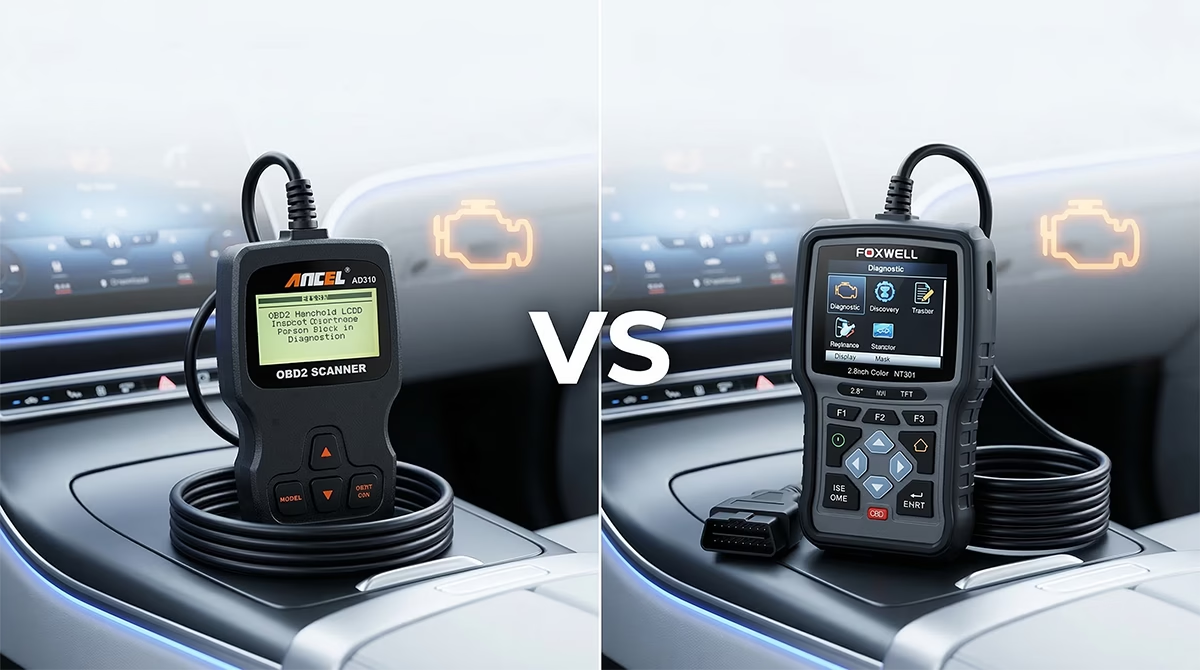
Ancel AD310 vs Foxwell NT301: Overview of the Ancel AD310
The Ancel AD310 is a straightforward, entry-level handheld OBD2 scanner built for one core job: helping drivers understand why the check engine light is on. It is designed as a true plug-and-play unit. There are no batteries to charge, no phone pairing steps, and no app setup to slow you down. You plug it into the vehicle’s OBD-II port, power it from the car, and start reading.
Its hardware is simple but practical. The device uses a 2.4-inch backlit LCD with a 128 x 64 resolution and contrast adjustment. It connects through a standard 16-pin OBDII interface and comes with a 2.5-foot heavy-duty flexible insulated cable. It supports all current OBDII protocols, including J1850 PWM, J1850 VPW, ISO9141, KWP2000, and CAN. In terms of compatibility, it works with most 1996 US-based, 2000 EU-based, and 2005 Asian-based vehicles.
Functionally, the AD310 covers the basics most casual users care about. It can read and erase engine trouble codes, helping you identify the reason for a check engine light and clear it after repairs. It includes a built-in DTC lookup library, so the meaning of a code appears right on the screen. It can also display live engine data in text form, check I/M readiness for emissions testing, capture freeze frame data, and retrieve vehicle information such as VIN, CID, and CVN.
That feature set explains why the scanner remains popular in 2026. Not every driver wants a deeper diagnostic platform. Many just want a dependable device that works right away and gives fast answers without needing a smartphone or a learning curve. For that buyer, the Ancel AD310 review story stays consistent: it is basic, but it is honest about what it is.
Typical use cases are easy to picture:
- Checking whether a check engine light is something minor or something urgent
- Confirming readiness before a smog or emissions test
- Pulling a code before deciding whether to visit a mechanic
- Keeping a compact scanner in the car for road trips or daily commuting
- Double-checking a repair shop’s diagnosis
Its continued popularity also comes from reliability. Users frequently praise it for connecting quickly and avoiding the connection issues that plague some cheap Bluetooth alternatives. At the same time, its limitations are clear. It is a code reader, not a full-system diagnostic tool. It does not handle ABS, SRS, or transmission codes. It shows live data only as text, not graphs. The screen looks dated. Still, for beginners and value-focused buyers, the AD310 remains one of the most dependable entry-level choices around.
Overview of the Foxwell NT301
The Foxwell NT301 sits a notch above the most basic code readers while staying firmly in the affordable, DIY-friendly category. It is still a plug-and-play handheld scanner, still powered directly from the vehicle, and still focused on engine and emissions systems. But compared with a simple reader, it offers a noticeably richer user experience.
Right away, the hardware shows that upgrade path. The NT301 uses a 2.8-inch TFT color screen with about 320 x 240 resolution. That alone makes menus and live data easier to read than on a monochrome display. The device is compact enough for glovebox or toolbox storage, uses an integrated flexible OBD-II cable with a sturdy connector, and includes dedicated hotkeys for I/M readiness and DTC read/erase functions. It also has a HELP button for quick code lookup, which makes the scanner easier to use when you are troubleshooting on the spot.
Compatibility is broad. The NT301 supports most 1996 and newer OBD-II-compliant vehicles in the US, 2000 and newer in Europe, and 2005 and newer in Asia, including gasoline and light diesel engines. It supports all standard OBD-II protocols and specifically lists coverage across many major brands such as Ford, GM, Toyota, Honda, BMW, Audi, Chrysler, Hyundai, and Kia. It does not support hybrids, electric vehicles, or non-OBD-II systems, so its role is still clearly defined.
Where the Foxwell NT301 review picture really separates itself from simpler models is in the feature list. It supports all 10 OBD-II service modes. It can read and clear generic, pending, and manufacturer-specific diagnostic trouble codes. It offers code definitions and repair tips. It can stream live data in both text and graph formats, which is a major step up for tracking changing sensor behavior. It also includes freeze frame data, I/M readiness with red, yellow, and green LED indicators plus a built-in speaker, O2 sensor tests, EVAP system testing, Mode 6 on-board monitoring, component tests, VIN/CID/CVN retrieval, data logging and playback, and the ability to print reports through a PC.
That is why it positions itself as an upgrade over a basic entry-level OBD2 code reader. It stays approachable, but it gives users more tools to interpret what they are seeing. Add lifetime free software updates via PC, multiple languages, and lifetime technical support alongside a one-year warranty, and the NT301 starts to look like a budget scanner with unusually strong long-term value.
In practical terms, this scanner suits drivers who want more than quick code reading. It is well matched to DIY owners who like to monitor live data, compare sensor behavior before and after a repair, prepare for emissions checks with more confidence, or perform used-car inspections with more detail. It is not a full professional scan tool, but it absolutely moves beyond the most basic tier.
Ancel AD310 vs Foxwell NT301: Side-by-Side Specifications Comparison
Before looking at everyday use, it helps to compare the hard specs. On paper, both scanners share the same general mission: affordable handheld OBD2 diagnostics for engine and emissions faults. But the detail differences explain why their user experience feels so different.
Scanner Specification Clash
Ancel AD310 vs. Foxwell NT301
128 x 64, Contrast Adj.
320 x 240, Backlit
RPM, Temp, Speed
Real-time visual monitoring
Approx. 0.6 kg
No graphing
Updates require Windows PC
Real User Reviews and Community Feedback
Real-world owner sentiment helps separate marketing claims from actual ownership experience, and this is where both scanners earn credibility. Neither tool is treated by enthusiasts as a miracle device. Instead, both are appreciated for doing a specific job well, as long as buyers understand their limits.
The Ancel AD310 gets praise for being the classic “grab it, plug it in, and get an answer” scanner. Across forums and Reddit-style discussions, users consistently treat it as a glovebox essential.
Owners like that it powers up instantly from the car, avoids app problems, and connects without the pairing issues common with cheap Bluetooth dongles. One recurring view can be summed up like this: it is perfect for finding out whether the check engine light likely points to something minor, like a loose fuel cap, or something more serious that needs quick attention. Another repeated sentiment is even simpler: if you do not plan to become your own mechanic, the AD310 gives you enough information to avoid walking into a repair shop blind.
The Foxwell NT301 earns a different kind of praise. Users still call it a budget scanner, but they often describe it as a clear upgrade over monochrome entry-level tools. Long-term owners, including people who say they have used it for years, tend to focus on three strengths: the color screen, the graphing function, and the built-in diagnostic help. Enthusiasts appreciate that it provides more insight without forcing them into apps or subscription models. In community discussions, the graphing function is frequently highlighted because it makes changing sensor behavior easier to see during troubleshooting.
The sentiment gap between the two models is revealing. The AD310 is admired for reliability and simplicity. The NT301 is admired for value and capability. In plain terms, the Ancel is often recommended when someone says, “I just want a basic code reader that works.” The Foxwell is more likely to be recommended when someone says, “I want something affordable, but I also want better data and more diagnostic help.”
Complaints are also telling. On the Ancel side, the dated black-and-white screen and text-only data display are the main compromises. More experienced users also warn that it is a code reader, not a true diagnostic tool. That means it can tell you what system reported a problem, but not necessarily the root cause. On the Foxwell side, criticism is milder but more varied. Some users mention slow menu scrolling, a modest screen size, or a Windows-only update process that can feel clunky. A smaller group also notes occasional limitations on certain very recent vehicles or specific brand quirks.
Long-term reliability appears strong for both. The AD310 is praised for sturdy construction and dependable connection behavior. The NT301 is widely described as durable and still effective after years of use. Overall, the Ancel inspires trust because it is simple. The Foxwell inspires enthusiasm because it offers more while still feeling manageable.
Performance in Real-World Scenarios
Specs matter, but buying decisions usually come down to actual use cases. Here is how these scanners stack up in everyday situations.
1. Roadside Check Engine Light on a Trip
If a warning light appears during a road trip, the Ancel AD310 performs very well. It is simple, fast, and easy to keep in the glovebox. You plug it in, read the code, and quickly decide whether you are dealing with something that looks minor or something that needs immediate attention. In this situation, its simplicity is an advantage.
The Foxwell NT301 also works well here, but its added features are not always necessary if you only need a quick yes-or-no read. Winner: Ancel AD310 for grab-and-go convenience.
2. Emissions or Smog Test Preparation
Both tools support I/M readiness, so either can help you avoid a failed emissions visit. The difference is ease of interpretation. The NT301’s dedicated I/M hotkey, LED indicators, and speaker make this task quicker and more intuitive. The AD310 still does the job, but the Foxwell makes it easier to confirm readiness at a glance.
Winner: Foxwell NT301 for a more user-friendly emissions workflow.
3. Intermittent Misfire or Sensor Behavior Diagnosis
This is where the Foxwell pulls ahead clearly. The AD310 can show live engine data in text form, which may be enough for basic checks. But the NT301’s graphing capability makes changing values easier to interpret. When a problem comes and goes, being able to watch data patterns is much more helpful than reading single values one by one.
Winner: Foxwell NT301 by a comfortable margin.
4. Pre-Purchase Inspection on a Used Car
For a used-car check, both scanners can reveal whether engine-related trouble codes are present and whether readiness monitors are set. The AD310 gives a quick basic read, which is useful if you want a fast screening tool. The NT301 adds more value because it can provide more code detail, more support information, and more live-data visibility if you want a deeper look before buying.
Winner: Foxwell NT301 for buyers who want more confidence before handing over money.
5. Basic Home Ownership and Occasional DIY Use
If you own one or two vehicles and just want to avoid paying for simple code checks, the Ancel AD310 is often enough. It is easy to understand, low-hassle, and reliable. If your DIY interest grows, though, the NT301 gives you more room to learn and more capability without jumping to a much more advanced scanner.
Winner: Tie, depending on user type. The Ancel is better for minimalist owners. The Foxwell is better for growing DIY users.
Price, Value, and Long-Term Ownership
Both models live in the budget end of the OBD2 scanner market, but they represent different value strategies. The Ancel AD310 is the classic cost-first choice. It is described as one of the cheapest reliable options for basic diagnostics, and that framing is important. You buy it because it covers the essentials without adding cost for features you may never use.
The Foxwell NT301 remains affordable too, but it aims to deliver more value per dollar rather than just the lowest barrier to entry. Its feature list is clearly broader: color screen, graphing, all 10 OBD-II modes, built-in help, data logging, report printing, and lifetime free software updates. It also includes a one-year warranty with lifetime technical support, which strengthens the long-term ownership story.
From an ownership perspective, the AD310 is appealing because it is so simple. There is almost nothing to manage. No batteries, no apps, and no update process. For some buyers, that simplicity is a form of value. You are not paying for extra layers you do not want.
The NT301 offers stronger long-term ROI for users who will actually use its added capability. If you plan to monitor live data, perform more detailed troubleshooting, or keep the scanner for years, the update path and richer diagnostics make it easier to justify. The only caveat is the Windows-based update process, which may feel inconvenient to some owners.
In short, the Ancel offers better value for pure basics. The Foxwell offers better value for buyers who want headroom.
Who Should Buy the Ancel AD310? Who Should Buy the Foxwell NT301?
The Ancel AD310 is the right pick for drivers who want the simplest possible answer to a simple problem. If your main goal is to read and clear engine trouble codes, check emissions readiness, and keep a reliable scanner in the glovebox, it makes a lot of sense. It suits beginners, casual car owners, older-school users who dislike app-based tools, and anyone who wants a dependable entry-level OBD2 code reader without feature overload. It is also a good fit if your budget is tight and you do not care about graphing, data logging, or extra guidance features.
The Foxwell NT301 is better for buyers who want to stay in the budget category but get more diagnostic value from every scan. It is a strong choice for DIY mechanics, hands-on home users, and anyone who wants clearer live data, graphing, more code help, and better emissions-check usability. If you often inspect used cars, troubleshoot recurring engine issues, or want a scanner that can grow with your skill level, the NT301 is the more capable fit.
A simple way to decide is this:
- Choose Ancel AD310 if you want basic, reliable, no-nonsense code reading
- Choose Foxwell NT301 if you want a better interface, more functions, and more diagnostic context
Neither model is right for full-system diagnostics. If you specifically need ABS, SRS, transmission, or advanced module access, you will need to look beyond both of these scanners.
Final Verdict and Recommendation
If this were purely a battle of simplicity, the Ancel AD310 would be hard to beat. It is reliable, easy to use, and still one of the smartest low-cost tools for basic check engine light diagnostics. For many drivers, that is enough. It does the core job well and avoids unnecessary complexity.
But for most buyers in 2026, the Foxwell NT301 is the stronger overall choice. It builds on the same plug-and-play convenience while offering a better screen, live data graphing, broader OBD-II functionality, richer built-in help, data logging, and lifetime free updates. Those upgrades make it far more useful in day-to-day troubleshooting without pushing it into intimidating territory.
So who wins in ancel ad310 vs foxwell nt301? The Foxwell NT301 wins for overall value, versatility, and long-term usefulness. The Ancel AD310 still deserves consideration if your budget is the top priority and your needs are strictly basic. But if you can benefit from better visibility and more diagnostic assistance, the Foxwell is the scanner most people will be happier with over time.
The key takeaway is simple: buy the Ancel for quick, minimal, low-cost code reading. Buy the Foxwell if you want a budget scanner that feels like a meaningful step up.
Frequently Asked Questions (FAQ)
1. Is the Ancel AD310 good enough for beginners?
Yes. The AD310 is one of the most beginner-friendly options because it is plug-and-play and avoids apps, Bluetooth pairing, and setup. It is especially good for users who only want to read and clear engine codes and check emissions readiness.
2. Does the Foxwell NT301 support live data graphing?
Yes. The NT301 can display live data in both text and graph formats. That makes it more useful for tracking changing sensor values and spotting patterns during troubleshooting.
3. Can either scanner read ABS codes?
No. Based on the provided feature sets, neither scanner supports ABS diagnostics. Both are limited to engine and emissions-related functions.
4. Can either scanner read SRS or airbag codes?
No. The Ancel AD310 and Foxwell NT301 do not support SRS or airbag code reading. If that is a requirement, you will need a more advanced scanner.
5. Which one is better for emissions testing?
Both can check I/M readiness, but the Foxwell NT301 is better for emissions prep because it adds a dedicated I/M hotkey, LED status indicators, and audio feedback.
6. Which scanner is better for live engine data?
The Foxwell NT301 is better because it supports both text and graph views. The AD310 can display live data too, but only in text format.
7. Is the Ancel AD310 a full diagnostic tool?
No. It is better described as a code reader. It can tell you what code has been triggered, but it does not provide the deeper system access or advanced guidance of a full professional diagnostic tool.
8. Does the Foxwell NT301 work on hybrids or EVs?
No. The NT301 is listed as not compatible with hybrids, electric vehicles, or non-OBD-II systems.
9. Which one is better for Toyota or Honda owners?
If the vehicle falls within standard OBD-II compatibility years, both may be usable for engine and emissions diagnostics. The NT301 has broader stated manufacturer coverage and more diagnostic features, so it is the safer pick if you want more than basic code reading.
10. Do either of these scanners need batteries or a phone app?
No. Both are powered directly through the vehicle’s OBD-II port. Neither depends on batteries or smartphone apps for basic operation.
Conclusion
The best scanner is not always the one with the longest feature list. It is the one that matches how you actually use your car and how much diagnostic detail you really need. In the ancel ad310 vs foxwell nt301 matchup, both tools earn their place because both solve the core problem of check engine light diagnostics without unnecessary hassle.
The Ancel AD310 remains a smart buy for drivers who want a dependable, no-frills, entry-level OBD2 code reader that simply works. The Foxwell NT301 is the better fit for buyers who want a more capable best budget OBD2 scanner with graphing, stronger code help, and more long-term value.
So before you buy, think honestly about your needs. Do you just want to read a code and move on? Or do you want better data, better visibility, and a more useful tool for future troubleshooting? Once you answer that, the right scanner becomes obvious.
Meta Description Suggestion: Ancel AD310 vs Foxwell NT301 compared in depth for 2026. See features, pros, cons, real-world use, and which budget OBD2 scanner wins.