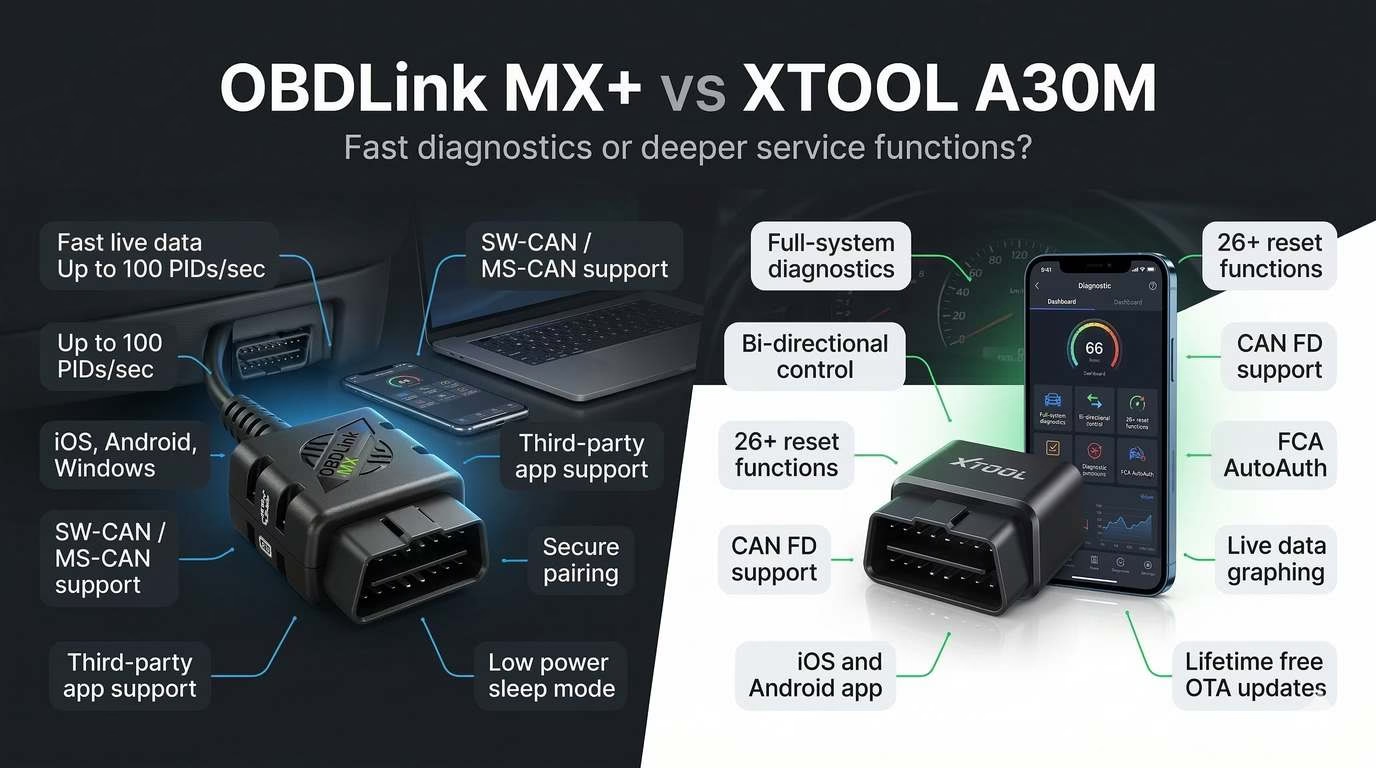
You plug into your car because the check engine light pops on, and suddenly the cheap scanner you bought last year feels useless. It reads the code, sure, but it cannot tell you much beyond that. Now you are stuck choosing between two much more capable tools: the OBDLink MX+ and the Xtool A30M. If you are searching for the real answer on OBDLink MX+ vs Xtool A30M, this is where the confusion ends.
Quick Verdict Overview
These two scanners are not built for the same buyer. One is the smarter pick for fast, reliable diagnostics and app flexibility. The other wins if you want more hands-on service functions like active tests and resets.

OBDLink MX+
Buy this if you want the better pure diagnostic tool. It is the stronger pick for fast live data, iPhone support, third-party app flexibility, and enhanced Ford/GM access.
- Drivers who mainly want to read and clear codes, monitor live data, and diagnose problems faster
- iPhone users who want native Bluetooth Low Energy support
- Ford and GM owners who want enhanced network access
- Works with iOS, Android, and Windows
- Supports third-party apps like Torque, AlfaOBD, and BimmerCode
- Fast data performance with strong real-time monitoring capability
- Compact design with automatic sleep mode and low power draw

XTOOL A30M
Buy this if you want more than a code reader. It is the better pick for full-system scans, active tests, and maintenance functions without stepping up to a much pricier shop scanner.
- DIY mechanics who want bi-directional control and reset functions
- Users who need access to more vehicle systems beyond engine codes
- Buyers who want strong feature depth for the money
- Full-system diagnostics across multiple modules
- Bi-directional control for active testing
- 26+ maintenance and reset functions
- Supports CAN FD and FCA AutoAuth with lifetime free updates
Bottom line
Choose OBDLink MX+ if you want the better everyday scanner for faster diagnostics, stronger app compatibility, and smoother iPhone use. Choose XTOOL A30M if you want more repair-focused capability like active tests, resets, and wider system access in one tool.
Quick Comparison Table
Both tools have distinct strengths. Keep reading to see which one fits your needs.
| Feature | OBDLink MX+ | Xtool A30M |
|---|---|---|
| Price | Typically $100–$120 | Typically $120–$170 |
| Connectivity | Bluetooth v3.0 Class 1.5 with BLE support for iOS | Bluetooth 3.0 / 4.0 |
| Display/Interface | Uses phone, tablet, or computer with apps | Uses phone or tablet with the Anyscan app |
| Vehicle Compatibility | All OBD-II compliant vehicles, 1996+ in the U.S.; enhanced Ford and GM networks; some functions limited on hybrids/electrics | 85+ brands, 10,000+ models, OBD2 vehicles from 1996 onward |
| OBD2 Protocols Supported | All legislated OBD-II protocols plus SW-CAN and MS-CAN | Full OBD2 modes; also supports CAN FD and FCA AutoAuth |
| Special/Advanced Functions | Real-time monitoring, OEM-specific add-ons, high PID speed, security features, third-party app support | Full-system diagnostics, bi-directional control, 26+ service functions, live data graphing, data export |
| App Compatibility | iOS, Android, Windows, works with third-party apps | iOS and Android via Anyscan app |
| Warranty | 3 years | Typically 2 years |
| Best For | Drivers who want fast diagnostics, iPhone support, and strong app flexibility | DIYers who want resets, active tests, and more advanced service functions |
| Our Rating | 8.6/10 | 8.0/10 |
Both tools have distinct strengths — keep reading to see which one fits your needs.
OBDLink MX+: Overview and Key Features
The OBDLink MX+ is built as a premium Bluetooth OBD-II adapter for people who want more than a bargain-bin code reader. Based on the product details, its core pitch is simple: turn your phone, tablet, or computer into a capable diagnostic device with fast data access, broad platform support, and stronger compatibility than many cheap Bluetooth dongles. It is especially attractive if you care about iPhone support or if you drive Ford or GM vehicles that benefit from SW-CAN and MS-CAN access.
Physically, the MX+ is compact at 1.97 x 1.77 x 0.91 inches and weighs only 1.2 ounces, so it is small enough to leave plugged in without getting in the way. It runs on 8–18V DC, uses automatic sleep and wake, and keeps sleep-mode draw below 10 mA. That matters because a lot of cheap adapters stay alive too aggressively and become battery-drain annoyances. This one is clearly designed for regular use rather than occasional emergency scans only.
Its biggest strength is how it handles diagnostics and connectivity. The MX+ supports all legislated OBD-II protocols and adds SW-CAN and MS-CAN support for Ford and GM, which is rare at this level. It works with iOS, Android, and Windows, and it is compatible with third-party apps like Torque, AlfaOBD, and BimmerCode. That open app ecosystem is a major advantage because it gives you flexibility instead of trapping you inside one mediocre software experience.
Performance is another selling point. The product file highlights up to 100 PIDs per second on PC and Android, slightly less on iOS, along with a Bluetooth range of about 250 feet. It also includes 128-bit encryption, MITM protection, and a physical connect button for pairing. That security detail is not marketing fluff. It is one of the few adapters in this price class that treats pairing security seriously. The downside is obvious too: while it is excellent at reading data, monitoring live parameters, and clearing codes, it is not the stronger option for service resets or deeper bidirectional control without relying on extra software.
OBDLink MX+ — Quick Highlights
- Fast data rate with up to 100 PIDs per second on PC and Android
- Native iOS, Android, and Windows support
- Enhanced Ford and GM access through SW-CAN and MS-CAN
- Strong security with encryption and physical-button pairing
- Compact design with low sleep-mode power draw and firmware updates
Xtool A30M: Overview and Key Features
The Xtool A30M V2.0 is aimed at DIY mechanics and small garages that want more than basic engine-code reading without stepping up to a much more expensive dedicated shop scanner. It is a Bluetooth OBD2 scanner that uses a phone or tablet instead of a built-in screen, and its entire value proposition is centered on breadth: full-system diagnostics, active tests, service resets, and broad modern vehicle support.
The hardware is small and portable, roughly palm-sized, and weighs about 3.8 ounces. It plugs into the OBD port and uses Bluetooth 3.0 or 4.0 to connect to the Anyscan app on iOS or Android. It also includes a built-in LED flashlight, battery voltage monitoring, and data recording and playback. None of those extras make it magical, but they do reinforce the idea that this tool is trying to be more useful in a garage setting than a plain adapter.
Where the A30M separates itself is feature depth. It supports all 10 standard OBD-II modes, but it goes much further with full-system access to engine, transmission, ABS, SRS, BCM, TPMS, HVAC, battery management, instrument cluster, and more. It also offers bi-directional control, which means you can command certain vehicle components to operate for testing. That includes functions like fuel pump tests, EVAP tests, door locks, injector tests, sunroof tests, and AC compressor clutch tests. Cheap Bluetooth tools usually cannot touch this.
Then you get the service side. The A30M includes 26+ maintenance and reset functions such as oil reset, EPB, SAS reset, DPF regeneration, TPMS reset, ABS bleeding, injector coding, throttle relearn, crankshaft relearn, gearbox matching, and headlight calibration. The catch is the usual one: function support depends heavily on make and model. So yes, the feature list is impressive for the money, but it is not a blank check for every car. Add CAN FD and FCA AutoAuth support, plus lifetime free OTA updates, and the A30M becomes a very strong option for buyers who want advanced capability more than polished simplicity.
Xtool A30M — Quick Highlights
- Full-system diagnostics across many modules
- Bi-directional control for active component testing
- 26+ maintenance and reset functions
- Supports CAN FD and FCA AutoAuth for newer vehicle access
- Lifetime free OTA updates with iOS and Android support
OBDLink MX+ vs Xtool A30M: Head-to-Head Feature Comparison
1. Vehicle Compatibility
The OBDLink MX+ supports all OBD-II compliant vehicles and is aimed at 1996 and newer vehicles in the U.S. It also adds enhanced protocol support for Ford and GM through SW-CAN and MS-CAN, which is a real advantage if those brands are your focus. There is a limitation worth noticing, though: some functions are not fully applicable to hybrids and electric vehicles.
The Xtool A30M takes a wider “global coverage” approach. Its file claims support for 85+ brands, 10,000+ vehicle models, and OBD2 vehicles from 1996 onward, plus CAN FD for modern GM vehicles and FCA AutoAuth for Chrysler, Jeep, and Dodge security gateways. On paper, that sounds broader and more future-facing than the MX+.
In practice, the real difference is this: the MX+ is stronger where protocol quality and Ford/GM specialization matter, while the A30M is stronger if you want wider full-system ambitions across many brands. If you mean “universally compatible” in the sense of deep everyday engine diagnostics and broad app support, the MX+ is safer. If you mean wider system access and more modern gateway support across more brands, the A30M has the edge. This category is a narrow win for Xtool A30M on breadth, but not by a knockout.
2. Connectivity and Setup
The OBDLink MX+ connects over Bluetooth, supports BLE for iOS, and works with iOS, Android, and Windows. That last part matters because it is not locked to mobile only. It also offers around 250 feet of range, which is unusually generous for a Bluetooth OBD2 adapter. The physical pairing button and secure connection system make setup slightly more deliberate, but they also reduce random and insecure pairing nonsense.
The Xtool A30M also connects over Bluetooth, using versions 3.0 and 4.0, but it relies on the Anyscan mobile app and is limited to Android and iOS. That keeps things simple enough for most people, yet it also means you are fully dependent on the app experience. If the app is clunky or your phone has pairing issues, that becomes part of the ownership experience fast.
User feedback in the product summary also matters here. The MX+ is repeatedly praised for speed and reliability, though some users still complain about app connection delays. The A30M gets occasional reports of random disconnects and pairing issues, with some users describing the app as slightly clunky or harder to learn. Winner: OBDLink MX+. It is the safer choice if you care about a smoother connection experience.
3. OBD2 Diagnostic Functions
Both tools handle the basics you expect from a decent OBD2 scanner. That includes reading and clearing codes, viewing live sensor data, freeze-frame data, readiness information, vehicle information, and related standard OBD functions. The Xtool file explicitly lists all 10 standard OBD-II modes, while the MX+ is described as a capable tool for reading and clearing trouble codes, monitoring real-time performance, and accessing advanced vehicle data.
Where the MX+ stands out is raw diagnostic speed and data streaming. Up to 100 PIDs per second on PC and Android is serious performance for live data monitoring, logging, and real-time analysis. If your workflow depends on monitoring sensor behavior cleanly and quickly, this is where the MX+ earns its premium reputation.
The A30M is no slouch either. It can display up to eight live data streams at once, graph them, record them, and export them for analysis. That makes it plenty useful for common troubleshooting, but the file does not suggest the same data-speed focus or app flexibility that the MX+ has. Winner: OBDLink MX+ for core OBD2 diagnostics and data quality.
4. Advanced and Special Functions
This is the section that decides the entire matchup for a lot of buyers. The OBDLink MX+ has advanced strengths, but they are mostly on the diagnostics side: Ford and GM enhanced network support, OEM-specific data add-ons, third-party app compatibility, overvoltage protection, firmware updates, and strong security. It is an excellent data adapter, but by the file’s own summary, it has limited bidirectional capability and restricted service functions unless you pair it with specific software.
The Xtool A30M comes loaded with the kind of features that usually push buyers toward more expensive scanners. It offers full-system diagnostics across many modules, active tests, and 26+ service functions. That means oil resets, EPB, SAS reset, DPF regeneration, TPMS reset, ABS bleeding, injector coding, throttle relearn, crankshaft relearn, gearbox matching, and more, all from a tool that still sits in the low-to-mid budget bracket.
There is an important warning attached. The file explicitly says service-function availability depends on vehicle make and model, and some user feedback points to occasional module access issues or odd sensor-value readings on certain cars. So no, this is not a replacement for a high-end shop scanner. But if the question is simple, which tool goes further beyond basic OBD2, the answer is not close. Winner: Xtool A30M. It offers much more functional range for active diagnostics and service work.
5. Software and App Experience
The OBDLink MX+ benefits from flexibility. It works with iOS, Android, and Windows, and it supports third-party apps such as Torque, AlfaOBD, and BimmerCode. That matters because you are not boxed into one software ecosystem. You can choose the interface and feature set that matches your car and your comfort level.
The downside is that the included companion app is not universally loved. The product summary calls it outdated, clunky, and sometimes slow to connect. So while the hardware is strong, the default software experience is not its strongest asset. The saving grace is that you can sidestep some of that by using other supported apps.
The Xtool A30M depends on the Anyscan app. That app provides auto VIN detection, full-system scanning, graphing, report export, and OTA updates, which is a solid feature set. But app dependency cuts both ways. If you like it, great. If you do not, you do not really get an alternative ecosystem the way you do with the MX+. Some users also describe it as clunky or requiring a learning curve. Winner: OBDLink MX+, mostly because app choice beats app lock-in.
6. Build Quality and Design
The OBDLink MX+ is tiny, discreet, and easy to leave installed. It also has low sleep-mode power draw, automatic sleep and wake, and overvoltage protection up to 100V. That tells you it was engineered for long-term convenience, not just casual use. The negative side is that some users think the plastic body and button feel cheap.
The Xtool A30M is also compact and portable, with a palm-size dongle design, no built-in screen, and a few hardware extras like an LED flashlight. Its design is practical, but the file does not highlight the same security or power-management depth as the MX+. It is a functional hardware package rather than a refined one.
Neither tool is a tank, but the MX+ feels more carefully engineered for always-plugged-in use. The A30M feels more like a feature-heavy utility device built around what it can do rather than how polished it feels. Winner: OBDLink MX+.
7. Price and Value for Money
The OBDLink MX+ usually lands around $100 to $120. For that money, you get fast data performance, iOS support, Windows support, enhanced Ford and GM access, strong security, and broad third-party app compatibility. There are no subscription fees mentioned, and the file notes free unlimited OEM-specific add-ons. That makes it a premium basic-plus diagnostic adapter rather than a service-focused scanner.
The Xtool A30M usually costs about $120 to $170. That higher upper range buys a much larger feature set: full-system diagnostics, active tests, 26+ service functions, CAN FD, FCA AutoAuth, report export, and lifetime free updates. If you actually use those features, the A30M offers more hardware-for-dollar value than the MX+.
So which is the better value? For a hobbyist who wants clean diagnostics, strong live data, and flexible app support, the OBDLink MX+ is better value because you are paying for a refined core experience. For a DIYer or light-duty mechanic who wants resets and bidirectional testing without buying a much pricier shop tool, the Xtool A30M wins on value. This category is a tie, because value depends completely on whether you need advanced service functions or just better diagnostics.
Pros and Cons: OBDLink MX+ vs Xtool A30M
OBDLink MX+ Pros
- Fast and reliable live data performance
- Works with iOS, Android, and Windows
- Supports third-party apps like Torque, AlfaOBD, and BimmerCode
- Enhanced Ford and GM support through SW-CAN and MS-CAN
- Strong security and low sleep-mode battery draw
OBDLink MX+ Cons
- Higher price than basic code readers
- Companion app is often criticized as clunky or outdated
- Limited bidirectional and service-function capability on its own
- Some users report occasional connectivity frustrations
Xtool A30M Pros
- Full-system diagnostics across many vehicle modules
- Bi-directional control is rare at this price
- Includes 26+ maintenance and reset functions
- Supports CAN FD and FCA AutoAuth
- Lifetime free OTA updates improve long-term value
Xtool A30M Cons
- Requires a phone or tablet because there is no built-in screen
- Feature availability depends heavily on make and model
- App can feel clunky and take time to learn
- Some users report module-access issues, bad data values, or Bluetooth drops
Which Scanner Should You Choose? OBDLink MX+ or Xtool A30M?
Choose the OBDLink MX+ if you are the kind of buyer who cares more about accurate, fast, repeatable diagnostics than about having a giant list of service resets. If you use an iPhone, want a Bluetooth OBD2 tool that works well across iOS, Android, and Windows, and prefer the freedom to use third-party apps, the MX+ is the better fit. It is also the smarter buy if you own Ford or GM vehicles and want enhanced network access without jumping into a more expensive pro-level scanner.
Choose the OBDLink MX+ if you are:
- A DIYer who wants strong live data and broad app flexibility
- An iPhone user tired of adapters with bad Apple support
- A Ford or GM owner who wants enhanced network access and reliable diagnostics
Choose the Xtool A30M if your priority is doing more work from one tool. If you want to scan more modules, trigger components, perform resets, and get closer to a budget shop scanner, the A30M is the obvious choice. It is better suited for the hands-on DIY mechanic, the part-time mobile technician, or the enthusiast who actually uses active tests and maintenance functions instead of just liking the idea of them.
Choose the Xtool A30M if you are:
- A DIY mechanic who wants service resets and bi-directional testing
- A small garage or mobile mechanic handling different vehicle systems
- A buyer who values broad function count more than polished software flexibility
Here is the blunt answer. If your main job is diagnostics, choose the OBDLink MX+. If your main job is diagnostics plus service functions, choose the Xtool A30M. Most casual drivers will be happier with the MX+. Most ambitious DIYers will get more usable capability from the A30M.
Real-World Use Cases: How Each Tool Performs in Practice
Imagine your 2018 sedan throws a check engine light and you want to track live fuel trims, MAF behavior, and sensor response during a drive. You also want a tool that pairs cleanly with your iPhone and does not box you into one app. That is exactly where the OBDLink MX+ makes sense. Its fast data handling, iOS support, and third-party compatibility make it a better daily diagnostic companion.
Now imagine you are diagnosing an ABS issue, resetting service lights, or trying to trigger a fuel pump or door-lock test during troubleshooting. A basic adapter is not enough here. The Xtool A30M is the better match because it combines full-system scanning with active tests and reset functions in one package. That is the difference between “I can read the code” and “I can actually work through the system.”
Here is another realistic split. A weekend enthusiast with one or two personal vehicles, especially Ford or GM, will likely get better long-term satisfaction from the MX+ because it is more stable as a premium diagnostic adapter. A mobile mechanic or heavier DIY user touching multiple brands may accept a rougher app if it means getting bi-directional control, CAN FD support, and more service functions from the Xtool A30M.
Frequently Asked Questions
Is the OBDLink MX+ compatible with all vehicles?
It is compatible with all OBD-II compliant vehicles and is aimed at 1996 and newer vehicles in the U.S. It also supports enhanced Ford and GM networks through SW-CAN and MS-CAN. That said, some functions are limited on hybrids and electric vehicles, so “all vehicles” is too broad if you expect every advanced feature to work the same way everywhere.
Can the Xtool A30M perform bidirectional tests?
Yes. Bi-directional control is one of the A30M’s main selling points. The file lists examples such as fuel pump tests, EVAP tests, AC compressor clutch tests, door lock and window tests, injector tests, and sunroof tests. That is a major step up from basic code readers and many simple Bluetooth adapters.
Does the OBDLink MX+ require a subscription?
The product file does not mention any subscription requirement. It specifically highlights no subscription fees, a free app, and free unlimited OEM-specific add-ons. It also supports third-party apps, though some of those external apps may have their own pricing structures outside the product file.
Which scanner is better for European vehicles?
The file does not give a direct “best for Europe” ranking, so you should avoid blind assumptions. The Xtool A30M claims broad support across American, European, and Asian cars with 85+ brands and 10,000+ models, which suggests stronger broad full-system ambition. The OBDLink MX+ is stronger where app flexibility and fast diagnostics matter, but its highlighted enhanced support is specifically tied to Ford and GM networks.
Is the Xtool A30M good for beginners?
It can be, but only if the beginner actually wants to learn. The upside is huge function depth, guided scanning through a phone app, and a lot more capability than a basic scanner. The downside is that some users say the app feels clunky, there is a learning curve, and feature support varies by vehicle. So yes, it is beginner-usable, but it is not the most foolproof beginner tool.
How do these two scanners compare in price?
The OBDLink MX+ typically sits around $100 to $120, while the Xtool A30M usually falls in the $120 to $170 range. The MX+ is the better buy if you want premium diagnostics and better app flexibility at a lower entry price. The A30M costs more, but it also gives you more service and active-test functionality if you will actually use it.
Which one is better for iPhone users?
The OBDLink MX+ is the safer choice for iPhone users because the product file explicitly highlights Bluetooth Low Energy support for iOS and repeatedly points to seamless Apple-device integration as a strength. The Xtool A30M also supports iOS through the Anyscan app, but it does not have the same emphasis on Apple-specific strength or the same third-party app flexibility.
Which one is better for Ford and GM owners?
The OBDLink MX+ has the cleaner argument here because it specifically supports SW-CAN and MS-CAN for enhanced Ford and GM network access. The Xtool A30M may still work well across those brands, especially with CAN FD support for newer GM vehicles, but the MX+ is the one explicitly positioned around stronger Ford and GM protocol support.
Product Comparison Hub
Expert head-to-head comparisons to help you make informed purchasing decisions
OBDLink MX vs VLinker MC
Compare two premium OBD2 scanners for professional diagnostics and real-time vehicle monitoring.
OBD Scanner → 🚙 📱OBDLink MX vs BlueDriver
Discover which Bluetooth OBD2 adapter offers better app integration and diagnostic features.
OBD Scanner → 🔧 🛠️Ancel AD310 vs Foxwell NT301
Budget-friendly code readers compared for accuracy, ease of use, and value for money.
OBD Scanner → 📲 🚘Ancel AD310 vs BlueDriver
Traditional handheld scanner versus smartphone-connected adapter – which suits your needs?
OBD Scanner → ⚡ 🔋Ancel AD310 vs MotoPower MP69033
Entry-level OBD2 readers compared for beginners seeking reliable check engine light solutions.
OBD Scanner → 🔩 🛠️Eetenwolf Vortex S6 vs DeWalt
Power tool comparison for professionals seeking performance, durability, and value.
Power Tool → 🎯 📈Ancel FX2000 vs Foxwell NT604
Mid-range diagnostic scanners compared for advanced features and system coverage.
OBD Scanner → 📹 🚗VIOFO A329S vs BlackVue DR970X
Premium dash cam showdown for video quality, night vision, and parking mode features.
Dash Cam →Final Verdict: OBDLink MX+ vs Xtool A30M
The short version is simple. These tools are not really competing for the exact same buyer. The OBDLink MX+ is the better pure diagnostic tool for most normal users because it is fast, flexible, secure, and easier to trust for daily scans, live data, and broad app-based use. The Xtool A30M is the better feature-heavy tool for buyers who want active tests, service resets, and broader system access without paying for a full professional scanner.
So who wins overall in OBDLink MX+ vs Xtool A30M? For the average buyer, the OBDLink MX+ wins. It does the core job better, and that matters more than a long feature list you may never use. But if you are the kind of DIYer who will genuinely use bi-directional control, maintenance resets, and full-system diagnostics, the Xtool A30M gives you more practical capability per dollar.
The honest answer is this: buy the OBDLink MX+ if you want the better everyday scanner. Buy the Xtool A30M if you need a more aggressive toolset and can tolerate a rougher app experience. Ready to make your decision? Check the latest fitment and feature support for your exact vehicle before you buy, because with scanners like these, vehicle match matters as much as the hardware itself.