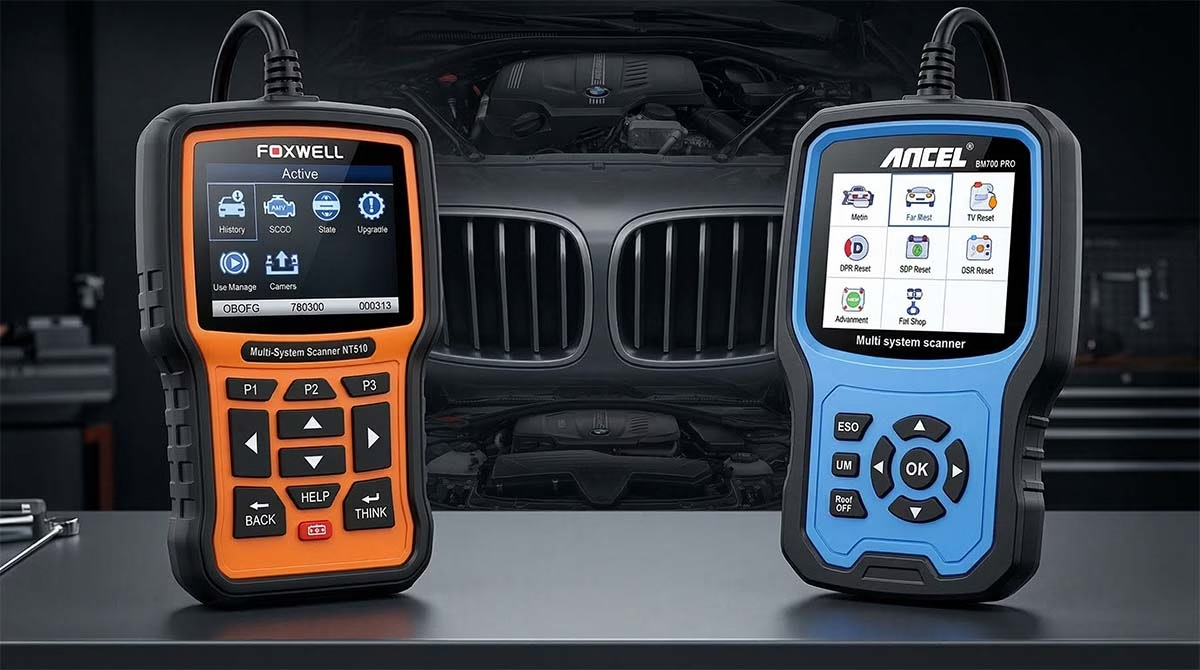
Two names likely fill your search bar: The Foxwell NT510 vs ANCEL BM700. Both tools promise to save you money. Both claim to read every module in your car. But they are not created equal. One is a versatile multi-brand tool. The other is a dedicated specialist.
Which one deserves a spot in your toolbox? Let’s dive deep into the Foxwell NT510 and ANCEL BM700 debate. We will look at specs, real-world use, and user feedback to help you pick the winner.

- Display: 2.8″ TFT color · 8–18V via OBD · microSD updates
- Coverage: 50+ brands, but deep functions for ONE chosen make
- Bi‑directional: EVAP, fuel pump, windows, EPB, SAS, ABS pump
- Maintenance: oil reset, battery registration, DPF, injector coding, TPMS
- Updates: lifetime free for that brand (newer tools) · 18 mo. older policy
👍 PROS
- Very strong value ($150–180)
- Deep BMW/Mini coverage (injector coding, VANOS, battery reg)
- Bi‑directional tests & service resets
- Lifetime updates (chosen brand)
- Portable, built‑in cable
👎 CONS
- Slow scans (minutes per system)
- UI / translations confusing
- Clunky PC update process
- Multi‑brand = extra cost
- Coverage gaps on very new models

- Coverage: BMW, MINI, Rolls‑Royce full systems + generic OBD2 on others
- Hardware: 32‑bit processor, color display, hotkeys (DTC, I/M)
- Service functions: battery registration, EPB, DPF, SAS, throttle adaptation, injector coding (IQA)
- Updates: lifetime free via Windows PC (AncelAssist) – no Mac
- Auto VIN & built‑in DTC lookup
👍 PROS
- Excellent BMW depth (battery reg, EPB, DPF…)
- Lifetime updates, no subscription
- Auto VIN & one‑click I/M
- Often pays for itself in one job
- Solid build / compact
👎 CONS
- Windows‑only updates (no Mac)
- Some E‑series compatibility issues
- Battery coding workflow confusion
- Non‑BMW = generic OBD2 only
- Customer support hit or miss
⚠️ Some owners of older E36/E39 report limited functionality.
Quick Specs Comparison
Before we get our hands dirty, let’s look at the hardware. Here is a snapshot of how these two contenders stack up on paper.
| Feature | Foxwell NT510 (Elite) | ANCEL BM700 PRO |
|---|---|---|
| Primary Use | Full System Diagnosis & Coding | Full System Diagnosis & Service |
| Vehicle Coverage | Multi-Brand (Software Specific) | Dedicated for BMW / Mini / Rolls-Royce |
| Display | 2.8″ TFT Color Screen | 2.4″ TFT Color Screen |
| Interface | Menu-Driven, Keypad | Menu-Driven, Keypad |
| Special Functions | Bi-Directional Control (Active Tests), Coding, Adaptations | Oil Reset, EPB, BMS, DPF, SAS, Bleeding |
| Software Updates | Free for 18 Months (approx.) | Lifetime Free Updates |
| Build Quality | Rugged, Rubberized Bumpers | Compact, Lightweight Plastic |
| Connection | OBDII Cable (Attached) | OBDII Cable (Attached) |
| Battery | Powered by Car | Powered by Car |
| Price Point | Mid-Range ($150 – $200) | Budget-Friendly ($100 – $150) |
Deep Dive: The Foxwell NT510 Elite
The Foxwell NT510 is often the gateway tool for serious DIYers. It bridges the gap between a basic code reader and a professional dealer-level tool. It is built like a tank. It feels solid in your hand. This device is not just about reading codes. It is about fixing problems.
Real User Experience: Foxwell NT510
Users on forums like Bimmerfest and Reddit often praise the NT510 for its depth. It digs deep. One user mentioned how they used it to diagnose an intermittent airbag light that the dealer couldn’t fix. It turned out to be a sensor under the seat. The Foxwell pinpointed it in minutes.
However, it is not perfect. The interface can feel a bit “Windows 95.” It is clunky. The menus are deep. Sometimes you have to click four times to get where you want to go. New users might find the menu structure confusing at first. The translation in some menus can also be a bit rough. But once you learn the logic, it becomes second nature.
The real power of the Foxwell lies in its bi-directional control. This is also called “active tests.” This feature lets you send commands to the car.
Imagine you want to test your window motor. You don’t need to take the door panel apart. You use the Foxwell to send a “Window Up” command. If the window moves, the motor is good. If it doesn’t, you know where to look. This saves hours of diagnostic time.
Foxwell NT510 Pros & Cons
Pros:
- Bi-Directional Control: You can actuate components like fans, windows, and valves.
- Coding Capabilities: You can code new batteries, injectors, and modules.
- Multi-Brand Potential: You can buy software for other cars (Audi, VW, Ford) later.
- Solid Build: It can survive a drop from a workbench.
Cons:
- Steep Learning Curve: The menu system is complex for beginners.
- Slow Boot Up: It takes a moment to load the software when you plug it in.
- Update Process: Updating the software involves a PC and a USB cable. It can be buggy.
Deep Dive: The ANCEL BM700 PRO
The ANCEL BM700 takes a different approach. It is sleek, red, and focused. While the Foxwell tries to be everything for everyone (with the right software), the ANCEL BM700 is a BMW specialist. It is built specifically for BMW, Mini, and Rolls-Royce owners.
Real User Experience: ANCEL BM700
Users love the simplicity of the BM700. It is a “plug and play” device. You plug it in, and it quickly identifies your VIN. You don’t have to scroll through endless menus to find your model. It knows it’s a BMW.
One user on a BMW i3 forum noted how the BM700 cleared a “Drivetrain Malfunction” error instantly. They were stressed about a potential trip to the shop. The scanner cleared the code, and the car ran fine. It turned out to be a glitch. The scanner saved them a towing bill.
The interface is more modern. It feels snappier than the older Foxwell units. The buttons are responsive. The screen is bright. For the average DIYer who wants to reset a service light or read a check engine code, this tool is a joy. It removes the intimidation factor.
Where it falls short is deep coding. If you want to retrofit a navigation system or code a complex module swap, the ANCEL might not go deep enough. It handles the “service” side perfectly but lacks some of the advanced engineering-level functions of the Foxwell.
ANCEL BM700 Pros & Cons
Pros:
- User Friendly: The interface is intuitive and easy to navigate.
- Auto-VIN: It reads your vehicle info automatically.
- Great Value: It is generally cheaper than the Foxwell.
- Lifetime Updates: You won’t pay a subscription fee later.
Cons:
- Limited Coding: It cannot perform complex retrofitting or advanced coding.
- Brand Specific: It only works for the BMW family. It won’t help with your Ford truck.
- Build Quality: It feels a bit more plasticky compared to the rubberized Foxwell.
Head-to-Head: Real Use Case Scenarios
Let’s put them to the test. How do they handle common garage jobs?
Scenario 1: The Battery Swap
You just installed a new AGM battery in your BMW E90. You need to tell the car that the battery is new. This is called “battery registration.” If you don’t do it, the alternator might overcharge the new battery, killing it early.
Foxwell NT510: You navigate to the ‘Service’ menu. You select ‘Battery Registration.’ You input the battery specs. It codes the new battery to the car. It works perfectly. It allows you to change the battery capacity and type (AGM vs Lead-Acid) easily.
ANCEL BM700: You plug it in. You select ‘Service Reset.’ You find ‘Battery Management.’ You click ‘Register.’ The tool asks for the battery details. It registers the battery. It is fast and simple.
Winner: Tie. Both handle this critical task with ease. The Foxwell offers slightly more customization for aftermarket battery sizes, but for a standard swap, both work.
Scenario 2: The Brake Job
You are swapping out your brake pads. You have an Electronic Parking Brake (EPB). You cannot simply push the caliper piston back. You must retract it electronically.
Foxwell NT510: You go to ‘Special Functions.’ You select ‘EPB.’ You choose ‘Open Caliper.’ The motor whirs. The piston retracts. You change the pads. You select ‘Close Caliper.’ Done. It also has a “bleed” function to help you flush the brake fluid.
ANCEL BM700: You navigate to ‘Service.’ You find ‘EPB Reset.’ You click ‘Retract.’ The piston pulls back. You do the job. You click ‘Release.’
Winner: Tie. Both tools are essential for this job. You simply cannot do a modern brake job without one of these scanners.
Scenario 3: The Ghost in the Machine
Your car runs rough. You have a misfire code (P0300). You changed the spark plugs, but the code comes back. You suspect a bad ignition coil. But you don’t want to buy six new coils to find the bad one.
Foxwell NT510: You use the bi-directional control. You go to ‘Drive.’ You select ‘Ignition Coils.’ You can fire each coil individually. You listen to the engine. You hear cylinder 3 is weak. You swap the coil with cylinder 4. You test again. The fault moves to cylinder 4. You found the bad coil without spending a dime on parts.
ANCEL BM700: You read the codes. It tells you “Cylinder 3 Misfire.” You can look at live data. You can see the misfire count rising on cylinder 3. You can diagnose it, but you cannot “fire” the coil remotely to test it physically.
Winner: Foxwell NT510. The active test function is a game changer for diagnosing mechanical failures. The ANCEL helps you see the data, but the Foxwell lets you manipulate the hardware.
Scenario 4: The Used Car Purchase
You are looking at a used BMW at a dealership. You want to know if the car is hiding secrets. You want to scan every module.
Foxwell NT510: You run an “Auto-Scan.” It talks to every computer in the car. Engine, Transmission, ABS, Airbag, Radio, Navigation, Sunroof. It prints a list of every stored code. You find out the car has a history of transmission overheating. You walk away from a bad deal.
ANCEL BM700: You perform a full system scan. It reads the major modules. It finds the engine and ABS codes. It might miss the navigation unit or the soft-top controller if it is not scanning every single sub-module.
Winner: Foxwell NT510. It generally has deeper coverage for obscure modules (like the amplifier or seat modules).
Who Should Buy Which?
This is the million-dollar question. Or rather, the hundred-dollar question.
You Should Buy the Foxwell NT510 If:
You are a serious DIYer or a “weekend warrior.” You love data. You want to know exactly what is happening inside your engine. You plan on doing more than just basic maintenance. You might want to retrofit parts, code used modules, or perform active tests to isolate faults. You might also own other cars in the future and want the option to buy software for them. You are willing to learn a slightly complex menu system in exchange for professional-grade power.
The Foxwell is for the person who wants to be the mechanic.
You Should Buy the ANCEL BM700 If:
You are a DIYer who focuses on maintenance. You change your own oil. You swap your own brakes. You replace your own battery. You want a tool that is simple, fast, and effective. You don’t care about coding a new navigation system. You just want the service light to turn off. You want to save money on the initial purchase. You only own BMWs or Minis and don’t need a scanner for other brands.
The ANCEL is for the person who wants to be the service technician.
The Importance of Updates and Support
Buying the tool is just the first step. Software updates are vital. Cars change. New models come out every year.
The Foxwell NT510 comes with free updates for a period (often 18 months). After that, you might pay a small fee. The update process uses a tool called FoxAssist. It is a bit technical. You connect the scanner to a Windows PC. It can be frustrating if the server is slow. But once updated, the tool is solid for years.
The ANCEL BM700 offers lifetime free updates. This is a huge selling point. The process is similar. You download an update tool. You connect via USB. The ANCEL servers are generally reliable. For a budget tool, the promise of free updates forever gives you peace of mind.
Understanding Diagnostics
Wait, let’s take a breath. Why are we comparing these tools so closely? Because diagnostics is about communication. It is about readability. You want a tool that “reads” your car clearly and presents the info simply.
Think of the Foxwell NT510 like a medical textbook. It is dense. It has all the answers. But you have to know how to read it. It assumes you have some knowledge.
Think of the ANCEL BM700 like a WebMD app. It gives you the basics fast. It tells you, “Check Oil.” It is user-friendly. It speaks your language.
Both have a place. If you are performing surgery (or rebuilding an engine), you want the textbook. If you are just checking your temperature (or resetting an oil light), the app is fine.
Common Issues and Troubleshooting
No tool is perfect. Let’s look at what can go wrong.
Foxwell NT510 Issues:
- Freezing: Sometimes the screen freezes during a scan. You have to restart.
- Cable Issues: The cable is attached. If it breaks, you can’t easily swap it.
- VIN Reading: occasionally it fails to auto-read the VIN. You must enter it manually.
ANCEL BM700 Issues:
- Compatibility: Some older OBD1 BMWs (pre-2000) might need an adapter.
- Deep Codes: It might clear a code but not explain why it happened as clearly as the Foxwell.
- Build: The plastic casing can feel a bit brittle in very cold weather.
Most of these issues are minor. Both companies have decent customer support. But as a user, you should be patient. Technology is never flawless.
The Bottom Line
Choosing between the Foxwell NT510 vs ANCEL BM700 comes down to your ambition.
Do you want a tool that grows with you? Do you want to diagnose complex electronic issues? Do you want to code features? The Foxwell NT510 is the clear winner. It is a professional tool disguised as a consumer gadget. It offers bi-directional control and deep coding. It is the tool you buy once and keep for a decade.
Do you want a tool that just works? Do you want to save $50? Do you just want to turn off that annoying service light? The ANCEL BM700 is your best bet. It is specialized. It is efficient. It does exactly what it says on the box. It is perfect for the “DIY Maintenance” crowd.
Both tools will save you money. A single trip to the mechanic covers the cost of either scanner. That is the real victory. Taking back control of your car’s health is a great feeling. Whether you choose the rugged power of the Foxwell or the sleek simplicity of the ANCEL, you are making a smart choice for your garage.
Frequently Asked Questions
Can the Foxwell NT510 program a new key?
No. Most key programming requires specific security access. The Foxwell can read the ECU info, but you need a dedicated key programmer for cutting and syncing new keys.
Can the ANCEL BM700 reset the airbag light?
Yes. It can read and clear airbag codes. If you fix the issue (like a broken seat belt buckle), the ANCEL will turn the light off.
Do these scanners work on diesels?
Yes. Both tools support BMW diesel engines. They can perform DPF regeneration (Diesel Particulate Filter) which is a critical maintenance task for diesel owners.
Will these tools work on a Mini Cooper?
Yes. Mini is owned by BMW. Both the Foxwell and ANCEL are fully compatible with Mini Coopers.
Do I need a laptop to use these?
No. You do not need a laptop in the garage. The tools are handheld. You only need a Windows PC to update the software occasionally.
Which tool is faster?
The ANCEL BM700 generally boots up faster and reads basic codes faster. The Foxwell NT510 takes a bit longer to load its complex software but offers deeper scans.
Making the right choice means understanding your own needs. You wouldn’t buy a semi-truck to drive to the grocery store. You also wouldn’t buy a scooter to haul lumber. Match the tool to the job. Happy wrenching
Product Comparison Hub
Expert head-to-head comparisons to help you make informed purchasing decisions
OBDLink MX vs VLinker MC
Compare two premium OBD2 scanners for professional diagnostics and real-time vehicle monitoring.
OBD Scanner → 🚙 📱OBDLink MX vs BlueDriver
Discover which Bluetooth OBD2 adapter offers better app integration and diagnostic features.
OBD Scanner → 🔧 🛠️Ancel AD310 vs Foxwell NT301
Budget-friendly code readers compared for accuracy, ease of use, and value for money.
OBD Scanner → 📲 🚘Ancel AD310 vs BlueDriver
Traditional handheld scanner versus smartphone-connected adapter – which suits your needs?
OBD Scanner → ⚡ 🔋Ancel AD310 vs MotoPower MP69033
Entry-level OBD2 readers compared for beginners seeking reliable check engine light solutions.
OBD Scanner → 🔩 🛠️Eetenwolf Vortex S6 vs DeWalt
Power tool comparison for professionals seeking performance, durability, and value.
Power Tool → 🎯 📈Ancel FX2000 vs Foxwell NT604
Mid-range diagnostic scanners compared for advanced features and system coverage.
OBD Scanner → 📹 🚗VIOFO A329S vs BlackVue DR970X
Premium dash cam showdown for video quality, night vision, and parking mode features.
Dash Cam →