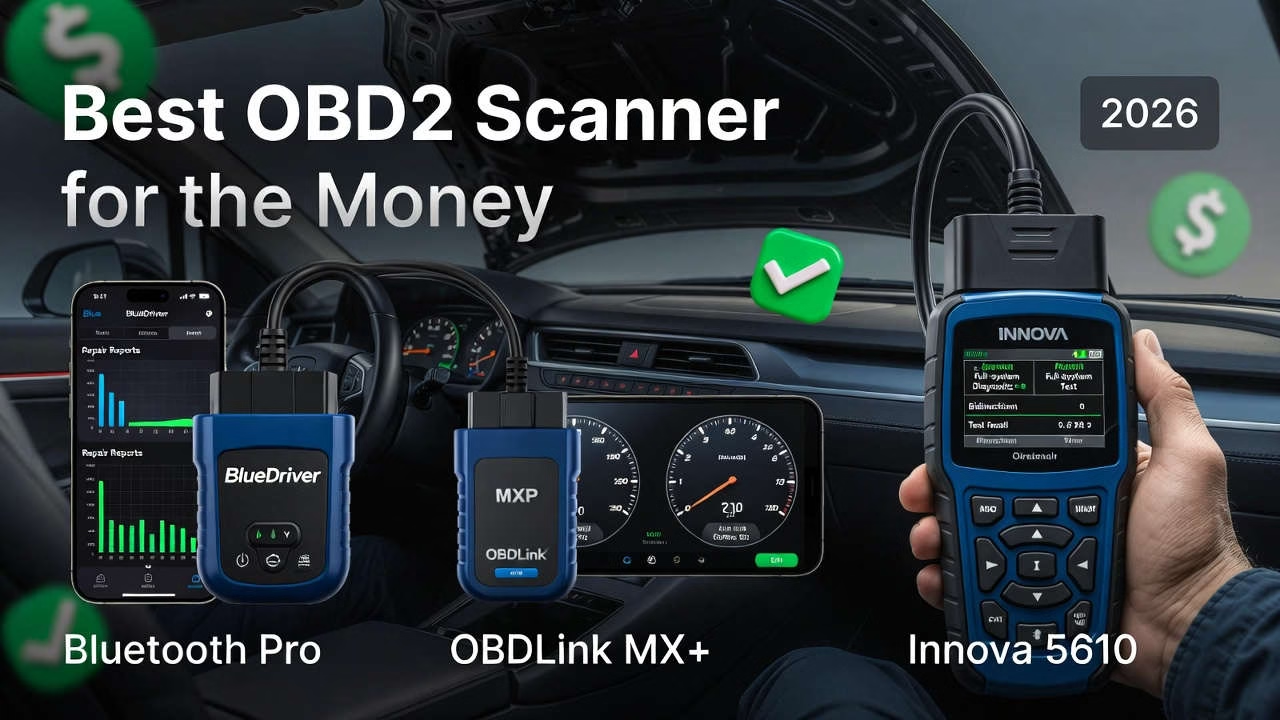
Picture this: you’re driving home after a long day. The car feels… slightly off. Not broken, just “different.” Then the check engine light pops on. You do what most people do—you keep driving and hope it disappears.
A week later, it doesn’t. So you swing by a shop for a diagnosis.
The service advisor comes back with a printout, a serious face, and a number that feels like a punch to the gut: $800.
Maybe the repair is legitimate. Maybe it isn’t. The worst part is you don’t know—because you don’t have visibility into what your car is trying to tell you. You’re forced to rely on someone else’s interpretation.
⚡ At‑A‑Glance Quick Look
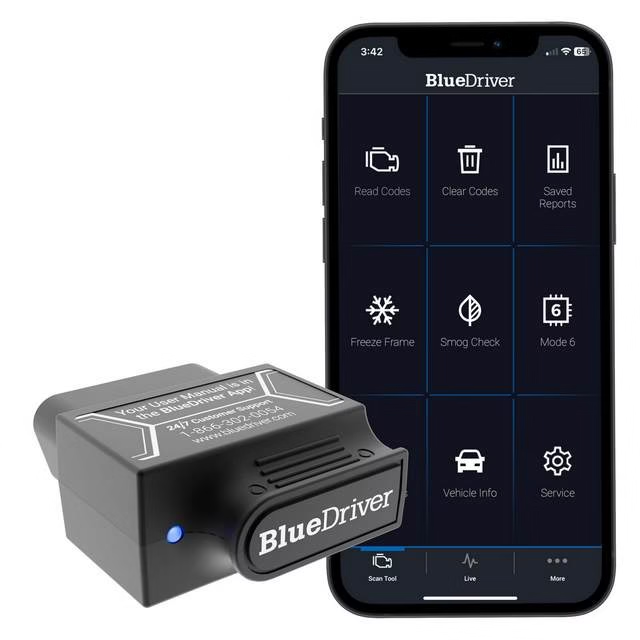
BlueDriver Bluetooth Pro OBD2 Scanner
- Wireless Bluetooth · iOS/Android app
- Enhanced: ABS, Airbag/SRS, TPMS, transmission
- Repair reports & live data graphing
- No subscriptions · free updates
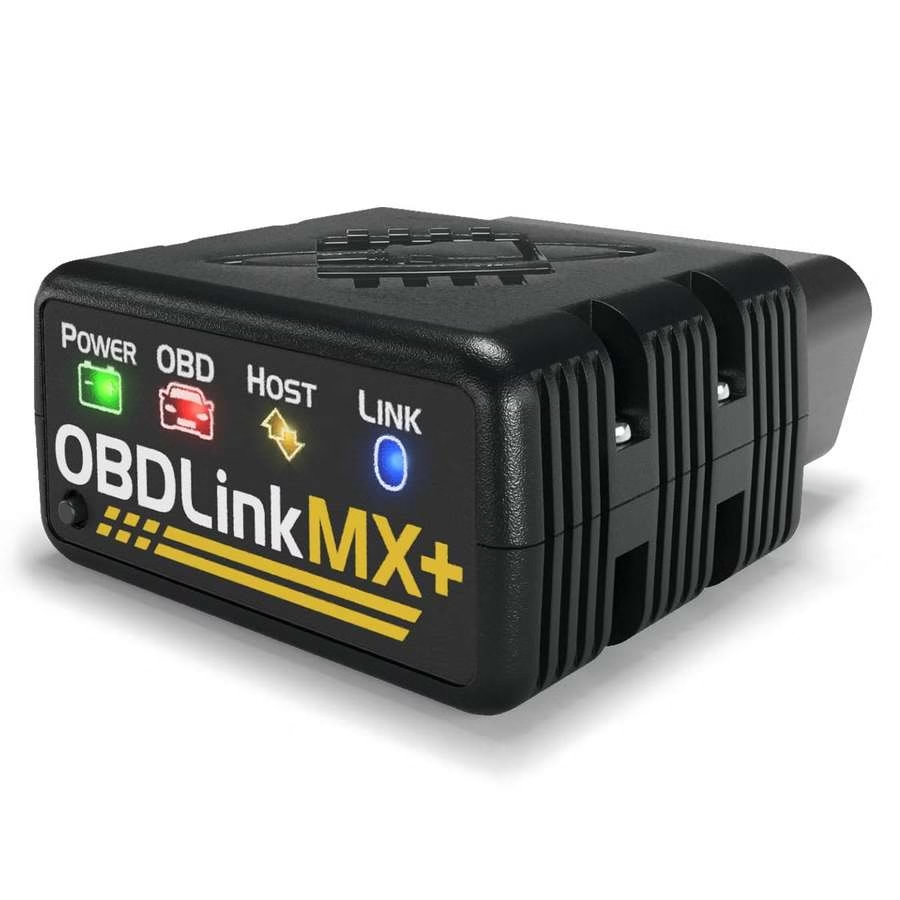
OBDLink MX+ Bluetooth OBD2 Scanner
- Fast BT 3.0 · stable data rate
- Works with FORScan, Torque Pro, BimmerCode
- Enhanced Ford/GM networks (MS‑CAN, SW‑CAN)
- BatterySaver™ · 3‑year warranty
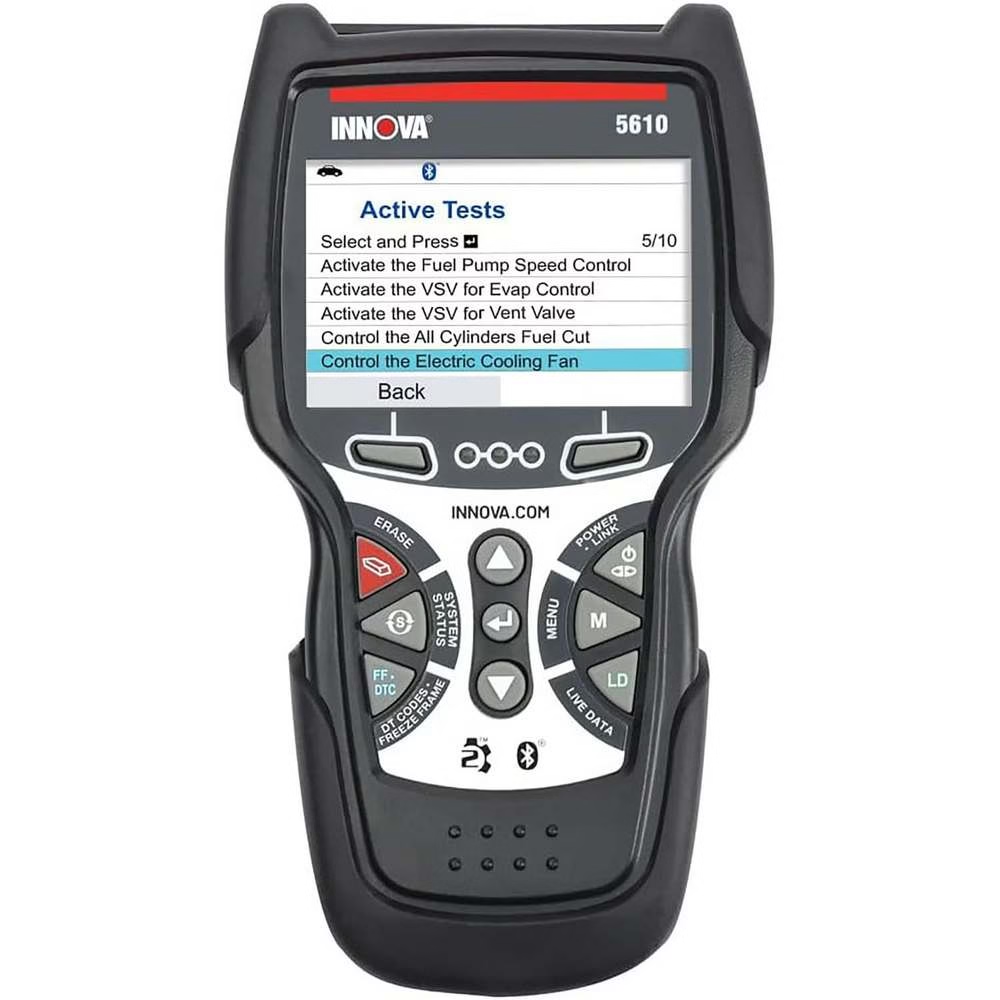
Innova 5610 Bidirectional OBD2 Scan Tool
- Bidirectional controls (active component tests)
- 34+ resets: EPB, TPMS, oil, throttle
- Standalone handheld + free RepairSolutions2 app
- Full‑system (ABS, SRS, trans) · free updates
Product images & ratings from official sources. Prices are hidden – click the button to check latest offers.
That’s exactly why so many DIYers, used-car buyers, and everyday drivers start searching for the best obd2 scanner for the money. Not because they want to become mechanics—but because they want control:
- Control over whether a repair is urgent or can wait
- Control over whether a “recommended” part is actually the culprit
- Control over whether a shop’s diagnosis passes the smell test
- Control over avoiding repeat visits, wasted parts, and guesswork
And in 2026, that control doesn’t require a $1,000 pro tool. You just need the right scanner for how you actually maintain your car.
In this guide, you’ll get an OBD2 scanner review built around three products only—each one a proven value play in a different way:
- BlueDriver Bluetooth Pro OBD2 Scanner (app-driven clarity and repair guidance)
- OBDLink MX+ Bluetooth OBD2 Scanner (speed, stability, and wide app compatibility)
- Innova 5610 Bidirectional OBD2 Scan Tool (true bidirectional power and workshop-level functions)
By the end, you’ll know which one is the best obd2 scanner for the money for your situation—and why “best value” isn’t about the lowest price. It’s about the most capability per dollar, the fewest limitations for your vehicle, and the fastest path from warning light to confident fix.
📊 Pros & Cons · Detailed Breakdown
- Intuitive app with clear repair guidance & videos – saves diagnostic fees
- Accurate enhanced codes (ABS, airbag, TPMS, transmission)
- No subscriptions, free updates, unlimited scans
- Reliable for DIYers, used car checks, live data graphing
- Occasional Bluetooth pairing delays or drops (reported in some threads)
- Enhanced diagnostics limited on certain newer / non‑listed makes
- Requires smartphone (no standalone screen)
- Extremely fast & stable data rates (up to 3x faster)
- Excellent for manufacturer tasks: FORScan, BimmerCode, AlfaOBD
- Works across 20+ third‑party apps, secure pairing
- BatterySaver™ sleep mode, minimal drain, 3‑year warranty
- Bluetooth can occasionally lag/drop (especially older cars/some phones)
- Steeper setup for non‑technical users
- Higher price than basic adapters
- True bidirectional controls (active component testing)
- 34+ resets & relearns: EPB, TPMS, throttle, injector coding
- Standalone handheld + free RepairSolutions2 app
- Free updates, strong U.S. support, dealership‑level capability
- Steeper learning curve (deep menus, many functions)
- Feature coverage varies by vehicle (limitations on some FCA/Jeep)
- Higher initial price; screen brightness occasionally average
What Is an OBD2 Scanner and Why Every Car Owner Needs One
OBD2 stands for On-Board Diagnostics, Second Generation. In plain English: it’s the standardized system your vehicle uses to monitor its own health, detect problems, and store diagnostic information when something goes wrong.
If your car is 1996 or newer (in North America), it almost certainly has an OBD2 port—usually under the dash near the steering column. That port is the gateway to what your vehicle’s computers know.
An OBD2 scanner plugs into that port and helps you do three core things:
- Read trouble codes (why the light came on)
- Clear codes (after repairs or to verify a fix)
- View live data (what sensors and systems are doing in real time)
Why that matters in real life (not theory)
A check engine light can mean anything from “tighten your gas cap” to “serious misfire that can damage your catalytic converter.” Without a scanner, you’re blind. With one, you can:
- Pull the code and find out whether the issue is urgent
- Decide if the car is safe to drive
- Avoid replacing parts blindly
- Walk into a shop with real information
And that’s how you save money on car repairs—not by magically fixing everything yourself, but by cutting out confusion and wasted diagnostics.
What an OBD2 scanner can reveal beyond the engine light
Many people think scanners are only for engine codes. But depending on the tool and vehicle support, scanners can access other systems too—like ABS, airbag/SRS, transmission, and TPMS.
That matters because many of the expensive “surprise bills” come from exactly those systems:
- An ABS light that’s really a wheel speed sensor (often simple)
- An airbag light that prevents inspection renewal
- A transmission code that’s actually a sensor or solenoid issue
- Emissions readiness that blocks registration until you complete drive cycles
Even if you never pick up a wrench, simply knowing what’s going on changes everything.
Who benefits most from owning one
1) DIY beginners
If you’re learning, a scanner helps you move from “panic” to “plan.” You can research the code, understand symptoms, and decide whether it’s a DIY job or a shop job.
2) Weekend mechanics
Live data, freeze frame, and deeper system access help you diagnose faster and stop throwing parts at a problem.
3) Used-car buyers
A scanner is the cheapest insurance policy you can bring to a test drive. Codes—especially pending codes—can reveal problems the seller “cleared” yesterday.
4) Multi-vehicle households
If you have more than one car, a scanner quickly becomes a go-to tool. The cost gets spread over years and multiple vehicles, which is exactly how “value” becomes real.
The quiet superpower: catching problems early
Most costly repairs don’t start costly—they start small. A sensor reading slightly off. A misfire only under load. A catalyst efficiency code that appears intermittently. Early detection is how you avoid “everything failed at once” repair bills.
And now that we understand what an OBD2 scanner does, the next step is choosing one that matches your real needs—because the wrong scanner can be just as frustrating as having none.
How to Choose the Best OBD2 Scanner for the Money in 2026
If you’re hunting for the best obd2 scanner for the money, here’s the truth: value isn’t just the sticker price. It’s what the tool can do on your vehicle, how reliably it does it, and how much time and frustration it saves you.
Below is the practical buying guide I use when recommending scanners to real drivers—DIYers, commuters, and “I just want to know what’s wrong” owners.
Price vs. long-term value (the part most people get wrong)
A cheaper tool can be “good value” if it does exactly what you need. But if it can’t access the systems throwing the warning light—or the app is a mess—you’ll buy twice.
True value includes:
- Coverage that matches your vehicle and goals
- Updates that keep the tool useful for years
- Good support when something doesn’t connect
- Features that reduce repeat shop visits
In other words: the best value scanner is the one you’ll actually use—and trust.
Compatibility: the make/model/year reality check
This is non-negotiable. Many scanners can read basic engine codes on most OBD2-compliant vehicles, but enhanced diagnostics (ABS, SRS, TPMS, transmission) can vary wildly by make/model/year.
If you’re buying for:
- A common daily driver (Ford, GM, Toyota, Honda, etc.)
- A newer car with more modules and tighter security
- A specific brand you want deeper access to
…you must prioritize compatibility first.
Now that we’ve covered that, let’s talk form factor—because your tolerance for screens, apps, and setup matters more than you think.
Wireless vs. handheld: which fits your style?
Bluetooth OBD2 scanner (phone-based):
- Great if you always have your phone
- Often cheaper for the capability
- App interface can be excellent (or terrible)
- Some setups require pairing and permissions
Handheld scanner:
- No phone required
- Often more “shop-like” workflow
- Usually more expensive for deeper features
- Menus can be dense—but powerful
If you want quick checks and guidance, wireless tools can be perfect. If you want workshop-style functions and standalone operation, handheld wins.
Enhanced diagnostics: the difference between “engine-only” and “real diagnosis”
Basic OBD2 is like reading the headline. Enhanced diagnostics is reading the whole story.
If your car throws an ABS or airbag light, an engine-only scanner leaves you stuck. A tool with enhanced access can:
- Read codes from the module causing the light
- Show live data relevant to that system
- Help you confirm whether a sensor, wiring, or component is failing
This is where “best for the money” becomes personal. If you never plan to go beyond engine codes, don’t overpay. But if you own a higher-mileage car, deeper access is often the smart play.
Bidirectional controls: the step from “reading” to “testing”
A bidirectional obd2 scanner doesn’t just read data—it can command certain functions.
That can include active tests and service functions that let you verify repairs and complete procedures correctly.
This is huge for serious DIY work because it can reduce guesswork:
- You can test components instead of hoping they work
- You can perform resets and relearns after repairs
- You can complete service procedures that otherwise require a shop
Not everyone needs this. But if you do, you’ll know fast—usually after your first “why won’t this reset?” moment.
Updates and support: the invisible value multiplier
A scanner is a long-term tool. Updates matter because:
- Vehicle protocols evolve
- Apps change (for Bluetooth tools)
- Bug fixes improve stability and speed
- Coverage can expand
Support matters because pairing issues, coverage questions, and feature access will happen eventually. The difference between a good tool and a regret purchase is often how the company handles the “stuff that goes wrong.”
App quality and workflow: where time gets saved (or wasted)
With Bluetooth tools especially, the app is half the product. The best apps:
- Make codes easy to understand
- Present live data in a usable way
- Help you move from code → cause → fix
- Don’t hide features behind confusing menus
And with that buying framework in place, we’re ready to evaluate the three scanners that deliver standout value in different ways—without pretending one tool is perfect for everyone.
BlueDriver Bluetooth Pro OBD2 Scanner Review: Best OBD2 Scanner for the Money for Most Drivers
If you want the shortest path from check engine light to “what do I do next?”, BlueDriver is built for that. It’s a bluetooth obd2 scanner that leans heavily into clarity: readable code info, repair guidance, and a user-friendly flow that makes sense even if you’re not a car person.
Price & rating snapshot (March 2026)
- $84.95 (sale price; list $119.95).
- Amazon rating: 4.4 out of 5 stars from 61,734 global ratings.
Image placement suggestion:
Alt text: “BlueDriver Bluetooth Pro OBD2 Scanner connected to vehicle OBD2 port under the dashboard”
Key specifications (verbatim) + what they mean for you
- “Wireless Bluetooth-enabled sensor that connects to iOS/Android smartphones/tablets (no wires).”
You get a compact tool that lives in your glove box and uses your phone as the screen—great for quick checks in a parking lot or driveway. - “Reads and clears engine codes plus enhanced diagnostics (ABS, Airbag/SRS, TPMS, transmission) for supported makes.”
This is the difference between “engine-only” and “real-world useful,” especially if you’re chasing warning lights beyond the engine. - “Features include repair reports with possible causes/fixes and repair videos, live data graphing/export, freeze frame, Mode 6, smog/emissions readiness check, and unlimited scans.”
Translation: it doesn’t just tell you what code you have—it helps you understand why it might be happening, what to check next, and whether your car is ready for emissions/inspection. - “Supports all major OBD2 protocols.”
Broad baseline compatibility for standard OBD2 functions. - “No subscriptions or in-app fees.”
This is a big part of why BlueDriver often lands in “best value” conversations—no surprise recurring costs. - “Designed and supported in North America with free updates.”
Updates extend the tool’s useful life, and support being accessible matters when you’re troubleshooting connection or coverage issues. - “Compatibility: All gas-powered vehicles 1996+ sold in North America (U.S., Canada, Mexico); enhanced diagnostics available for GM (Chevrolet, GMC, etc.), Ford/Lincoln/Mercury, Chrysler, Toyota/Lexus/Scion, Nissan/Infiniti, Mazda, Subaru (U.S.), Mitsubishi (2008+), Hyundai/Kia (2011+), Mercedes/Smart (2005+), BMW/Mini (2005+, North America), Honda/Acura (2003+, North America), and Volkswagen/Audi (North America). Basic OBD2 functions on any OBD2-compliant vehicle.”
This is where you match the tool to your vehicle. Basic engine OBD2 is broad. Enhanced access depends on brand and year. - “What’s included: BlueDriver sensor only.”
Simple package—your phone is the interface. - “Warranty/support: 24/7 professional phone and in-app support; free shipping/returns on official purchases.”
Strong support availability is valuable when you’re stuck and the car is in “limp mode” in your driveway.
Image placement suggestion:
Alt text: “BlueDriver app displaying a diagnostic trouble code and repair report on a smartphone”
Real customer review excerpts (verbatim)
- “Been using mine for 3 years and it has been great. I leave it always plugged into my truck… It has saved more than its cost in not having to pay for diag time at the shop… For any code you get, it tells you what it is, likely fixes… plus usually a link to buy the part on Amazon… You can gain insights into why maybe the engine feels rough… Couldn’t be simpler to use.”
- “I have owned several scanners, this is by far the best… extra features that are usually only available on larger more professional models… It allows you to reset codes, scan and even tells you of numerous potential problems. Then it shows you the part and part number to order.”
- “Excellent tool. It has already paid for itself 10 times over. Offers detailed description and definition of obd 2 codes and offers common fixes. Also has live data reading… Easy to use and works great.”
- “The tool… can not only scan engine codes but codes from other systems as well! Including ABS, Transmission… The repair reports… tell you what the code is and what are the most likely culprits… The live data tool is very good.”
Pros and cons (exactly as aggregated)
Pros:
- Intuitive app with clear repair guidance and videos saves hundreds in diagnostic fees; accurate enhanced codes and live data; no ongoing costs; reliable for DIYers checking used cars or monitoring vehicles.
Cons:
- Occasional Bluetooth pairing delays or drops (especially noted in some Reddit threads); enhanced diagnostics limited on certain newer or non-listed makes/models; requires smartphone.
Who it’s for—and why it’s outstanding value for money
If you’re a normal driver who wants to understand the car without becoming a full-time mechanic, BlueDriver’s value comes from speed to clarity.
Here’s the real-world scenario where it shines:
- The light comes on before work
- You scan the code in two minutes
- You see likely causes and common fixes
- You decide whether it’s safe to drive today
- You avoid paying a shop just to tell you what you can learn yourself
It’s also an excellent obd2 scanner for diy beginners because the guidance reduces the intimidation factor. And for used-car checks, it can help you catch red flags early.
Now, if you’re more technical—or you want maximum app flexibility across platforms—there’s another scanner that’s built around speed, stability, and third-party app support.
OBDLink MX+ Bluetooth OBD2 Scanner Review: Best OBD2 Scanner for the Money for Power Users
OBDLink MX+ is the Bluetooth option for people who care about performance, fast data, and broad compatibility across apps and devices. It’s not trying to hold your hand as much as it’s trying to be a rock-solid adapter that works with a wide ecosystem.
Price & rating snapshot (March 2026)
- $139.95 (official site).
- Amazon rating: 4.6 out of 5 stars from 14,966 global ratings.
Image placement suggestion:
Alt text: “OBDLink MX+ Bluetooth OBD2 scanner plugged into OBD2 port with smartphone running live gauges”
Key specifications (verbatim) + what they mean for you
- “Fast Bluetooth 3.0 adapter (Class 2, 128-bit encryption, “Connect” button for secure pairing) that works with iOS, Android, and Windows devices/apps (including FORScan, Torque Pro, BimmerCode, AlfaOBD, Carista, DashCommand).”
The headline here is flexibility. If you like choosing your own apps—or you already use one—MX+ is designed to play well across ecosystems. - “Supports all standard OBD-II protocols plus proprietary Ford/GM networks (MS-CAN, SW-CAN).”
This matters for deeper access and manufacturer-specific workflows, especially in communities that rely on brand-focused apps. - “Provides more live parameters (ABS, SRS, TPMS, etc.) than basic scanners; high data sampling rate (up to 3x faster than competitors).”
If you monitor live data for diagnosis, speed and sampling rate make the experience smoother and more accurate—especially when chasing intermittent issues. - “Features BatterySaver™ sleep mode, over-voltage/battery-drain protection, free unlimited OEM-specific data add-ons, lifetime free firmware updates.”
These are long-term ownership features: less worry about battery drain, plus firmware updates that keep the adapter current. - “Compatibility: All 1996+ cars and light trucks sold in the U.S. (plus EOBD/JOBD international variants); enhanced support for Ford, GM, Mazda, Nissan/Infiniti, Toyota/Lexus/Scion, Honda, Hyundai/Kia.”
Strong baseline coverage, with enhanced support focused on common brands. - “What’s included: OBDLink MX+ adapter.”
Clean, simple package. - “Warranty: 3-year warranty and 180-day money-back guarantee (official).”
This is a confidence signal—and part of the value equation if you want long-term reliability.
Real customer review excerpts (verbatim)
- “Awesome OBD2 Dongle. Pairs quickly… lightning fast… The OBDLink app has a great assortment of gauges and picks up all the signals… Additionally, the OBDLink app also gives a lot of BMW specific trouble codes.”
- “This is a great little OBD2 Scanner… works with a ton of third party apps that allow you to make modifications… Bluetooth connection was consistent… It fit in the OBD2 with zero issues.”
- “Bought for my 2018 challenger… paired with Jscan I was able to… program 2 additional Fobs… The scan works well connect the Bluetooth quickly and has a lot of cool options.”
- “What a great product! It is so customizable… The support from the OBDLink staff is intelligent… They respond super quick.”
Pros and cons (exactly as aggregated)
Pros:
- Extremely fast and stable data rates; excellent for manufacturer-specific tasks and reprogramming (e.g., FORScan on Ford/GM); works across many third-party apps; minimal battery drain; secure and reliable for advanced DIY or performance monitoring.
Cons:
- Bluetooth connection can occasionally lag or drop (especially in older vehicles or with certain phones); steeper setup for non-technical users; higher price than basic adapters.
Who it’s for—and why it delivers outstanding value for money
If you love data, customization, and a “build your own workflow” approach, OBDLink MX+ makes sense. Its value comes from being a high-performance bridge between your car and whichever app ecosystem you prefer.
This is the real-world sweet spot:
- You want live gauges and data logging
- You care about fast sampling for diagnosis
- You use (or plan to use) third-party apps
- You want cross-platform support (including Windows)
- You want an adapter that’s built for long-term ownership (updates, protections, warranty)
In other words: it’s the best obd2 scanner for the money for a certain type of user—someone who wants capability and flexibility more than guided repair explanations.
Next, let’s step into a different category entirely: a handheld tool that can do true bidirectional testing and workshop functions without relying on your phone.
Innova 5610 Bidirectional OBD2 Scan Tool Review: Best OBD2 Scanner for the Money for Deep DIY Work
The Innova 5610 is the “I want real control” option in this lineup. It’s a standalone handheld tool with a color screen, designed for people who want deeper diagnostics and service functions—especially bidirectional capability.
If you’ve ever hit a wall where a basic scan isn’t enough—this is the kind of tool that removes that wall.
Price & rating snapshot (March 2026)
- $277.70–$349.99 (frequent sales around $278 from list $349.99–$379.99).
- Amazon rating: 4.4 out of 5 stars from 3,211 global ratings.
Image placement suggestion:
Alt text: “Innova 5610 handheld bidirectional OBD2 scan tool performing a full-system scan on a vehicle”
Key specifications (verbatim) + what they mean for you
- “Standalone handheld scanner with color screen (no phone required, though pairs with free RepairSolutions2 app).”
You can diagnose in the driveway without juggling Bluetooth pairing—while still having optional app support. - “Full-system diagnostics (engine, ABS, SRS/airbag, transmission).”
This is full coverage for the most common modules that trigger warning lights. - “Bidirectional controls (active component testing, e.g., fuel pump, electronic parking brake).”
This is the major leap: you can command certain tests and functions, which helps you confirm issues instead of guessing. - “Enhanced OEM live data graphing/recording/playback.”
Useful when problems are intermittent—record, review, and compare. - “Advanced resets and relearns: oil maintenance, battery, EPB, TPMS, throttle body, DPF, SAS, injector coding, and many more (34+ workshop functions).”
This is where the 5610 starts behaving like a shop tool. Resets and relearns can be required after repairs or maintenance—especially on newer vehicles. - “Code severity/priority, battery/charging tests, smog readiness.”
Helps you decide what’s urgent, plus readiness checks for inspection/registration. - “Free lifetime updates, no subscriptions.”
Long-term value, no recurring cost surprises. - “Supports English/Spanish/French.”
Helpful for multi-driver households. - “Compatibility: Most 1996–2024 OBD2 vehicles manufactured in U.S./Canada (features vary by make/model/year; use coverage checker). Optional OBD1/HD truck kits available. Limited on some 2018+ FCA vehicles requiring AutoAuth.”
This is powerful—but coverage varies. Checking your exact vehicle coverage matters more here than with basic tools. - “What’s included: Scanner tool.”
Everything you need to start scanning is in the box. - “Warranty: 1-year limited (extendable for $29).”
Note the shorter base warranty compared to some Bluetooth adapters—worth factoring into your value math.
Image placement suggestion:
Alt text: “Innova 5610 showing bidirectional active test menu for electronic parking brake function”
Real customer review excerpts (verbatim)
- “This bidirectional scan tool is a game changer… I was able to test the fuel pump and reset the EPB… The live data for ABS and SRS was spot on… saved a thousand dollars on this repair.”
- “Just got this beauty… Easy, Screen is clear… Help your man fix & diagnose your car with great diagnostics! It worth every penny!”
- “What an amazing scanner, its very easy to use… Code clarity is amazing especially with the app.”
- “Excellent Must have in your tool kit… scanned my vehicle and came up with a code… Sure enough, that was the issue… this device already paid for itself.”
Pros and cons (exactly as aggregated)
Pros:
- True bidirectional testing and extensive resets/relearns provide dealership-level capability; standalone operation with clear screen; thorough all-system scans and app integration for repair guidance; free updates and strong U.S.-based support save significant repair costs.
Cons:
- Steeper learning curve due to deep menus; feature coverage varies by vehicle (some limitations on newer FCA/Jeeps or exotics); higher initial price; screen brightness occasionally noted as average.
Who it’s for—and why it’s worth the money
If you’re stepping into deeper DIY territory—brakes, batteries, modules, service functions—the Innova 5610’s value is simple: it can do things cheaper tools can’t.
Here are the scenarios where it earns its price:
- You need to run active tests to confirm a failing component
- You need resets/relearns after maintenance or repairs
- You want full-system diagnostics without relying on a phone
- You prefer a dedicated tool you can keep in the garage
And just as importantly: it’s the tool here that most directly reduces “I replaced the part but the light is still on” moments—because bidirectional capability and workshop functions are built for verification, not guesswork.
Now that you’ve seen all three options, let’s put them head-to-head in a clean comparison and clarify which one wins for different driver types.
Head-to-Head Comparison: BlueDriver vs OBDLink MX+ vs Innova 5610
At this point, you’re not asking, “Which scanner is best?” You’re asking, “Which one is best for me?”
Because each of these tools is “best for the money” in a different way:
- BlueDriver is the best value for guided diagnosis and clarity
- OBDLink MX+ is the best value for power users and app flexibility
- Innova 5610 is the best value for bidirectional testing and workshop functions
Narrative analysis: which one wins for your scenario?
If you want the best obd2 scanner for the money for everyday ownership:
BlueDriver is hard to beat. It focuses on the part that costs drivers the most—confusion. When you understand what’s happening and what’s likely to fix it, you make better decisions. And because there are no subscriptions or in-app fees, the value stays strong year after year.
If you’re the “I want the best data and app ecosystem” type:
OBDLink MX+ is the most flexible. It’s built to work across iOS, Android, and Windows, and it’s praised for fast pairing, speed, and customization. If you’re using third-party apps and want a tool that keeps up, this is the best value play.
If you want the most capability per scan—especially bidirectional power:
Innova 5610 wins that category. Bidirectional controls and extensive resets/relearns are exactly the features that separate “I can read codes” from “I can finish the job correctly.” It costs more, but it can replace paid diagnostics and certain shop procedures—especially for serious DIYers.
Now that the differences are crystal clear, let’s turn that into a simple buying roadmap so you can choose confidently without overthinking it.
Final Buying Guide and Smart Shopping Tips
If you want the best obd2 scanner for the money, don’t start with price. Start with your use case, then let price guide you within the right category.
Here’s the simplest way to decide:
Step 1: Choose your “scanner style”
- Want phone-based convenience and guided repair info?
Pick a Bluetooth tool designed around clarity and repair assistance. - Want maximum app flexibility and fast live data?
Pick a Bluetooth adapter built for broad app/device support and high sampling. - Want workshop-level functions without relying on a phone?
Pick a handheld tool with full-system scans and bidirectional controls.
Step 2: Match the tool to your vehicle
This is where smart buyers save the most frustration.
- For Bluetooth tools, confirm enhanced coverage for your make/year if you want ABS/SRS/TPMS/transmission access.
- For handheld bidirectional tools, coverage varies more—so you should treat the vehicle coverage checker as required reading.
Step 3: Shop smart (without getting tricked)
Even great tools can become bad value if you buy blindly.
- Verify current pricing—prices can swing, especially around sales.
- Confirm what’s included—some tools are adapters only, some are fully standalone.
- Think long-term—tools with free updates and no subscriptions maintain value better over time.
And with that, you’re ready for the common questions people ask when they’re trying to choose the best obd2 scanner for the money without wasting cash.
Frequently Asked Questions (FAQ)
1) Do I need a smartphone to use these scanners?
It depends on the tool. BlueDriver is a “Wireless Bluetooth-enabled sensor that connects to iOS/Android smartphones/tablets (no wires).” OBDLink MX+ also relies on external devices because it “works with iOS, Android, and Windows devices/apps.” Innova 5610 is a “Standalone handheld scanner with color screen (no phone required, though pairs with free RepairSolutions2 app).”
2) Are there subscription fees or ongoing costs?
Not based on the provided product details. BlueDriver states: “No subscriptions or in-app fees.” Innova 5610 states: “Free lifetime updates, no subscriptions.” OBDLink MX+ includes “lifetime free firmware updates.”
3) Which is best for beginners who just want answers fast?
If you’re new to diagnostics, the best “beginner value” is usually the tool that reduces confusion and explains what you’re seeing. BlueDriver’s experience is heavily oriented around code understanding and repair guidance, including “repair reports with possible causes/fixes and repair videos,” which tends to shorten the learning curve.
4) Which is the best OBD2 scanner 2026 choice for serious DIY repairs?
If your DIY work includes service functions, active tests, and deeper procedures, the Innova 5610 stands out because it includes “Bidirectional controls (active component testing, e.g., fuel pump, electronic parking brake)” and “Advanced resets and relearns… (34+ workshop functions).”
5) Can these tools scan ABS and airbag/SRS codes?
Yes—depending on the tool and your vehicle support. BlueDriver states it reads “enhanced diagnostics (ABS, Airbag/SRS, TPMS, transmission) for supported makes.” OBDLink MX+ states it “Provides more live parameters (ABS, SRS, TPMS, etc.) than basic scanners.” Innova 5610 states “Full-system diagnostics (engine, ABS, SRS/airbag, transmission).”
6) Which scanner is best if I want to use third-party apps?
OBDLink MX+ is specifically positioned for that because it “works with iOS, Android, and Windows devices/apps (including FORScan, Torque Pro, BimmerCode, AlfaOBD, Carista, DashCommand).” If you like customizing your setup, that breadth matters.
7) Will these work on any 1996+ vehicle?
For basic OBD2 functions, generally yes on OBD2-compliant vehicles. BlueDriver states: “Basic OBD2 functions on any OBD2-compliant vehicle.” For enhanced functions, compatibility is more specific. OBDLink MX+ states: “Compatibility: All 1996+ cars and light trucks sold in the U.S. (plus EOBD/JOBD international variants)” with enhanced support for certain makes. Innova 5610 states: “Compatibility: Most 1996–2024 OBD2 vehicles… (features vary by make/model/year; use coverage checker).”
8) What if my vehicle is newer and has security restrictions?
This can matter most for deeper tools and certain brands. Innova 5610 notes: “Limited on some 2018+ FCA vehicles requiring AutoAuth.” If you own one of those vehicles, check coverage first so you don’t buy capability your car won’t allow.
📌 Explore More · Related Reads
Viofo A329S vs BlackVue DR970X
Head-to-head comparison of two flagship dash cams – video quality, parking mode, and reliability.
read comparison →Best Dash Cam for Mercedes C-Class
Perfectly integrated cameras that match the interior and electrical system of your C-Class.
find the best →Best Wall‑Mount Garage Door Opener
Top-rated openers according to Reddit discussions – quiet, space‑saving, and reliable.
see top picks →OBD2 Code Readers vs Real Scan Tools
What’s the difference? When to use a simple reader vs a professional bidirectional tool.
learn more →TPMS Light Won’t Reset? Real Reasons
Diagnose persistent TPMS warnings – sensor faults, relearn procedures, and hidden causes.
fix the issue →Conclusion: Choosing the Best OBD2 Scanner for the Money
The best obd2 scanner for the money isn’t a single universal winner—it’s the scanner that matches your vehicle, your comfort level, and the kind of problems you want to solve.
If you want the smartest value for everyday drivers, BlueDriver delivers a strong blend of pricing, massive user adoption, and features geared toward clarity—like repair guidance, live data, and enhanced diagnostics for supported makes. For many owners, that’s the difference between paying for repeated diagnostics and walking into a repair decision with confidence.
If you’re more technical and want speed plus broad app flexibility, OBDLink MX+ earns its place with fast data rates, strong third-party ecosystem support, and long-term ownership features like “lifetime free firmware updates.”
And if you’re ready for deeper DIY—active tests, service resets, and true shop-style capability—the Innova 5610 is the heavy hitter, especially with “Bidirectional controls” and “34+ workshop functions.”
No matter which direction you go, the smartest next step is the same: check compatibility for your exact make/model/year, verify current pricing, and invest once—so the next time a warning light shows up, you’re not at the mercy of an $800 surprise.