If you’ve ever had a check engine light pop on right before a trip—or an ABS or airbag light that won’t clear—you already know the pain: guessing gets expensive fast. You want answers you can trust, without paying a shop just to plug in a scanner.
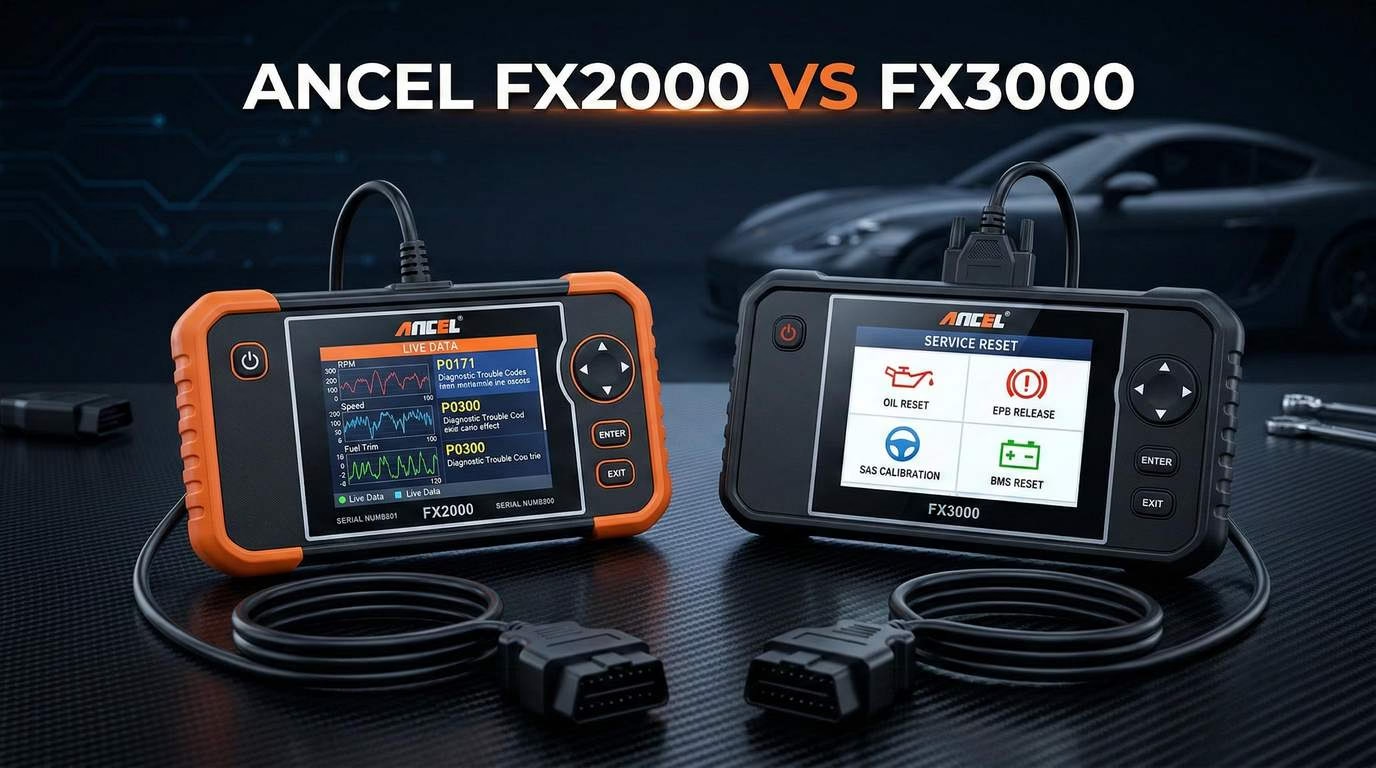
That’s exactly why the Ancel FX2000 vs FX3000 decision matters. These two handheld scanners sit in the sweet spot between cheap Bluetooth dongles and pro-level diagnostic tablets. They’re built for DIY owners, weekend mechanics, and anyone who wants a capable tool that can do more than just read generic engine codes.
🔧 Ancel FX2000 vs FX3000 🔧
🔍 Compare the features, specifications, and capabilities of these popular OBD2 diagnostic scanners
Ancel FX2000 ⚙️
⭐ Entry-Level to Mid-Range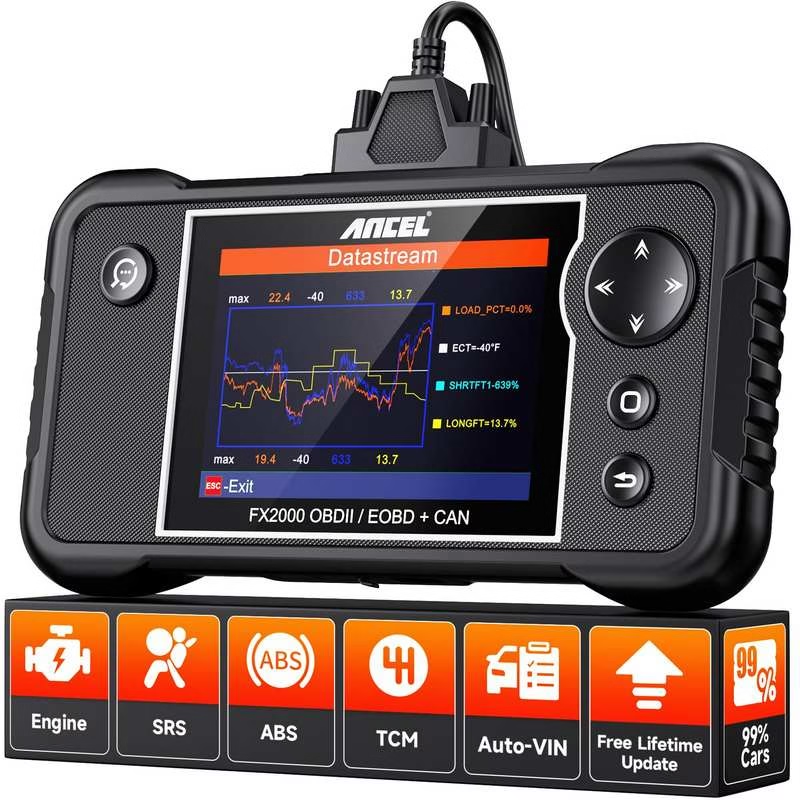
✨ Key Features
- Full OBDII/EOBD functionality
- Engine, ABS, SRS, Transmission diagnostics
- Graphical live data display
- Lifetime free software updates
- Data recording/replay capability
🚗 Vehicle Compatibility:
1996+ US, 2002+ EU Gas, 2004+ EU Diesel, 2005+ Asian
👍 Pros:
- ✅ Excellent value for price
- ✅ Solid build quality
- ✅ Graphical live data
- ✅ Lifetime free updates
- ✅ User-friendly interface
👎 Cons:
- ❌ Limited to 4 systems
- ❌ No service resets
- ❌ No built-in battery
- ❌ Wired connection required
- ❌ Potential info overload
Ancel FX3000 🚀
🔥 Upgraded Mid-Range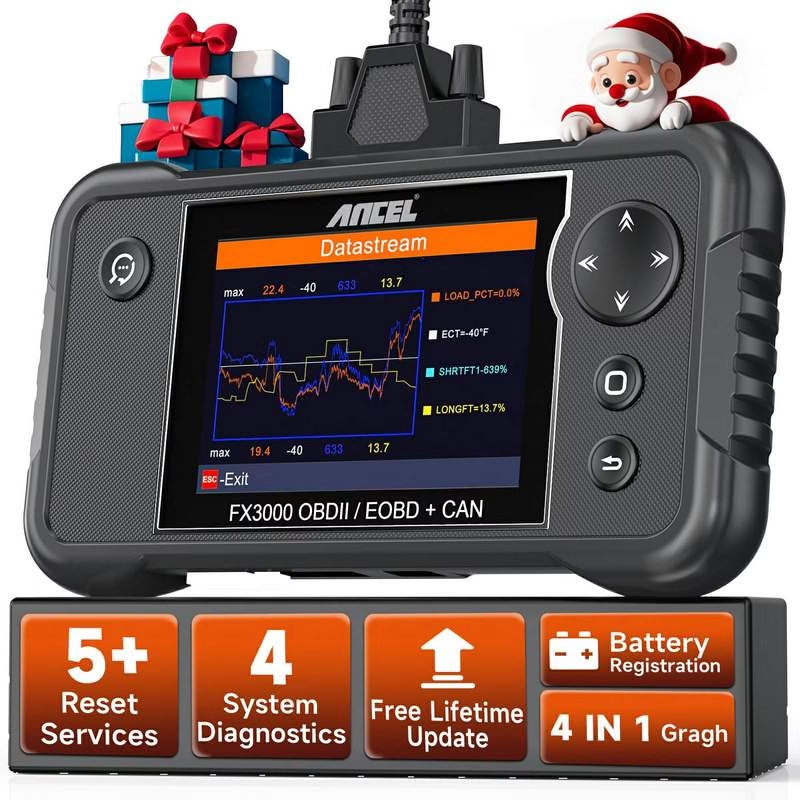
✨ Key Features
- All FX2000 features plus
- Oil Lamp Reset
- EPB & SAS Calibration
- ABS Bleeding & BMS Registration
- Enhanced service functions
🚗 Vehicle Compatibility:
1996+ US, 2002+ EU Gas, 2004+ EU Diesel, 2005+ Asian
👍 Pros:
- ✅ Strong value proposition
- ✅ Added service functions
- ✅ Graphical live data
- ✅ Lifetime free updates
- ✅ Compact, ergonomic design
👎 Cons:
- ❌ Limited to 4 systems
- ❌ Resets not universal
- ❌ No built-in battery
- ❌ Smaller screen
- ❌ PC updates required
Here’s the quick framing:
- Ancel FX2000 is the “core essentials” pick. It’s a four-system scanner that focuses on the fundamentals: Engine, ABS, SRS/Airbag, and Transmission diagnostics, plus graphical live data and full OBD2/EOBD modes. It’s aimed at troubleshooting and verification without extra maintenance resets.
- Ancel FX3000 keeps that same four-system foundation—but adds five service reset functions that can save serious time and shop fees if you do your own maintenance. That makes it the more “maintenance-friendly” option, especially if you want an oil reset scanner and related service functions in one device.
In this guide, you’ll get a clear, no-hype comparison. We’ll walk through what each tool is, what it does, what it doesn’t do, and where the real-world differences show up—especially around live data, updates, and service resets. You’ll also see side-by-side tables, practical use cases, and a summary of real user experiences included in the provided materials.
By the end, you’ll know which one fits your garage—and why.
What Is the Ancel FX2000?
The Ancel FX2000 is a handheld OBD2 diagnostic scanner positioned as an entry-level to mid-range tool for DIY users and light professional work. Think of it as a step up from basic code readers: it still covers standard OBD2 functions, but it also expands into four key systems that many cheap readers can’t touch.
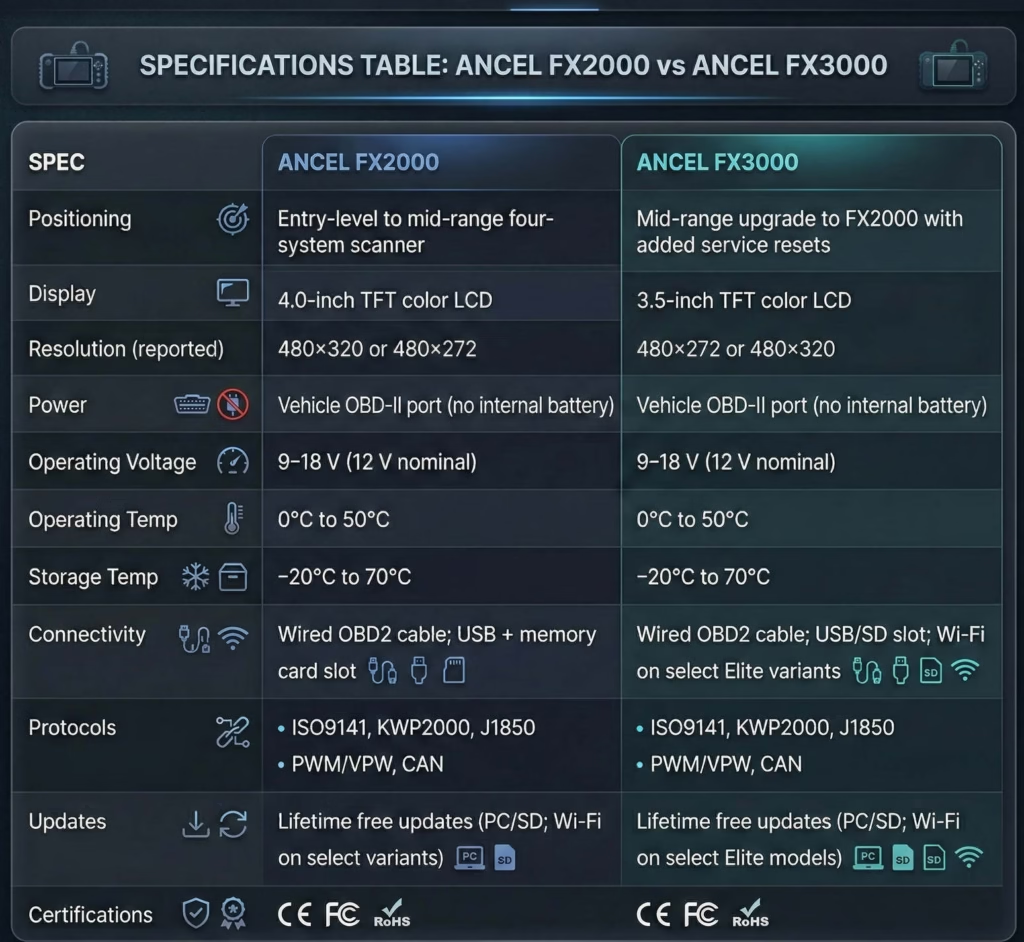
Full technical specifications (FX2000)
- Display: 4.0-inch TFT color LCD (resolutions reported as 480 × 320 or 480 × 272 depending on source/firmware)
- Operating Voltage: 9–18 V (nominal 12 V)
- Operating Temperature: 0°C to 50°C (32°F to 122°F)
- Storage Temperature: −20°C to 70°C (−4°F to 158°F)
- Dimensions: Approximately 7.7 × 4.17 × 1.25 inches (195 × 106 × 32 mm)
- Weight: Less than 400 g (reported range varies by configuration)
- Connectivity: 16-pin OBD-II diagnostic cable, USB port for PC updates, memory card slot (commonly 16 GB included)
- Supported Protocols: ISO9141, KWP2000, J1850 PWM, J1850 VPW, CAN (all standard OBD2 protocols)
- Languages: English, French, Spanish, German, Russian, Italian, Polish, Portuguese, plus additional options such as Korean, Japanese, and Dutch (varies by firmware)
- Power Source: Powered from the vehicle’s OBD-II port (no internal battery required)
- Certifications: CE, FCC, RoHS
- Update Mechanism: Lifetime free updates (via PC and SD card on standard models; Wi‑Fi direct on select FX2000 Wi‑Fi variants)
Key features and diagnostic capabilities
The FX2000 supports all 10 standard OBD2 test modes, which is the core of what most DIY owners need for engine/emissions troubleshooting. That includes:
- Read and clear DTCs (Diagnostic Trouble Codes) with definitions and a lookup library
- Live data streaming in text and graphical waveform format
- Freeze frame capture (snapshots of key sensor values at the moment a fault triggered)
- O2 sensor testing
- EVAP leak test
- I/M readiness status (helpful before emissions inspection)
- On-board monitor testing
- Vehicle info (VIN, CID, CVN)
- MIL status (malfunction indicator lamp status)
Where it gets more valuable is the four-system diagnostic coverage:
- Engine: ignition, fuel injection, air/fuel ratio, exhaust, and emissions monitoring
- ABS: brake component checks, bidirectional verification tests, and warning light reset (coverage varies by vehicle)
- SRS/Airbag: fault code retrieval, live data, safety system diagnostics
- Transmission: code read/clear, live data (including certain fluid parameters on supported vehicles), and system tests
You also get practical touches that matter when you’re actually working on a car:
- DLC location hints
- Data recording/replay
- PC printing
- Built-in help menus with abbreviations and code explanations
Vehicle compatibility
The FX2000 is designed to work with most OBD2-compliant vehicles, including:
- U.S.: 1996 and newer
- Europe: 2002+ gasoline, 2004+ diesel (in many cases)
- Asia: 2005 and newer
It’s stated to support over 60 makes and 10,000+ models, including major brands like Ford, GM, Chrysler, Toyota, Honda, Hyundai, Kia, BMW, Mercedes-Benz, VW, Audi, and others. Coverage depth varies by year, make, model, and region, and not every parameter (PID) is guaranteed on every car.
Bottom line on the FX2000: it’s a strong best budget OBD2 scanner contender if you want four-system diagnostics and graphing, and you don’t care about service reset features.
What Is the Ancel FX3000?
The Ancel FX3000 scanner is positioned as the upgraded successor to the FX2000. It keeps the same broad diagnostic mission—four-system coverage plus graphical live data—while adding service functions that push it closer to the “do your own maintenance” category.
If the FX2000 is mainly about diagnosing and confirming repairs, the FX3000 is designed to do that and help you complete certain common maintenance procedures with reset functions.
Full technical specifications (FX3000)
- Display: 3.5-inch TFT color LCD (resolution reported as 480 × 272 or 480 × 320; some Elite variants feature a larger 4.3-inch screen)
- Operating Voltage: 9–18 V (nominal 12 V)
- Operating Temperature: 0°C to 50°C (32°F to 122°F)
- Storage Temperature: −20°C to 70°C (−4°F to 158°F)
- Dimensions: Approximately 9.45 × 7.87 × 1.97 inches (tool body roughly 7–8 inches in length; compact handheld form)
- Weight: Approximately 1.63 lb (740 g)
- Connectivity: 16-pin OBD-II wired cable, USB/SD card slot for updates (PC-based on standard model; select Elite variants support Wi‑Fi)
- Supported Protocols: ISO9141, KWP2000, J1850 PWM, J1850 VPW, CAN (all standard OBD2/EOBD protocols)
- Languages: English, Spanish, French, German, Polish, Russian, Italian, Japanese, Korean, Dutch
- Power Source: Powered via vehicle OBD-II port (no internal battery required)
- Update Mechanism: Lifetime free software updates (via PC and SD card; Wi‑Fi on select Elite models)
- Certifications: CE, FCC, RoHS
Key features and diagnostic capabilities
Like the FX2000, the FX3000 supports all 10 OBD2 test modes, including reading/clearing codes, freeze frame, O2 tests, EVAP test, I/M readiness, on-board monitor test, vehicle info, MIL status, and a DTC lookup library.
It also maintains four-system diagnostics with graphical live data:
- Engine: full OBD2 coverage plus enhanced data presentation
- ABS: fault codes and component inspection support; basic bidirectional tests are referenced for supported vehicles (example given: ABS module cycling for bleeding)
- SRS/Airbag: safety system codes and live data
- Transmission: fault codes and live data (including select fluid parameters where available)
The big upgrade: five added service reset functions
This is where the Ancel FX2000 vs FX3000 decision becomes real for most buyers. The FX3000 adds five service reset functions (vehicle-specific coverage):
- Oil Lamp Reset
- EPB (Electronic Parking Brake) Release/Reset
- SAS (Steering Angle Sensor) Calibration
- ABS Reset/Bleeding
- BMS (Battery Management System) Registration
If you’ve ever had to do rear brakes on a car with an electronic parking brake, or you’ve replaced a battery on a vehicle that wants registration, you know how these features can turn a frustrating job into a straightforward one.
Other utilities noted include data recording/replay, DLC location hints, help menus, and PC printing.
Vehicle compatibility
The FX3000 is compatible with most OBD2 vehicles:
- U.S.: 1996 and newer (full Engine OBD2)
- Europe: 2002+ gasoline, 2004+ diesel (in many cases)
- Asia: 2005 and newer
For Transmission, ABS, and SRS diagnostics, the provided material emphasizes 2005 and newer vehicles with OBD2 protocol.
It’s described as supporting over 60 makes and thousands of models across common brands. But there’s an important reality check: reset function success depends heavily on the exact vehicle. Oil reset is commonly supported; other functions like BMS or SAS may fail on certain models/years (an example mentioned: BMS may not work on certain Porsche cases).
Bottom line on the FX3000: it’s the more maintenance-capable pick, especially if you want an Ancel four-system scanner that also does practical reset functions with lifetime free updates OBD2 support.
Head-to-Head Comparison: Ancel FX2000 vs FX3000
This is the section most people really want. Not marketing claims—real differences that impact your use.
Both scanners sit in the same general category:
- Standalone handheld tools
- Wired OBD2 connection
- Four-system diagnostics: Engine + ABS + SRS + Transmission
- Graphical live data scanner capability
- Lifetime free updates OBD2
But in the FX2000 vs FX3000 comparison, the details matter—especially around service resets, screen size, update workflow, and how each tool fits your maintenance style.
Features & functions table (FX2000 vs FX3000)
| Function | Ancel FX2000 | Ancel FX3000 |
|---|---|---|
| Engine diagnostics |
YES
(full OBD2 modes) |
YES
(full OBD2 modes) |
| ABS diagnostics | YES | YES |
| SRS/Airbag diagnostics | YES | YES |
| Transmission diagnostics | YES | YES |
| Reads/Clears DTCs | YES | YES |
| Freeze frame | YES | YES |
| I/M readiness | YES | YES |
| O2 sensor test | YES | YES |
| EVAP test | YES | YES |
| On-board monitor test | YES | YES |
| Vehicle info (VIN/CID/CVN) | YES | YES |
| Live data (text) | YES | YES |
| Live data (graph/waveform) | YES | YES |
| Record/Replay data | YES | YES |
| DLC location hints | YES | YES |
| PC printing | YES | YES |
| Service resets |
NO
advanced service functions listed |
YES
: Oil, EPB, SAS, ABS bleed, BMS (vehicle-specific) |
| All-module scanning | NO | NO |
| Advanced bidirectional controls/programming | NO |
NO
(limited/basic references only) |
Side-by-side analysis (what you’ll actually notice)
1) Display and readability
On paper, the FX2000’s 4.0-inch screen is a straightforward win for readability. A larger screen makes live data lists easier to scan and graphs easier to interpret.
The FX3000 typically lists a 3.5-inch screen, which is still usable, but smaller. Some variants (Elite) may use a 4.3-inch screen, but you shouldn’t assume that unless you’re sure you’re buying that specific version.
Real-world impact:
If you’re watching multiple sensors at once—or you’re learning how to interpret fuel trims, O2 behavior, or transmission-related PIDs—a little more screen space reduces fatigue.
2) Live data and graphing
Both are positioned as graphical live data scanner tools, and both offer live data in text and waveform/graph format. That’s a big deal at this price point because graphing helps you spot patterns you’d miss in raw numbers.
Examples of where graphing helps:
- Intermittent misfire clues
- O2 sensor switching behavior
- Tracking a sensor that spikes under load
- Comparing two values (like commanded vs actual) if available on your vehicle
Real-world impact:
For diagnosis—not just code reading—graphing is one of the most useful “step-up” features from a basic reader. In the Ancel FX2000 vs FX3000 debate, this is essentially a tie: both are built around it.
3) Service resets (the real separation)
This is the clearest difference.
- FX2000: explicitly does not include advanced service functions such as oil reset, brake bleeding, or steering angle calibration.
- FX3000: adds five service reset functions: Oil, EPB, SAS, ABS bleed/reset, and BMS registration (vehicle-specific).
Real-world impact:
If you do your own oil changes, brakes, steering work, or battery replacement on compatible vehicles, the FX3000 can reduce trips to a shop just to perform a reset.
This is why many people looking for an oil reset scanner will lean FX3000.
4) Update method and “lifetime free updates”
Both highlight lifetime free updates OBD2, but the workflow matters.
- FX2000 updates are generally via PC and SD card, with select Wi‑Fi variants that can update without a computer.
- FX3000 updates are via PC and SD card on the standard model, with Wi‑Fi available on select Elite variants.
Real-world impact:
If you hate plugging scanners into computers, the variant you buy matters more than the model name. But in general, you should expect a PC + SD update process on standard versions of both tools.
5) Build quality and portability
Both are framed as compact handheld tools meant for mobile use. FX2000 is specifically called out as ergonomic with a sizable display. FX3000 is described as compact and ergonomic with a clear color display.
Real-world impact:
Neither is a fragile dongle. Both are meant to live in a glove box, tool bag, or garage drawer and get used regularly.
6) Price positioning
The provided ranges put them roughly here:
- FX2000: typically $100–170
- FX3000: typically $120–200
Real-world impact:
That overlap is important. Sometimes the FX3000 is only slightly more expensive than the FX2000, and the added resets can justify it quickly—if your vehicle supports the service functions you want to use.
7) Real-world performance differences
In core diagnostics—reading/clearing codes, live data, readiness checks—both target the same job.
So the “performance” difference isn’t speed or accuracy (both are described as fast and reliable). The difference is what jobs you can finish without another tool.
That’s the heart of the FX2000 vs FX3000 comparison:
- If you mostly diagnose and verify repairs → FX2000 is usually enough.
- If you diagnose and do maintenance that requires resets → FX3000 becomes the smarter buy.
Performance & Real-World Use Cases (Ancel FX2000 vs FX3000)
Let’s talk about what it feels like to use these tools on real cars—without pretending they’re pro shop scanners.
Engine diagnostics (both tools)
For most DIY owners, engine work is where an OBD2 scanner earns its keep. Both FX2000 and FX3000 support:
- Reading and clearing engine-related DTCs
- Freeze frame review
- Live data
- Readiness checks for emissions prep
- O2 sensor and EVAP-related tests (as supported through OBD2 modes)
Best use case:
You’ve got a check engine light, you pull the code, you use live data to confirm whether it’s a sensor issue, a vacuum leak pattern, or something intermittent. Then you clear the code after repair and verify it stays gone.
In the Ancel FX2000 vs FX3000 debate, engine performance is essentially equal because both lean heavily on the same OBD2 test modes.
ABS diagnostics (both tools, with practical differences)
Both scanners include ABS coverage. That matters because a lot of budget readers can’t even access ABS codes.
Where the FX3000’s provided info stands out is the mention of basic ABS module cycling for bleeding on supported vehicles. That’s aligned with its listed ABS Reset/Bleeding service function.
Best use case:
- You replace a wheel speed sensor and need to clear an ABS light.
- You do a brake service that involves ABS bleeding (vehicle-dependent) and want a tool that can help.
If ABS bleeding/reset is something you actually plan to do, FX3000 has the clearer advantage—because it’s explicitly one of its service functions.
SRS/Airbag diagnostics (both tools)
SRS coverage is another feature that separates these from cheap readers. Both tools support SRS fault code retrieval and relevant live data where available.
Best use case:
- You had a low-voltage situation or connector issue that triggered an airbag light.
- You want to read the code, fix the cause, and clear it.
Important note: clearing SRS codes is great, but it doesn’t replace correct repair practices. The scanner helps you identify and verify—your work still has to be safe and correct.
Transmission diagnostics (both tools, coverage varies)
Both support transmission code read/clear and live data, including select fluid-related parameters where available.
A realistic expectation is the one stated: coverage varies by vehicle, and certain PIDs (like transmission temperature on some models) may not be universally available.
Best use case:
- You have a shifting issue and need codes and basic data to guide your diagnosis.
- You want to verify a repair cleared the fault.
Live data graphing experience (both tools)
This is where these tools punch above basic readers. When you can graph sensor data, diagnosis becomes less guesswork and more pattern recognition.
Practical tips for you:
- Use graphing when the issue is intermittent.
- Record baseline data when the car runs well.
- Compare “good” vs “bad” runs to narrow down the culprit.
The FX2000 is noted for fast refresh rates and multiple updates per second. The FX3000 is also described as fast and reliable, with recording and replay.
So again: in pure live data capability, the Ancel FX2000 vs FX3000 contest is more about screen preference and workflow, not a huge functional gap.
Service reset functionality (FX3000 advantage) with examples
This is where the FX3000 pulls away.
Here’s what those five reset functions can mean in real maintenance:
- Oil Lamp Reset: After an oil change, reset the oil light/service reminder on supported vehicles.
- EPB Release/Reset: Helpful for rear brake service where the electronic parking brake needs to be put into service mode.
- SAS Calibration: After steering/suspension work or alignment-related changes, calibrate the steering angle sensor on supported vehicles.
- ABS Reset/Bleeding: Assist with brake bleeding procedures on supported vehicles.
- BMS Registration: After battery replacement on vehicles that require registration, perform the registration process on supported models.
If those are jobs you actually do—or plan to do—that’s a meaningful upgrade. If you never touch EPB vehicles and you don’t need BMS registration, the advantage may be wasted.
Limitations vs professional-grade scanners (both tools)
Both tools share the big limitations:
- Limited to four systems (no full all-module scanning)
- No deep, extensive bidirectional active tests
- No advanced programming/coding functions
- Service resets on the FX3000 are not universal and depend on vehicle specifics
That’s not a knock. It’s the reality of the category. These tools are built to be cost-effective and easy to use—not to replace high-end shop platforms.
Real User Reviews & Experiences (Ancel FX2000 vs FX3000)
You asked for real user experiences strictly from the provided material, so here’s the clean summary—no extra opinions pulled from elsewhere.
What users say about the FX2000
The FX2000 is consistently described as a strong value tool for its segment, typically rated around the mid–high 4-star range in aggregated impressions.
Common praise themes included:
- Solid construction and screen quality
- Fast data display and refresh
- Live data graphing that exceeds what basic readers offer
- Useful four-system coverage (ABS/SRS/Transmission beyond engine)
One long-term owner reaction highlighted both the strength and the learning curve, calling it “information overload.” That’s not necessarily a negative. It’s often what happens when you move from a simple code reader to a scanner that can show real data streams.
In Reddit-style DIY conversations referenced in the provided material, the FX2000 is described as a practical mobile tool for quick code clearing and verification, with some people preferring a standalone screen over smartphone-based dongles.
There’s also a consistent “fits the middle” vibe: it’s more capable than cheap options but not trying to be a professional platform.
What users say about the FX3000
The FX3000 feedback sits in a similar satisfaction range, with a strong emphasis on “value for money” because of the added service resets.
A JeepKJ.com example included a user noting it “shows a lot more info” and describing success cycling the ABS module for brake bleeding—something that many cheaper tools simply can’t do.
A Planet-9 Porsche discussion included a very practical split experience:
- Oil light reset worked reliably
- BMS registration did not work on that specific vehicle
That one detail is important because it matches the stated limitation: service resets are vehicle-specific and not guaranteed across every make/year.
Across the summarized forums and Reddit mentions, the FX3000 is repeatedly framed as a logical upgrade from the FX2000 because it adds service functions while keeping the same four-system diagnostic foundation. Users also like the lack of subscriptions and the lifetime updates model. Some describe it as a tool that “pays for itself” after one or two avoided shop visits for resets.
Direct comparison of user satisfaction
When you line up the experiences, the satisfaction drivers look like this:
- FX2000 satisfaction comes from: four-system coverage, graphing, speed, and value as a diagnostic step-up.
- FX3000 satisfaction comes from: everything the FX2000 does, plus service resets that can eliminate extra trips and costs.
Complaints also align with the product positioning:
- FX2000 complaints: learning curve, occasional update hassles, vehicle-specific PID gaps.
- FX3000 complaints: reset incompatibility on certain models, smaller screen on standard versions, PC/SD updates.
If you’re weighing Ancel FX2000 vs FX3000, the user-experience story is consistent: the FX3000 feels like the better tool when its service functions match your vehicle and maintenance needs.
Pros & Cons Summary (Ancel FX2000 vs FX3000)
Here’s the cleanest side-by-side view—focused on what actually affects your buying decision.
Quick pros & cons comparison
FX2000 – best for core diagnostics
- Pros
- Excellent value for the price range (typically $100–170).
- Solid build quality with a clear, sizable color display and ergonomic design.
- Graphical live data visualization and recording, which aids troubleshooting.
- Lifetime free updates keep the tool relevant for newer models.
- Covers four critical systems that basic code readers omit, often saving diagnostic fees.
- Fast boot-up and data refresh rates (multiple updates per second).
- User-friendly interface suitable for non-professionals, with helpful DTC definitions and menus.
- Portable and reliable for mobile or roadside use.
- Cons
- Limited to four systems; lacks full all-module scanning or advanced bidirectional/active tests found on higher-end tools.
- No built-in battery or wireless Bluetooth/Wi-Fi on base models (requires vehicle power and wired connection for updates).
- Potential information overload for absolute beginners unfamiliar with interpreting live data or PIDs.
- Firmware updates can occasionally involve minor hassles (e.g., SD card formatting or Windows-only software).
- Vehicle-specific coverage is not universal; some newer (2023+) models or certain PIDs (e.g., transmission temperature on select Toyotas) may be partially supported or require workarounds.
- No advanced service functions such as oil reset, brake bleeding, or steering angle calibration.
FX3000 – best for diagnostics + maintenance resets
- Pros
- Strong value in the $120–200 price range, offering four-system diagnostics plus five useful resets.
- Graphical live data and recording aid in diagnosing intermittent issues.
- Lifetime free updates ensure ongoing compatibility.
- Compact, ergonomic design with clear color display suitable for mobile use.
- Performs basic service resets (oil, EPB, SAS, ABS bleed, BMS) that often save dealer or shop fees.
- Fast operation, reliable code reading/clearing, and user-friendly interface for non-professionals.
- Solid step-up from basic code readers or the FX2000.
- Cons
- Limited to four systems; lacks all-module scanning or deep bidirectional controls.
- Service resets are not universal—success depends heavily on make, model, and year (e.g., BMS may fail on select Porsche models).
- No built-in battery on standard models; requires vehicle power during use.
- Screen size (3.5″) is functional but smaller than some competitors or Elite variants.
- Firmware updates require a PC and SD card (minor hassle for some users).
- Learning curve for interpreting live data or confirming reset applicability.
Who Should Buy the FX2000 vs Who Should Buy the FX3000?
This is the decision section. Read it like a checklist, not a sales pitch.
Buy the FX2000 if you’re this type of owner
You should lean FX2000 if your main goal is diagnosis and verification, not service resets.
FX2000 makes the most sense if:
- You want a best budget OBD2 scanner that goes beyond engine codes.
- You specifically want ABS and SRS access without paying for a pro tool.
- You care about graphical live data for troubleshooting.
- You like having a larger standard screen (4.0-inch) for readability.
- You’re okay with updates via PC/SD on standard models.
- You do basic repairs—sensors, ignition, emissions troubleshooting—and want a standalone scanner.
Ideal buyer persona:
DIY owner who wants better data than a cheap reader and wants to understand what the car is doing, not just read a code.
Buy the FX3000 if you want more “maintenance capability”
You should lean FX3000 if you want diagnostics plus the ability to complete common maintenance procedures that require a reset.
FX3000 makes the most sense if:
- You want an oil reset scanner as part of your diagnostic tool.
- Your vehicles use EPB and you do your own rear brakes.
- You might need SAS calibration after steering/alignment-related work.
- You want the option for ABS bleed/reset on supported vehicles.
- You replace batteries on vehicles that may require BMS registration.
- You want the same four-system diagnostic foundation with added service functions.
Ideal buyer persona:
Weekend mechanic who does routine maintenance and wants to avoid shop visits for basic resets—while still having real diagnostic capability.
Budget considerations (the practical view)
The price ranges overlap. That’s the key.
If FX3000 is only slightly more than FX2000 at the time you buy, the service resets can be worth it fast—but only if they work on your vehicle.
If you know you’ll never use EPB/SAS/BMS/ABS bleed features, the FX2000 may be the better value because you’re not paying for functions you won’t touch.
Future-proofing and upgrade path advice
Both tools offer lifetime free updates OBD2, which is a major advantage versus tools that lock you into subscriptions.
But “future-proofing” still has limits:
- Neither is an all-module professional scanner.
- Coverage varies by vehicle, and newer models can bring PID/module quirks.
- FX3000 resets are not universal.
If you want the most flexibility inside this two-model choice, the FX3000 is the more future-friendly pick because it adds functionality that can matter as your garage changes (newer cars, EPB, battery registration, etc.). If you want the simplest, strongest diagnostic value, FX2000 stays compelling.
Frequently Asked Questions (FAQ) — Ancel FX2000 vs FX3000
1) What’s the biggest difference in the Ancel FX2000 vs FX3000?
The biggest difference is service reset functions. The FX3000 adds five: Oil reset, EPB reset, SAS calibration, ABS bleed/reset, and BMS registration (vehicle-specific). The FX2000 does not include advanced service functions like oil reset or steering angle calibration.
2) Are both tools true “four-system” scanners?
Yes. Both are positioned as Ancel four-system scanner tools covering Engine, ABS, SRS/Airbag, and Transmission diagnostics, plus full OBD2 modes.
3) Can the FX2000 reset the oil light?
Based on the provided information, the FX2000 does not include advanced service functions such as oil reset. If oil reset is a must-have, the FX3000 is the model that lists Oil Lamp Reset.
4) Is the FX3000 scanner good for EPB brake jobs?
The FX3000 lists EPB (Electronic Parking Brake) Release/Reset as one of its five service functions. That makes it the better choice if you work on vehicles with EPB systems—assuming your specific make/year is supported.
5) Do both have graphical live data?
Yes. Both are described as supporting live data in text and graphical waveform formats. If a graphical live data scanner is high on your list, both satisfy that requirement.
6) How do updates work—do I have to pay for them?
Both highlight lifetime free updates OBD2. Standard models typically update via PC and SD card. Select variants may support Wi‑Fi updates (FX2000 Wi‑Fi variants, FX3000 Elite variants), but you should expect PC/SD updates unless your version explicitly includes Wi‑Fi.
7) Will these scanners work on my car?
They’re designed for most OBD2-compliant vehicles:
- U.S. 1996+
- Europe 2002+ gasoline / 2004+ diesel (in many cases)
- Asia 2005+
For ABS/SRS/Transmission coverage, support can be more vehicle-dependent, and the FX3000’s reset functions are explicitly vehicle-specific.
8) Can either tool do full all-module scanning like pro scanners?
No. Both are limited to four systems and do not offer full all-module scanning or deep bidirectional/programming functions typically found in professional-grade tools.
9) Which one is the best budget OBD2 scanner for DIY troubleshooting?
If your focus is diagnostics—codes, live data graphing, readiness checks, and four-system access—the FX2000 is a strong best budget OBD2 scanner pick. If you also want resets for maintenance, the FX3000 often offers better value for a slightly higher price range.
10) In a true FX2000 vs FX3000 comparison, which should I buy first?
If you want maximum capability per dollar and don’t need resets, start with FX2000. If you want the broadest “DIY maintenance” usefulness—including oil reset and EPB—start with FX3000, provided your vehicle supports the service functions you care about.
Conclusion & Final Verdict (Ancel FX2000 vs FX3000)
The Ancel FX2000 vs FX3000 choice is simple once you focus on how you actually work on your car.
If you want a capable, standalone scanner that covers Engine, ABS, SRS, and Transmission, with graphical live data, recording, and full OBD2 test modes, the FX2000 delivers strong value. It’s a practical diagnostic tool that helps you stop guessing, clear codes after repairs, and track real sensor behavior—without stepping into pro-tool prices.
But if you do your own maintenance and you want your scanner to help you finish the job, the FX3000 is the more complete DIY companion. Those five service functions—Oil reset, EPB, SAS calibration, ABS bleed/reset, and BMS registration—can eliminate extra trips and fees when they match your vehicle. That’s the real upgrade, and it’s why the FX3000 is often the better long-term pick for hands-on owners.
Final verdict:
- Choose FX2000 if you want the best value for diagnostics and live data graphing, and you don’t need reset functions.
- Choose FX3000 if you want diagnostics plus practical maintenance resets—and you’re comfortable with the reality that reset compatibility depends on your make/model/year.
Ready to choose? Check current pricing from your preferred retailer and match the scanner to the jobs you’ll actually do. That’s how you buy once—and buy right.