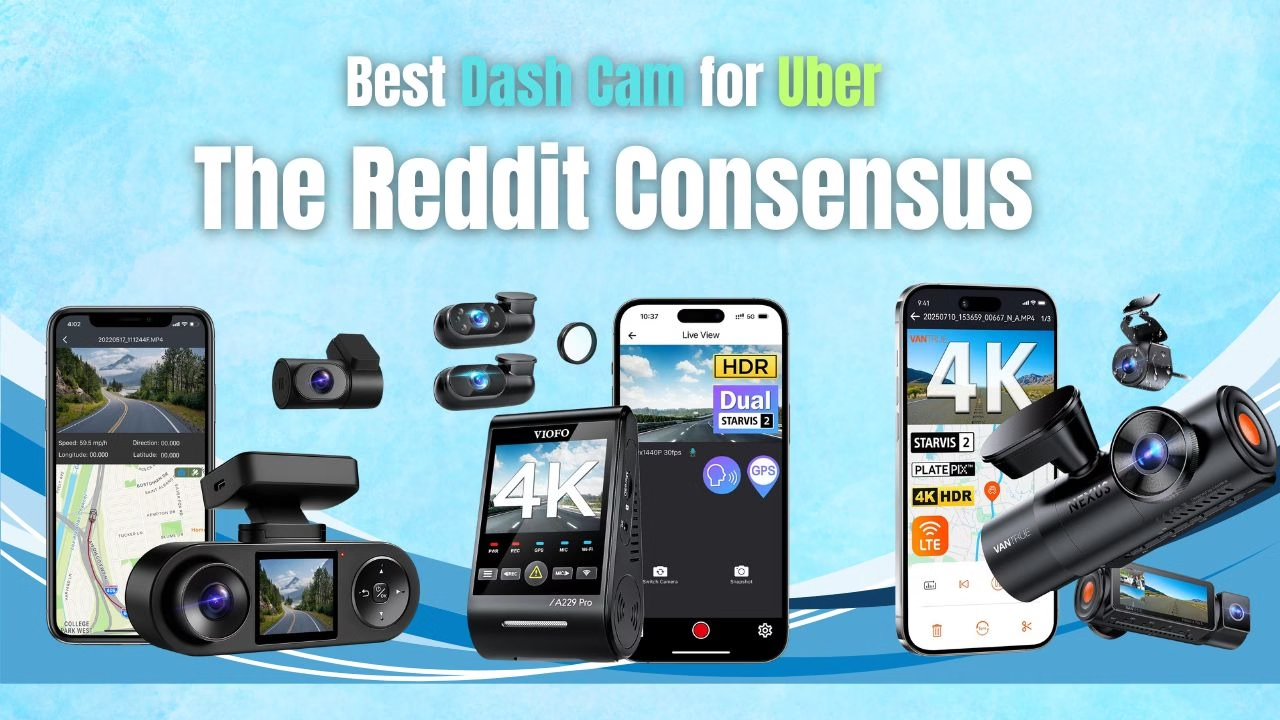
We analyzed 12 months of Reddit threads from rideshare drivers to find the only 3-channel dash cams with reliable interior night vision.
Most dash-cam “reviews” read like recycled marketing copy. Every camera is magically amazing, and the real problems get buried. If you want actual answers — the kind that come from drivers who use these things every night — Reddit is where the truth shows up.
1. VIOFO A229 Pro 3 Channel 4K
The Reddit Verdict: Crisp low-light front and cabin capture — evidence-grade night performance if you hard-wire and maintain an endurance SD card.
Check Price on Amazon →2. Vantrue N4 Pro S 4K 3 Channel Dash Cam
The Reddit Verdict: Stunning 4K front video and solid event locking — but expect adhesive and firmware headaches unless you’re comfortable troubleshooting.
Check Price on Amazon →3. COXPAL 3 Channel Dash Cam
The Reddit Verdict: Full 3-channel coverage and large SD support at a low price — solid hardware, weaker app and timekeeping.
Visit Manufacturer →This guide breaks down the three 3-channel models Uber and rideshare drivers talk about most. If you want the full, big-picture breakdown of all dash-cam categories (heat resistance, capacitor vs. battery, parking mode, reliability rankings), you can check the main guide here.
But for 3-channel ride-share setups specifically? This is the real story.
Uber driving is different. You’re recording for protection, not for fun. So the best dash cam for uber drivers is the one that’s reliable, easy to use, and quick to pull clips from when you actually need them. Not tomorrow. Not “after I figure out the app.” Right now.
- Uber-ready checklist
- Front/rear/interior choices
- Setup in 15 minutes
- Best dash cam app workflow
- Under $100 & affordable picks
- Does Uber allow dash camera?
- Australia, UK, Canada notes
- FAQ
Uber-ready checklist: what “best” means for rideshare
When people ask what is the best dash cam for rideshare, they usually mean: “Which camera helps me stay safe, reduces disputes, and doesn’t waste my time?” Here’s the checklist that matches real Uber driving.
- Clear interior + exterior footage: you want the road story and the cabin context.
- Night-friendly interior view: low-light cabin footage matters most when it matters.
- Fast clip lock: one-tap saving so loop recording doesn’t overwrite the moment.
- Reliable auto-record: start the car, it records. No button rituals.
- Stable mounting: a shaky mount turns “evidence” into “guessing.”
- Simple exports: your workflow should be calm under stress.
What riders actually notice (and why it matters)
Your camera setup can influence comfort. The goal is “professional and discreet,” not “surveillance vibes.” A tidy install plus clear notice keeps things smooth.
- Keep it compact and high behind the mirror
- Avoid bright blinking lights
- Use clear passenger notice
- Don’t place it in the driver’s line of sight
- Don’t run messy cables across the cabin
- Don’t fumble with the app mid-ride
That’s how “best dash cam for uber reddit” advice typically lands: make it clean, calm, and consistent.
Front, rear, and interior: the coverage that fits Uber driving
The biggest choice is coverage. Most rideshare drivers end up choosing an interior camera because it adds context when stories conflict. That’s why searches like best interior dash cam for uber drivers, best dual camera dash cam for uber, and best 3 channel dash cam for uber show up constantly.
Simplest setup. Best for road incidents, traffic disputes, and general proof. Good choice if your priority is “set it and forget it” with minimal wiring.
Strong rideshare combo. Captures the road and the cabin. A popular answer to “which dash cam do uber drivers use” because it covers the most common disputes.
Great for rear impacts and tailgaters. If you’re searching “best dash cam front and rear for uber drivers,” plan the rear cable route first so it stays tidy.
Maximum context. Best if you want fewer “he said, she said” moments and cleaner documentation. Slightly more setup, but often worth it for full coverage.
How to set up the best dash cam for Uber drivers (fast, tidy, repeatable)
Setup is where good intentions go to die. Keep it simple. The easiest dash cam to use is the one you configure once and then barely touch.
- Mount high and centered. Tuck it behind the mirror to reduce distraction and keep it discreet.
- Angle the cabin view thoughtfully. You want the front seats and general cabin context, not a zoomed-in face shot.
- Route cables neatly. Clean routing looks professional and prevents snagging.
- Enable auto-record + loop recording. Make it automatic so you don’t forget.
- Turn on clip lock. One tap should protect an important moment.
- Do a quick night test. Confirm interior footage is usable in low light.
Passenger notice that keeps things calm
The smoothest rideshare setups are transparent. If you’re asking “can i put a camera in my uber car,” the practical answer is: keep it visible enough to be honest, discreet enough to be non-distracting, and always use clear notice.
“Just a heads-up, I have a dash cam for safety.”
Long explanations, defensive tone, or bringing it up mid-conflict.
What is the best dash cam app experience for Uber driving?
The question what is the best dash cam app really means: “How fast can I get a clip when something happens?” A calm workflow beats a feature-packed app that’s confusing when you’re stressed.
- Lock the clip immediately. Protect it first, ask questions later.
- Export a short segment. Grab the key moment fast.
- Save a backup. Keep a copy somewhere safe.
- Export the full clip later. Do the big download when you’re calm.
- Fast pairing without repeated retries
- Clear event list and timestamps
- Simple exporting in a few taps
- Stable playback without crashing
Best dash cam for Uber under $100: what “cheap” can’t be allowed to do
Budget questions are normal: best dash cam for uber under $100, best cheap dash cam for uber, best budget dash cam for uber, and best affordable dash cam for uber drivers. Here’s the key: cheap is fine. Unreliable is not.
What is a good inexpensive dash cam for Uber?
- Auto-record every trip: no manual steps
- Stable mount: minimal shake, no drifting
- Usable night cabin footage: not perfect, but clear enough
- Easy clip saving: quick protection from overwriting
- Return-friendly purchase: test it on your actual night shifts
Free vs affordable: the honest take
“Best free dash cam for uber drivers” comes up a lot, but free options often add friction: storage problems, overheating phones, messy cable setups, or inconsistent recording. If you want reliable evidence, a dedicated camera usually feels simpler over time.
- You drive occasionally
- You don’t need interior coverage
- You’re okay babysitting the setup
- You drive many hours per week
- You want automatic recording
- You need fast exports for disputes
Does Uber allow dash camera? (and do you need one?)
Two questions show up nonstop: does uber allow dash camera and do you need a dash cam for uber. In practice, many drivers use a dash cam because it reduces disputes and makes incidents easier to handle. The best approach is keeping it transparent, professional, and compliant with local rules.
For frequent drivers, yes. Dash cams can calm “what happened?” situations by giving you a clear record. They also encourage professional behavior on both sides when passengers know recording is in place.
Not strictly. But many drivers prefer having one because it’s a quiet safety net. If you’ve ever had a dispute, you already understand the value.
Regional search intent: Uber Australia, UK, and Canada
Region-specific searches like best dash cam for uber australia, best dash cam for uber uk, and best dash cam for uber canada usually point to the same needs: clear night footage, stable mounting, and a smooth app workflow. The practical differences are climate, road lighting, and personal comfort with interior recording.
Prioritize heat tolerance, stable storage, and a mount that doesn’t drift over time.
Prioritize stable night footage, glare control, and clean windshield habits.
Frequently asked questions (Uber dash cams)
What is the best dash cam for Uber drivers?
Which dash cam do Uber drivers use most often?
Does Uber allow dash camera?
Do you need a dash cam for Uber?
What is the best dash cam for Uber under $100?
What is a good inexpensive dash cam for Uber driving?
What is the best dash cam app for rideshare drivers?
Should I choose front and rear, or front and interior?
Can I put a camera in my Uber car?
Are dash cams worth it for Uber and Lyft drivers?
The Reddit-style truth is simple: the best dash cam for uber drivers 2025 is the one you can trust on your messiest night. Keep the install tidy. Keep notice clear. Keep the workflow fast. When something happens, you’ll be glad you chose boring reliability over fancy confusion.
VIOFO A229 Pro 3-Channel
VIOFO A229 Pro 3-Channel
- **Clear Night Vision:** Crisp footage for both front and cabin.
- **High Resolution Sensors:** Ideal for capturing detail over long shifts.
- **Flexible Parking Mode:** Offers multiple parking options (if wired correctly).
Reddit consensus: the A229 nails clarity. Night footage is crisp and usable. Cabin images are clear enough to read faces and expressions. People who run long shifts praise its sensors and overall video fidelity. The brand also shows up repeatedly in install shops and fleet reports.
What drivers like
- Clean, high-detail footage at night.
- Flexible parking mode options and sensible hardware design.
- Works well with high-end SD cards when maintained.
The Dealbreaker
Battery drain when hard-wired and occasional recording freezes on impact tests. Multiple users report the unit draining their car battery even after professional installs. There are also reports of shutdowns in high heat and an unreliable mobile app.
“It has drained the car battery twice … even got it professionally installed … Next day, battery flat again.”
Verdict: Buy if you prioritize evidence-grade, low-light footage and will actively manage hard-wiring and SD card maintenance.
Avoid if you want a true set-and-forget dash cam or you can’t tolerate any risk of battery drain.
Vantrue N4 Pro S 4K 3-Channel
Reddit consensus: the Vantrue N4 Pro S gives a gorgeous 4K front image and straightforward mounting. Many DIY drivers praise how quickly you can get it installed and how crisp the front footage is. It’s the pick for someone who values raw resolution and accident locking.
What drivers like
- 4K front camera with good dynamic range.
- Easy initial install for most cars.
- Automatic lock on impact works when it works.
The Dealbreaker
Adhesive mounts failing, firmware/update bricking, and frequent SD errors. Long-term users complain the 3M mounting never truly sticks, the cable is too thick to tuck neatly, and updates can brick the unit. Those are not small inconveniences — they’re trip-stopping failures.
“… no situation was I able to achieve more than a temporary adhesion … the 3M never adheres fully.”
Verdict: Buy if you’re tech-savvy, comfortable troubleshooting firmware and routing thick cables, and you want the best front resolution for evidence capture.
Avoid if you want a hassle-free adhesive mount or you can’t tolerate a risk of bricking during an OTA update.
COXPAL A11T (3-Channel)
Reddit consensus: the COXPAL A11T is the value play. It gives true 3-channel recording, big SD support (512 GB), GPS, IR cabin night vision, and sensible heat dissipation at a low price. For riders on a budget who need full coverage, it’s often the sensible choice.
What drivers like
- Great specs for the price and support for very large SD cards.
- Solid thermal design — runs cooler than some rivals.
- Infrared cabin capture that actually helps at night.
The Dealbreaker
Unreliable timekeeping and a weak companion app. Users report time drift that undermines incident timestamps, and intermittent audio drops. Support/parts are reportedly hard to source if something physical breaks.
“… the system and app both need an overhaul … the time … never seems to want to keep the time you set … it corrects … but … after a bit … it will go back … one or two hours off … not good …”
Verdict: Buy if you need full 3-channel coverage on a tight budget and can tolerate occasional software rough edges.
Avoid if timestamp accuracy and reliable audio are mission-critical for your rideshare evidence needs.
Final Verdict — Which one fits your job?
- Best for night-shift Uber drivers who need evidence-grade video: VIOFO A229 Pro. If you can manage wiring and SD upkeep, it gives the best low-light cabin/front clarity.
- Best for DIY installers who want maximum front resolution: Vantrue N4 Pro S. Great 4K front and 3-channel coverage — but be ready to deal with adhesive and firmware quirks.
- Best budget 3-channel coverage: COXPAL A11T. Lots of features for the price; watch the app and timekeeping.
- If you want true set-and-forget reliability: None of these are perfect. Expect trade-offs: keep a high-quality, high-endurance SD card, verify hard-wire settings, and test parking mode before you rely on it.
Quick shopping checklist
- Use a recommended, high-end microSD (look for endurance class).
- Hard-wire with a proper voltage cutoff or FUSE tap to prevent battery drain.
- Test parking mode and impact-lock in your own car before long shifts.
- Keep recent footage backed up off the card; SD corruption is a recurring theme.
Uber/Lyft Hacks: IR Glare & The Law
Interior cameras use Infrared (IR) LEDs to see in the dark. If placed wrong, the IR light bounces off the glass and blinds the camera.