
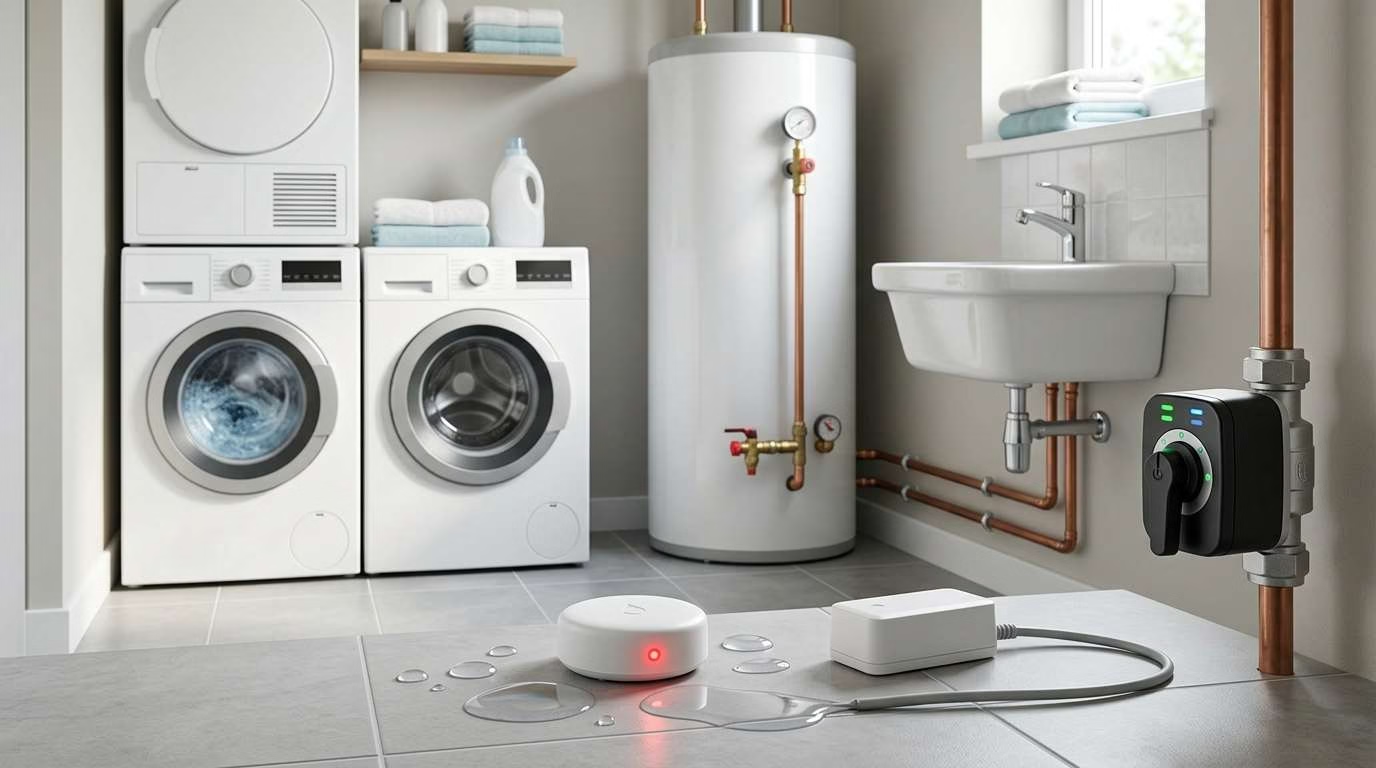
A small leak can soak floors, stain walls, and feed mold. The damage may start before you see one drop.
The best water leak detectors spot water early. They sound an alarm, send phone alerts, or shut off your water. Some can do all three.
For most homes, the YoLink Water Leak Sensor 4 Kit offers the best balance. It has long range, loud alarms, and long battery life. Yet another model may suit your home better.
This guide compares eight strong options sold in the United States. The picks reflect product features, current availability, and owner feedback from Reddit and smart-home forums.
Looking for more new-home essentials? See our full checklist of 42 useful things to buy for a new home.
The Best Water Leak Detectors at a Glance
This page contains Amazon affiliate links. If you buy through them, I may earn a small commission at no additional cost to you.
Our top pick is the YoLink Water Leak Sensor 4 Kit. It can cover large homes without adding each sensor to Wi-Fi. It also gives you loud local alarms and remote alerts.
However, no single detector suits every leak. Cable sensors work well around large appliances. Small puck sensors fit under sinks and toilets. A main-line shutoff can stop the flow before the damage spreads.
Our Top Water Leak Detector Picks
1. YoLink Water Leak Sensor 4 Kit — Best Overall
The YoLink Water Leak Sensor 4 is a smart choice for broad coverage. It works well in small homes, large houses, and detached buildings.
Each sensor has a loud alarm. It can also send app, text, and email alerts through the hub.
Check PriceKey specifications
- Sensor type: Puck-style floor sensor
- Connection: LoRa-based radio [long-range wireless link]
- Alarm: 105 decibels
- Battery: Two AAA batteries
- Battery life: Up to five years
- Water resistance: IP66 [resists dust and strong water spray]
- Hub needed: Yes
- Freeze warning: Yes
- Smart-home support: Alexa, IFTTT, and Home Assistant
- Shutoff support: Compatible YoLink valves and controllers
- Typical kit: Hub with four or more sensors
Why we recommend it
Range is the main draw. YoLink sensors can reach places where Wi-Fi may struggle. That may include your basement, shed, garage, or utility room.
The long battery life also cuts upkeep. You should still test each unit often. Yet you may change batteries less than with direct Wi-Fi sensors.
A built-in alarm adds local backup. If your internet goes down, the sensor can still make noise. Certain YoLink devices can also link to each other without cloud access.
That means a leak sensor may trigger a local siren or valve. You must set this up first. Phone alerts still need an internet link.
The hub can support a large sensor network. This helps if you want to cover:
- Every sink
- Each toilet
- Your water heater
- The washing machine
- The dishwasher
- A sump pump
- A detached garage
- A vacation property
What Reddit and forum users say
Owners often praise YoLink’s range. Many also like the long battery life and low cost per sensor.
Large-home users tend to favor it over basic Wi-Fi units. You only connect the hub to your home network. The sensors then speak with the hub.
Some users also value direct device control. This may let a sensor trigger a siren during an outage.
Feedback is not perfect. Some owners have reported false alarms with cable-based YoLink models. That issue appears less common with the simple puck sensor.
Potential drawbacks
- You need a YoLink hub.
- Remote alerts rely on internet and cloud access.
- Full local smart-home control may take extra work.
- The puck only detects water near its contacts.
- Cable models may suit wide areas better.
Who should buy it?
YoLink makes sense if you need many sensors. It is also useful in a large or spread-out home.
It can work well for:
- Landlords
- Frequent travelers
- Large families
- Vacation-home owners
- Homes with weak basement Wi-Fi
- Properties with garages or sheds
Who should skip it?
Skip it if you want a fully hub-free setup. Privacy-focused users may also prefer a local Zigbee system.
2. Moen Smart Water Detector — Best Standalone Detector
The Moen Smart Water Detector keeps setup simple. You do not need a separate hub.
It connects to your 2.4 GHz Wi-Fi network. The sensor can then send alerts through the Moen app.
Check PriceKey specifications
- Sensor type: Floor contacts and remote sensing disc
- Connection: Wi-Fi
- Local alarm: Yes
- Phone alerts: Yes
- Temperature alerts: Yes
- Humidity alerts: Yes
- Hub needed: No
- Battery life: Up to two years
- Shutoff support: Works with Moen Flo
- Best placement: Sinks, appliances, and drain pans
Why we recommend it
The remote sensing disc gives you more placement choices. You can keep the main body in a dry spot. Then place the disc under an appliance or inside a drain pan.
This design is useful behind a washing machine. It also works near a water heater or sump pump.
Moen combines several safety checks in one device. It can warn you about:
- Water
- High humidity
- Low temperatures
- High temperatures
Freeze warnings can help in cold rooms. Humidity alerts may reveal damp air before you see mold.
The sensor also has a local alarm. That matters if your phone is off or your network fails.
You can use the detector on its own. You can also pair it with a Moen Flo shutoff. This creates a wider water safety system.
Potential drawbacks
The cost adds up fast. One or two sensors may fit your budget. Ten or twelve may not.
Each detector also uses Wi-Fi. A busy or weak home network may reduce alert speed. Thick walls can also hurt the signal.
Best locations
Use the Moen detector near:
- A kitchen sink
- A water heater
- A washing machine
- A dishwasher
- A refrigerator water line
- A basement drain
- A home water filter
A refrigerator leak can stay hidden for days. Place the remote disc near the water line. For better food safety, you can also use one of these refrigerator thermometers.
Who should buy it?
Choose Moen if you want a clean, hub-free setup. It makes the most sense when you need only a few sensors.
3. GoveeLife Water Leak Detector 1s — Best Budget Multi-Sensor Kit
The GoveeLife Water Leak Detector 1s gives you broad coverage for less. Its kits tend to include a gateway and several sensors.
That makes it a good fit for first-time buyers. You can protect several rooms without a high starting cost.
Check PriceKey specifications
- Sensor type: Puck sensor
- Connection: Sub-1 GHz radio [long-range low-power link]
- Gateway needed: Yes, often included
- Alarm: Up to 105 decibels
- Alarm level: Adjustable
- Battery: Two AAA batteries
- Battery life: Up to five years
- Water resistance: IP67 [resists dust and brief water dips]
- Phone alerts: Yes
- Email alerts: Yes
- Cable option: Available
Why we recommend it
GoveeLife offers strong value per room. A starter kit may cost less than one premium detector.
The sensors use a gateway. They do not each join your Wi-Fi network. This can help with range and battery life.
The alarm is also loud. You can change the volume through the app. This helps in bedrooms, rentals, and homes with pets.
The cable-based version adds more reach. It may work better near:
- Sump pits
- Water heaters
- Long pipe runs
- Washing machines
- Basement walls
- Large drain pans
What owners report
Many owners say their Govee sensors caught real leaks. The fast alarm and phone alert get the most praise.
Users also like the low cost. It lets them place sensors in spots they might skip with a costly brand.
However, some long-term reviews raise concerns. Older Govee models have had battery access and life issues. New models may improve those points, but regular tests still matter.
Potential drawbacks
- The sensors need a Govee gateway.
- Model names can be hard to follow.
- Not every Govee gateway works with every sensor.
- Some older units drew mixed long-term feedback.
- Advanced local control may need extra gear.
Check the model number before adding more sensors. A similar shape does not mean the parts will pair.
Best for
GoveeLife suits:
- Budget-minded homeowners
- Apartments
- Rental units
- Small landlords
- Homes needing eight or more sensors
- Buyers who want simple remote alerts
4. First Alert L1 — Best for Basements and Frozen-Pipe Protection
The First Alert L1 watches more than one small spot. Its cable can sense water along its full length.
This makes it useful in basements and utility rooms. It can also warn you about cold air and high humidity.
Check PriceKey specifications
- Sensor type: Full-length sensing cable
- Included cable: Five feet
- Maximum cable reach: Up to 500 feet
- Connection: Wi-Fi
- Hub needed: No
- Alarm: 100 decibels
- Phone alerts: Yes
- Email alerts: Yes
- Freeze alerts: Yes
- Humidity tracking: Yes
- Battery life: Up to two years
Why we recommend it
A puck sensor only checks a small patch of floor. A sensing cable can wrap around a wide risk zone.
You might loop it around a water heater. You could also run it beside basement walls or near a sump pump.
The cable reacts when water touches any part of it. This cuts the chance that a leak flows past a small sensor.
Temperature alerts add more value. You can set the unit to warn you before pipes freeze. This is useful in garages, cabins, and cold basements.
Humidity data can also flag damp air. It cannot prove that you have a leak. Still, a fast rise may tell you to inspect the room.
Potential drawbacks
The First Alert L1 costs more than a basic puck. It does not make sense under every sink.
You may get better value by using one L1 for a large room. Then use low-cost puck sensors in small spots.
It also cannot turn off your water on its own. You must act after an alert.
Best locations
The First Alert L1 works well in:
- Basements
- Sump-pump areas
- Water-heater rooms
- Unheated garages
- Cabins
- Vacation homes
- Long utility spaces
- Areas with exposed pipes
If your garage holds cold-storage gear, watch both water and heat. A leak may harm the outlet or floor. High heat may strain the appliance. See our guide to the best deep freezers for a garage for more setup tips.
5. Aqara Water Leak Sensor — Best for Zigbee and Smart-Home Users
The Aqara Water Leak Sensor is small, low-cost, and easy to hide. It works best if you already use Zigbee.
Zigbee is a low-power home network. Devices pass signals through nearby powered units.
Check PriceKey specifications
- Sensor type: Compact puck
- Connection: Zigbee
- Hub needed: Yes
- Water resistance: IP67
- Battery: Replaceable coin cell
- Battery life: More than two years
- Apple Home support: Yes, with a compatible hub
- Alexa support: Yes, with supported setup
- External probe support: Possible through contact screws
- Built-in alarm: No
Why we recommend it
Aqara sensors cost less than many Wi-Fi models. That helps when you need one under every fixture.
The IP67 shell suits damp spaces. The slim body also fits under low cabinets and appliances.
Two metal screws act as water contacts. Some users attach wires to them. This lets you place the sensor on a wall while the wire ends sit near the floor.
That setup may improve range. It can also protect the main unit from deep water.
Aqara works well with smart-home rules. For example, a leak may:
- Send a phone alert
- Trigger a hub alarm
- Turn on room lights
- cut power to an appliance
- Close a linked water valve
Do not cut power to safety gear or a sump pump. A poor rule may make the leak worse.
What forum users say
Many Home Assistant users like Aqara sensors. They often praise the small size and low price.
Yet some owners report dropped links. Others have seen fast battery drain.
These issues may come from a weak Zigbee network. Battery sensors do not repeat signals. You may need powered plugs or switches to build a stronger mesh.
A mesh lets devices pass signals between each other. Check the route before blaming the sensor.
Potential drawbacks
- It needs a hub or Zigbee adapter.
- The sensor has no built-in siren.
- Weak Zigbee coverage may cause missed check-ins.
- Battery reports may not always update at once.
- Setup can take more work than Wi-Fi.
Best for
Aqara is a good fit if you already use:
- Aqara Home
- Apple Home
- Home Assistant
- SmartThings
- Zigbee2MQTT
- A strong Zigbee mesh
You should set an offline warning. This lets your system alert you if a sensor stops checking in.
6. Shelly Flood Gen4 — Best for Home Assistant and Local Control
The Shelly Flood Gen4 supports several ways to connect. It works with Wi-Fi, Zigbee, Bluetooth, and Matter.
Matter is a shared smart-home standard. It helps devices work across more platforms.
Check PriceKey specifications
- Sensor type: Full-length sensing cable
- Included cable: About 6.5 feet
- Maximum cable reach: Up to 492 feet
- Connection: Wi-Fi, Zigbee, Bluetooth, and Matter
- Built-in alarm: Yes
- Phone alerts: Yes
- Local web page: Yes
- Local rules: Yes
- Water resistance: IP44 [resists splashes, not deep water]
- Hub needed: Depends on connection method
Why we recommend it
Shelly gives you more control than many simple sensors. You can run some actions inside your home network.
This reduces cloud use. It may also help an action run during an internet outage.
The included cable checks a wider area than a puck. You can place it:
- Behind a washing machine
- Around a water heater
- Along a basement wall
- Under kitchen cabinets
- Near a garage door
- Around a utility sink
You can join more cables for extra reach. This makes Shelly useful in long or odd-shaped spaces.
Its built-in web page is also handy. You can view and change settings from a browser. You may not need the app for each task.
Potential drawbacks
Shelly Flood Gen4 is still a newer model. It has less long-term owner data than Aqara or YoLink.
Its many options may also feel like too much. A basic user may prefer a detector with fewer settings.
The body has an IP44 rating. Keep it above flood depth. Place only the sensing cable on the floor.
Best for
Shelly suits:
- Home Assistant users
- Local-control fans
- Mixed-platform homes
- Users who want cable coverage
- People who build custom smart-home rules
7. Eve Water Guard — Best for Apple Home Users
Eve Water Guard uses a sensing cable instead of a small floor contact. It can watch a wide space and alert you fast.
It also keeps much of your data inside your home. You do not need an Eve cloud account.
Check PriceKey specifications
- Sensor type: Full-length sensing cable
- Included cable: 6.5 feet
- Maximum cable reach: Up to 490 feet
- Connection: Thread and Bluetooth
- Alarm: 100 decibels
- Visual warning: Red flashing light
- Power: Wall outlet
- Apple Home support: Yes
- Cloud account: Not needed
- Remote alerts: Need a suitable Apple home hub
Why we recommend it
Thread forms a low-power smart-home network. The Eve unit stays plugged in, so it can pass Thread signals for nearby devices.
This may help your smart-home network reach farther. It also avoids battery changes.
The sensing cable can cover a wide area. Use one cable around several leak points in the same room.
For example, you could route it:
- Behind a washer
- Under a utility sink
- Around a water heater
- Beside a drain
- Along a basement wall
The alarm gives you three warning types:
- A phone alert
- A loud siren
- A flashing red light
That mix is useful in a busy home. The light may help you locate the right unit.
Potential drawbacks
Eve Water Guard costs more than most puck sensors. It also needs a nearby wall outlet.
The product suits Apple homes best. Android users will find better choices elsewhere.
A power outage can stop the detector. A battery-backed outlet may help, but it adds cost.
Best for
Eve Water Guard fits:
- Apple Home users
- Privacy-focused homes
- Laundry rooms
- Utility rooms
- Large indoor risk zones
- Homes with an active Thread network
8. Moen Flo Smart Water Shutoff — Best Whole-House Protection
The Moen Flo Smart Water Shutoff monitors your main supply line. It tracks water flow and pressure.
If it finds an odd flow, it can warn you. It can also close the main valve.
Check PriceKey specifications
- System type: Main-line flow monitor and valve
- Connection: Wi-Fi
- Power: Wall outlet
- Installation: In-line plumbing work
- Automatic shutoff: Yes
- Remote valve control: Yes
- Water-use tracking: Yes
- Pressure tracking: Yes
- Small-leak checks: Yes
- Professional setup: Recommended
Why we recommend it
A phone alert helps only if you see it. An automatic valve can act while you sleep or travel.
The Moen Flo learns normal water use. It looks for flows that do not fit that pattern.
A sudden pipe break may cause a fast alert. A small toilet leak may take more time to find. Daily pressure checks can reveal slow leaks in the supply pipes.
The app also lets you close the valve from afar. That helps if a neighbor calls about water near your home.
Potential drawbacks
The device costs far more than a floor sensor. You may also need a plumber.
It needs power, Wi-Fi, and access to the main line. A battery backup may cost extra.
Flow monitors also have blind spots. They may not detect water from:
- A roof leak
- Groundwater
- A drain backup
- A sump overflow
- A leaking fish tank
- Rain through a window
- Water stored inside an appliance
The system may know that water is flowing. It may not know which room has the leak.
Best for
Moen Flo makes sense for:
- Vacation homes
- High-value properties
- Homes with past water damage
- People who travel often
- Owners who want an automatic response
- Homes with easy main-line access
The best setup pairs Flo with floor sensors. The valve stops new supply water. The sensors show where water reached the floor.
How We Chose the Best Water Leak Detectors
We compared the features that matter during a real leak. We also reviewed common owner feedback from Reddit and smart-home forums.
We did not rank products by brand name alone. We looked at how each system fits a real home.
Detection speed and sensitivity
A useful sensor must react to a small amount of water. It should not need a deep puddle.
Point sensors use metal contacts on the bottom. Water joins those contacts and starts the alarm.
Cable sensors detect water along a longer strip. They cover more ground but often cost more.
Main-line systems detect odd water flow. They do not need water to reach your floor first.
Alert reliability
A strong water alarm should warn you in more than one way.
Useful alert types include:
- A local siren
- A flashing light
- An app notification
- A text message
- An email
- An automated phone call
- An automatic valve action
Local alarms matter most during network trouble. Remote alerts matter when you are away.
The safest system uses both.
Wireless range
Your home shape affects wireless range. Thick walls, metal pipes, and concrete can block signals.
Common connection types include:
- Wi-Fi: Direct link to your router
- Zigbee: Low-power mesh network
- Thread: Newer low-power mesh network
- Z-Wave: Low-power smart-home network
- Long-range radio: Sensor-to-hub connection over longer gaps
Do not pick a system from range claims alone. Check where the hub or router will sit.
A shorter range can work well in a small home. A long-range hub system may suit a garage or basement.
Battery life and maintenance
A dead sensor cannot alert you. Long battery life cuts risk, but no estimate is exact.
Cold rooms can drain batteries faster. Weak signals may also cause more power use.
Look for:
- Replaceable batteries
- Low-battery alerts
- Easy battery access
- Online status checks
- Common battery sizes
- Clear test steps
AAA batteries are easy to find. Coin cells take less space but may cost more.
Smart-home compatibility
Smart-home links can add useful actions. They can also add more failure points.
A leak alert might:
- Turn on lights
- Sound several sirens
- Close a valve
- Stop a washing machine
- Send alerts to family members
Keep the main alarm simple. Fancy rules should add backup, not replace it.
Check support for:
- Apple Home
- Amazon Alexa
- Google Home
- Home Assistant
- Matter
- IFTTT
- The brand’s own valve
Cost of whole-house coverage
The price of one sensor can mislead you. Work out what it costs to cover the full home.
Include:
- The sensor price
- Hub or gateway cost
- Extra sensing cables
- Sirens
- Valve controllers
- Battery costs
- Paid plans
- Plumber fees
A low-cost sensor may need a hub. Yet the total can still be low if you add ten units.
A premium Wi-Fi sensor may cost less at first. It can become costly when you add one to every room.
Water Leak Detector Comparison
The main product types solve different problems. Knowing those limits helps you avoid gaps.
Smart water detectors vs. basic water alarms
A basic water alarm makes noise when it gets wet. It may cost little and need no network.
That simple design has real value. It can still work during an internet outage.
However, you must be close enough to hear it. This is a problem in a vacant home or remote basement.
A smart detector adds remote alerts. Some models also track heat and humidity.
Smart units can fail in more ways. The app, router, internet, hub, or cloud may go down.
For this reason, choose a smart detector with a local siren. You get remote reach and local backup.
Point sensors vs. sensing cables
Point sensors watch a small area. They work best where water will pool in one clear spot.
Point sensors are best for:
- Under sinks
- Behind toilets
- Inside drain pans
- Under a water filter
- Beneath a small appliance
- Near a pipe joint
Sensing cables watch a longer path. They can loop around large gear or run along walls.
Sensing cables are best for:
- Water heaters
- Basement walls
- Pipe runs
- Sump pumps
- Washing machines
- Wide utility rooms
- Several nearby appliances
A cable does not always replace several pucks. One cable may only tell you that water exists. It may not show the exact source.
Spot sensors vs. whole-house flow monitors
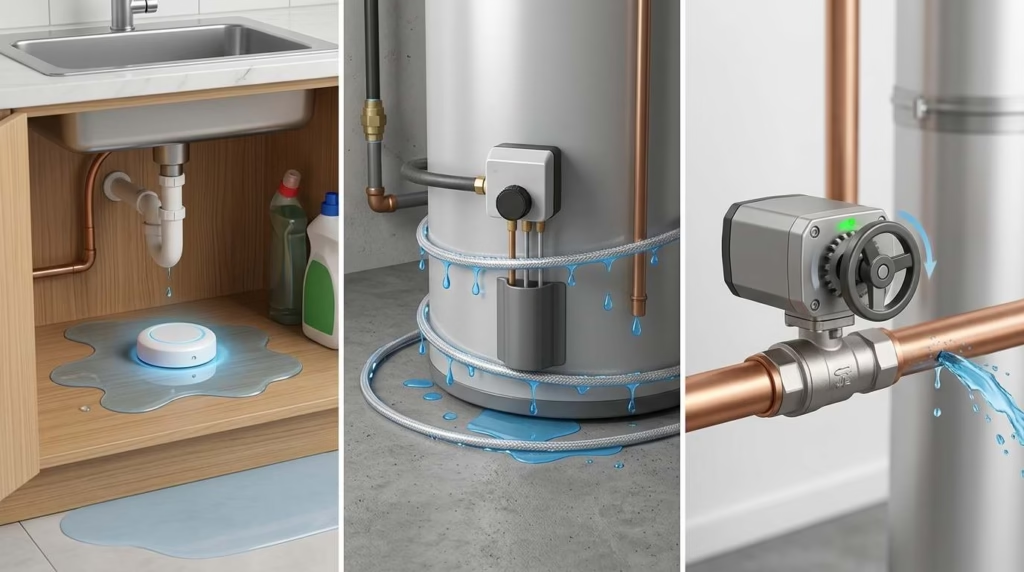
Spot sensors detect water where you place them. They can find supply leaks, drain leaks, and outside water.
A flow monitor checks water through your main supply. It can detect odd use before water reaches a puck.
Yet it cannot see every water source. It may miss rain, groundwater, drain backups, and stored tank water.
For stronger cover, use both systems:
- Place spot sensors near fixtures.
- Add a flow monitor to the main line.
- Link the sensors to a shutoff valve, where possible.
- Keep local alarms active.
What to Look for in a Water Leak Detector
A long feature list does not always mean better safety. Focus on the basics first.
A loud local alarm
Pick a unit you can hear from another room. A basement alarm may need more volume than a bathroom alarm.
A local siren should work without an internet link. Test this by turning off Wi-Fi during a safe test.
Do not rely on a phone alert alone. Your phone may be off, muted, or out of power.
Remote phone alerts
Remote alerts help when no one is home. They are useful for landlords and frequent travelers.
They also help with rooms you rarely enter, such as:
- Basements
- Attics with plumbing
- Utility closets
- Detached garages
- Guest bathrooms
- Vacation homes
Name each sensor by room. “Water sensor 7” will not help during a real leak.
Offline protection
Ask what happens when the internet fails.
Check whether:
- The sensor still sounds its alarm.
- A local siren still works.
- The valve can still close.
- Sensor rules run inside your home.
- The hub needs cloud access.
- The app shows the last check-in time.
Direct sensor-to-valve control is a strong backup. It should not depend on your phone.
Replaceable batteries
Built-in batteries can turn a good sensor into waste. Replaceable cells let you keep the unit longer.
Check how the battery door opens. A tight seal helps block water. Yet it should not make battery swaps unsafe.
Use good batteries from a known brand. Do not mix old and new cells.
Water resistance
A detector may sit in a damp space for years. A sealed shell helps it cope with splashes and high humidity.
Still, water resistance does not always mean full submersion. Read the stated rating.
Keep the battery area above likely flood depth. Use a wired probe if deep water is possible.
Freeze and temperature alerts
Freeze alerts help protect pipes in cold rooms. They are useful in:
- Garages
- Cabins
- Crawl spaces
- Basements
- Vacation homes
- Rooms on an outside wall
Temperature alerts can also protect nearby appliances. If you keep a fridge in an unheated space, choose the right model. Our guide to a freezerless refrigerator explains key placement needs.
Expandability
Think beyond your first kit. You may want more sensors after you map each risk point.
Check:
- The hub’s sensor limit
- Extra sensor prices
- Cable options
- Siren support
- Valve support
- Sensor range
- App user limits
- Alert-sharing options
A flexible system lets you start small. You can then add cover as funds allow.
Subscription requirements
Some systems charge for added features. These may include phone calls, water history, or longer data records.
Check which features remain free:
- Leak alerts
- Push alerts
- Text alerts
- Email alerts
- Valve control
- Extra app users
- Water-use history
A detector should still sound locally if a plan ends.
Where Should You Place Water Leak Detectors?
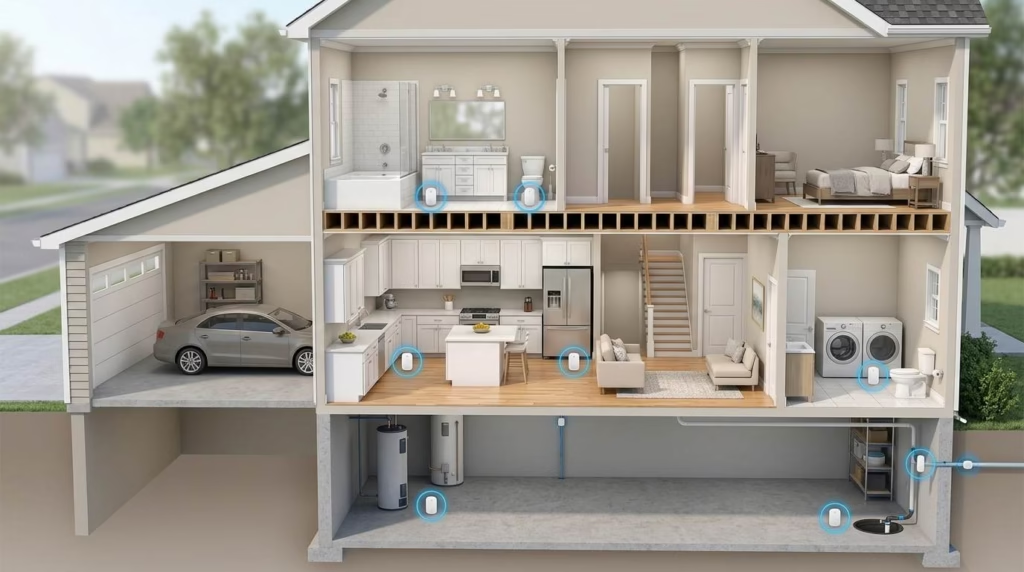
Place a sensor where water will collect first. Do not just place it near the appliance.
Good locations include:
- Under kitchen sinks
- Under bathroom sinks
- Beside each toilet
- Behind the dishwasher
- Behind the washing machine
- Near the refrigerator water line
- Beside the water heater
- Near the sump pump
- Under heating and cooling gear
- Near the main water line
- Beneath fish tanks
- Near basement drains
- Inside leak pans
- Near water filters
- Below upstairs plumbing fixtures
Water follows slope. Place the sensor at the lowest point.
You can test the path with a small marble. If it rolls away from the sensor, the water may do the same.
Do not block the contacts with a rug or mat. Avoid spots where normal floor cleaning will cause false alarms.
Hard-water systems can also leak near valves and drain tubes. If you are comparing scale-control options, see our guide to Aquabion vs. a water softener.
How Many Water Leak Detectors Do You Need?
Start by counting each water source. Then add one sensor for each high-risk zone.
A rough guide is:
- Apartment: Three to five sensors
- Small house: Five to eight sensors
- Average house: Eight to twelve sensors
- Large house: Twelve to twenty sensors
- Vacation home: Cover every water fixture
- Rental property: Cover each fixture and appliance
Your layout matters more than floor size. A small home may have two bathrooms, a laundry room, and several filters.
One long cable can cover a utility area. Yet separate pucks may show the leak location faster.
Do not forget upstairs fixtures. A small second-floor leak can harm the room below.
How to Install and Test a Water Leak Detector
Most puck sensors need no tools. Still, a careful setup matters.
Follow these steps:
- Install the brand’s app or hub.
- Add one sensor at a time.
- Name each sensor by room and fixture.
- Place it at the lowest risk point.
- Keep metal contacts against the floor.
- Test it with a damp cloth.
- Confirm that the local alarm sounds.
- Check the phone alert.
- Test email or text alerts.
- Test any linked valve.
- Dry the sensor fully.
- Add a test date to your calendar.
If the detector uses a cable, wet a small part of the cable. Make sure the alert starts.
Do not flood the whole unit during a test. Follow the maker’s reset steps.
If you link a valve, test it while you are home. Make sure it closes and opens with ease.
Tell everyone in the home what the alarm means. Show them where the main water valve sits.
How Often Should You Test Water Leak Sensors?
Test every detector after setup. Then test it once every three months.
You should also test after:
- A battery change
- A router change
- A hub update
- An app update
- A long power loss
- Moving the sensor
- Cleaning the floor
- A real leak
Check that each sensor still appears online. A unit may look fine while its battery is dead.
Clean dirty metal contacts with a soft cloth. Dry the unit before placing it back.
Replace a sensor if you see:
- Rust
- Cracks
- Swollen batteries
- Loose contacts
- Water inside the battery area
- Repeated false alarms
- Failed test alerts
Keep a simple test log. A note on your phone is enough.
Our Final Verdict
The YoLink Water Leak Sensor 4 Kit is the best overall choice for most homes. It offers long range, a loud alarm, and low upkeep.
The GoveeLife 1s kit gives you broad cover on a tighter budget. Moen works well if you want a few hub-free sensors.
Aqara is a smart value for an existing Zigbee home. Shelly gives you more local control. Eve best suits an Apple setup.
The Moen Flo Shutoff adds a different layer. It can stop supply water instead of only sending an alert.
For the strongest plan, combine two tools:
- Place smart sensors near fixtures and appliances.
- Add an automatic valve to the main water line.
One warns you where water has reached the floor. The other can stop more water from entering your home.
Frequently Asked Questions
What is the best water leak detector for home use?
The YoLink Water Leak Sensor 4 suits most homes. It has long range, loud alarms, and long battery life.
Your needs may point elsewhere. Choose First Alert for cable coverage or Moen for a hub-free setup.
Are Wi-Fi water leak detectors worth it?
Yes, if you want alerts while away. They work well in rentals, basements, and vacation homes.
Pick a model with a local alarm. Wi-Fi and internet service can fail.
Do water leak detectors work without Wi-Fi?
Most local alarms still work without Wi-Fi. Phone and email alerts often stop.
Some hub systems can trigger local sirens or valves without internet. You must set those links up first.
Can a water leak detector automatically shut off the water?
Yes, if it links to a compatible valve. Some main-line systems include the valve.
Check if the shutoff rule works without cloud access. Test it before you rely on it.
Where is the best place to put a water leak detector?
Place it at the lowest point near a leak source. Water should reach the contacts before it spreads.
Good spots include sinks, toilets, washers, and water heaters.
How many water leak sensors should a house have?
Most average homes need eight to twelve sensors. Your fixture count matters more than floor size.
Cover each sink, toilet, and water-fed appliance. Add sensors in the basement and utility room.
Can water leak sensors be reused after getting wet?
Most can be reused after they dry. Follow the reset steps for your model.
Replace the unit if water entered its battery area. Rust or damage can cause false alerts.
What is the best water leak detector for a basement?
The First Alert L1 is a strong basement choice. Its cable covers more floor than a small puck.
It also tracks heat and humidity. Freeze alerts can help in cold basements.
What is the best water leak detector for a washing machine?
Use a cable sensor behind and under the washer. It can watch the hoses and drain area.
You can also place two puck sensors near each rear corner.
Do plumbers install automatic water shutoff systems?
Yes. A plumber can cut the main line and install an in-line valve.
Professional setup helps prevent leaks at the new joints. It may also meet local code rules.
Can a leak detector lower homeowners insurance costs?
It may. Some insurers offer discounts for leak sensors or automatic shutoff valves.
Rules vary by company and state. Ask whether the system needs pro installation or active monitoring.
Are water leak detectors better than a whole-house water monitor?
Neither type is better in every case. They detect different leaks.
Spot sensors find water near appliances and drains. Whole-house monitors find odd supply flow.
Using both gives you wider protection.