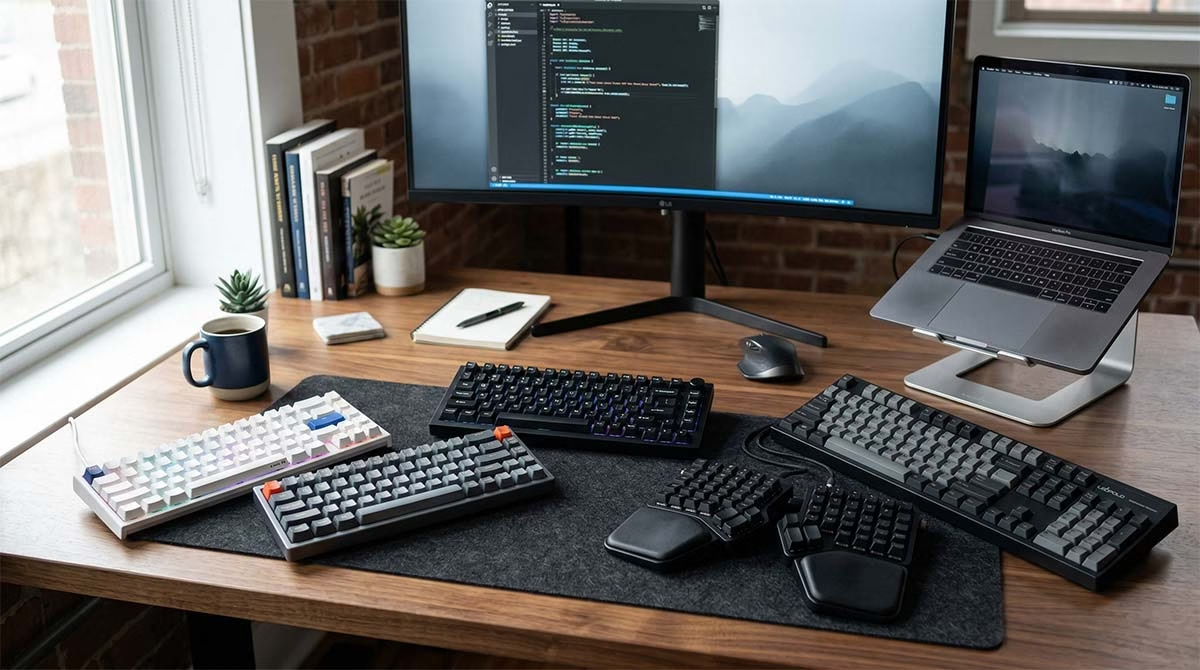
If you spend hours writing, coding, or working at a desk, your keyboard matters more than you think. A cheap membrane board will wear down your fingers and slow your pace. The best mechanical keyboards for typing change the game. They give you clear feedback, steady support, and a satisfying rhythm that keeps you focused. But not every board suits long writing sessions. Some click too loud. Some feel too stiff. Others drop keys or drain batteries fast.
I tested dozens of options to find the right fit for real work. I looked at comfort, sound, build quality, and price. I filtered out the gimmicks and kept only the boards that actually improve your daily workflow. You will find five standout picks below. Each one shines for a specific type of user. I also explain exactly how to choose the right one for your hands and your habits. Let us find the best typing keyboard for your setup.
Quick List — Best Mechanical Keyboards for Typing
- Keychron Q5 Max – Best overall pick for balanced comfort and build
- Keychron Q6 Max – Best office keyboard for typing with full layout
- NuPhy Halo75 V2 – Best premium pick with refined acoustics
- Keychron V6 Max – Best budget mechanical keyboard for typing
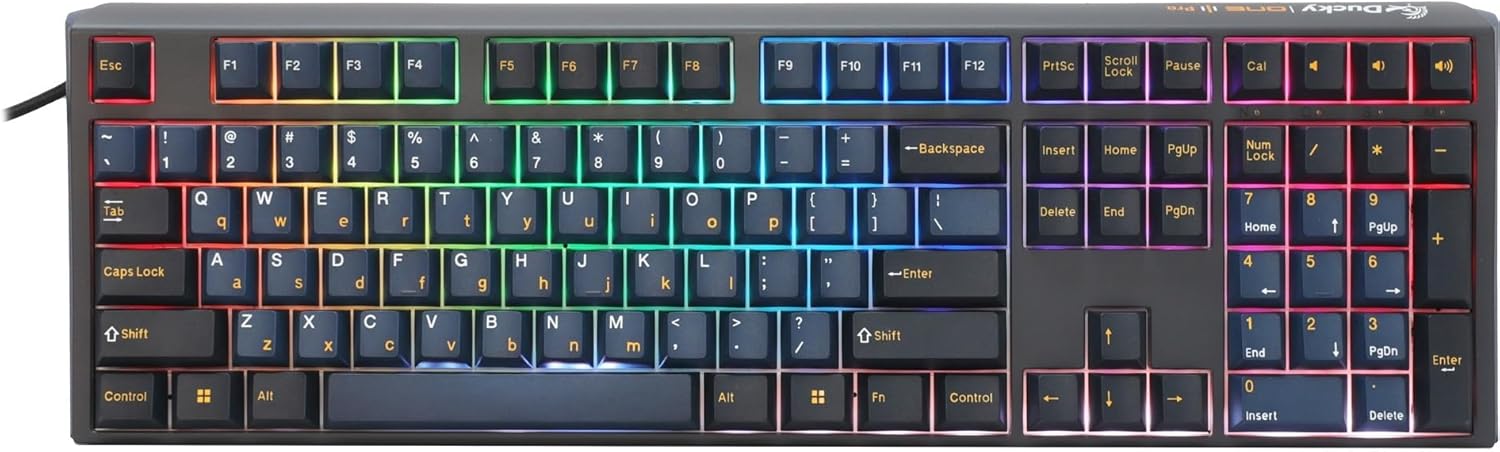
- Ducky One 3 Pro Nazca 8K – Best full-size board for fast, precise keystrokes
Quick Overview of the 5 Best Mechanical Keyboards for Typing
Find your perfect typing companion with our detailed comparison


Prices may vary. As an Amazon Associate, we earn from qualifying purchases.
Comparison Table of the 5 Best Mechanical Keyboards for Typing
| Keyboard | Best For | Layout Size | Switch Type | Wired/Wireless | Noise Level | Price Range |
|---|---|---|---|---|---|---|
| Keychron Q5 Max | Overall daily use | 96% | Tactile Brown | Tri-mode | Moderate | Premium |
| Keychron Q6 Max | Office work & data entry | 100% | Tactile Brown | Tri-mode | Moderate | Premium |
| NuPhy Halo75 V2 | Premium feel & desk space | 75% | Tactile Lemon | Tri-mode | Quiet to Moderate | Premium |
| Keychron V6 Max | Budget-friendly reliability | 100% | Tactile Brown | Tri-mode | Moderate | Mid-range |
| Ducky One 3 Pro Nazca 8K | Speed & clean typing | 100% | Linear Speed Silver | Wired | Quiet to Moderate | Mid-range |
How We Chose the Best Mechanical Keyboards for Typing
Typing comfort
We looked for boards that reduce finger strain during long sessions. A good typing keyboard keeps your hands relaxed. We favored cushioned designs and smooth key travel.
Key switch feel
We tested how each switch responds to light taps and firm presses. Consistent feedback helps you type faster without looking down. We picked switches that reward accurate strikes.
Noise level
Shared spaces need quiet options. We measured how much sound each board produces. Some boards offer a soft thock. Others stay nearly silent for open offices.
Build quality
Durability matters. We checked the frame material, keycap texture, and stabilizer strength. Solid boards resist flex and stay stable under heavy use.
Layout and ergonomics
We matched board sizes to real workflows. Full boards help with spreadsheets. Compact boards free up mouse space. We picked options that match different desk setups.
Value for money
Price should match performance. We weighed features against cost. You should not pay extra for flashy lights that distract from work.
Reviews of the 5 Best Mechanical Keyboards for Typing
1. Keychron Q5 Max – Best Overall Mechanical Keyboard for Typing
This board earns the top spot for good reason. It blends solid metal construction with a soft typing feel. The heavy aluminum frame stops flex. The cushioned mount absorbs shock. You get a deep, rounded sound that feels satisfying without echoing across the room.
The tactile switches give clear bumps under your fingers. You know exactly when a key registers. The double-layer PBT keycaps resist shine and feel grippy. Battery life stretches past three days of normal use. You also get full customization through a simple web app.
Pros: Heavy build, excellent typing feel, long battery, easy remapping
Cons: Slightly heavy to move, occasional wireless dropouts on older routers
Best for: Writers and professionals who want one board for everything
Why we included it: It delivers premium comfort right out of the box. You do not need extra mods to enjoy it.
Check the latest price and read user reviews on Amazon
2. Keychron Q6 Max – Best Mechanical Keyboard for Office Typing
If you type numbers daily or switch between apps all day, this full-size board saves time. It keeps the numpad you rely on. It adds a programmable knob for quick volume or scroll control. The metal frame stays flat on any desk.
The typing rhythm stays steady during long meetings or report writing. Sound dampening keeps chatter down in shared offices. Wireless switching works smoothly across three devices. You press a button and move from laptop to tablet without lag.
Pros: Full layout, stable wireless, quiet enough for offices, premium feel
Cons: Software setup requires a wired connection at first, heavy carry
Best for: Office professionals, accountants, and remote workers
Why we included it: It balances productivity features with real typing comfort.
Grab it on Amazon here
3. NuPhy Halo75 V2 – Best Premium Mechanical Keyboard for Typing
This board stands out for its clean look and refined sound. The 75 percent layout saves desk space while keeping arrow keys. The aluminum top plate looks sharp. The custom high-profile keycaps fit your fingers naturally.
You get a soft landing on every press. The internal foam cuts harsh echoes. The perimeter light strip adds a gentle glow without blinding you. Bluetooth pairing stays steady on modern devices. You also get a full toolkit in the box for quick swaps later.
Pros: Beautiful design, excellent acoustics, compact footprint, fast device switching
Cons: Tall profile needs a wrist rest, Bluetooth can stutter on crowded networks
Best for: Users who value style, desk space, and refined sound
Why we included it: It proves you can get premium typing without paying for gaming extras.
See current pricing and images on Amazon
4. Keychron V6 Max – Best Budget Mechanical Keyboard for Typing
You do not need to spend a fortune for a great typing experience. This board cuts corners on weight but keeps the features that matter. It shares the same switch family as the premium line. It uses the same foam layers for sound control.
The web app lets you change key functions in minutes. Battery life holds strong through a full workweek. The PBT keycaps resist oil and stay readable. You lose the heavy aluminum shell, but the typing rhythm stays smooth and predictable.
Pros: Affordable, reliable wireless, easy customization, comfortable feel
Cons: Plastic case feels lighter, no included wrist rest, non-glowing keycaps
Best for: Students, new remote workers, and budget-focused typists
Why we included it: It proves you can get core typing comfort at a fair price.
Find it on Amazon here
5. Ducky One 3 Pro Nazca 8K – Best Compact Mechanical Keyboard for Typing
This board focuses on speed and precision. It uses ultra-fast switches that respond to light touches. The eight-thousand polling rate cuts input delay to almost zero. Your words hit the screen the moment your fingers move.
The triple-shot PBT keycaps will not fade after years of heavy use. Internal foam softens the landing on every strike. It skips software apps entirely. You control everything with simple key combinations. The wired connection stays rock solid. You never worry about battery charge or signal drops.
Pros: Blazing response, durable keycaps, quiet operation, zero software bloat
Cons: Wired only, limited documentation, occasional quality control hiccups
Best for: Fast typists, coders, and users who hate software setup
Why we included it: It delivers pure typing performance without distractions.
Check availability and read reviews on Amazon
What Makes a Mechanical Keyboard Good for Typing?
Switch Type Matters
Switches control how keys feel and sound. Tactile switches give a small bump. That bump tells your brain the key registered. Linear switches slide smoothly. Clicky switches add a sharp snap. Most writers prefer tactile switches for steady control.
Key Travel and Feedback
Key travel means how far a key moves down. Short travel speeds up fast typing. Long travel gives more room for control. Good feedback keeps your rhythm steady. You type with less hesitation. You make fewer mistakes.
Noise Level
Loud boards drain focus in quiet rooms. Soft boards blend into the background. Look for boards with foam layers or silent switches. A quiet mechanical keyboard for typing keeps coworkers happy and your mind clear.
Layout and Size
Full-size boards include a number pad. They suit data work and spreadsheets. Tenkeyless boards drop the pad. They free up mouse space. Seventy-five percent boards keep arrows but shrink the frame. Compact boards travel well but force you to use layers for missing keys.
Ergonomics and Wrist Comfort
Your hands need support during long sessions. Flat boards force awkward angles. Slight tilt helps. A soft wrist rest lowers strain. Good boards angle your fingers naturally. Comfort keeps you typing longer without pain.
Best Switches for Typing
Tactile switches for typing
These switches push back slightly. That push confirms your press. You gain speed without bottoming out hard. Most writers choose these for daily use. They strike a sweet spot between control and comfort.
Linear switches for smooth keystrokes
These switches slide straight down. They feel light and fast. Some typists prefer them for rapid input. They work well if you type lightly. You just need to watch for accidental presses.
Clicky switches for people who like audible feedback
These switches snap and click. They give strong audio and physical signals. They sound satisfying. They also disturb open offices. Choose them only if you work alone or love that classic sound.
Are red, brown, or blue switches best for typing?
Brown switches offer gentle bumps and quiet sound. They suit most writers. Red switches feel smooth and fast. They help rapid typists who want less resistance. Blue switches click loudly. They reward heavy pressers but annoy others. Pick based on your space and touch style.
Mechanical Keyboard vs Membrane Keyboard for Typing
Membrane boards use soft rubber domes. They feel mushy over time. Keys wear out and turn sticky. Mechanical boards use individual switches. Each key works alone. You get steady feedback for years.
Mechanical boards cost more upfront. They save money later. You replace switches instead of the whole board. Typing feels sharper. Fatigue drops. You type faster with less effort. A mechanical keyboard for writers pays for itself through comfort and speed.
How to Choose the Best Mechanical Keyboard for Typing
Choose the right switch
Match the switch to your touch. Light fingers suit linear switches. Steady typists prefer tactile bumps. Loud rooms need quiet switches. Test a few if you can.
Decide on keyboard size
Measure your desk first. Large boards need room. Compact boards save space but hide keys. Pick the size that matches your daily tasks.
Check wired vs wireless
Wireless boards keep desks clean. They need charging. Wired boards never drop connection. They limit movement. Pick based on your routine.
Consider sound level
Listen to sound tests before buying. Quiet boards suit offices. Thocky boards suit home desks. Pick a sound that keeps you focused.
Set your budget
Great boards exist at every price. You do not need every feature. Focus on comfort and reliability first. Add extras later if needed.
Frequently Asked Questions
What is the best mechanical keyboard for typing?
The Keychron Q5 Max leads the pack. It balances comfort, sound, and build quality. It works well for most daily tasks.
Which switch is best for typing?
Tactile switches work best for most people. They give clear feedback without loud noise. Brown variants offer a safe starting point.
Are mechanical keyboards better for typing than membrane keyboards?
Yes. They give consistent feedback, longer life, and better comfort. You type faster with less strain.
Are blue or brown switches better for typing?
Brown switches usually win. They offer gentle bumps and quiet sound. Blue switches click loudly and work better for solo desks.
What is the quietest mechanical keyboard for typing?
The NuPhy Halo75 V2 and Ducky One 3 Pro Nazca keep noise low. Both use internal foam and smooth switches. They stay calm in shared spaces.
Is a compact keyboard good for typing?
Yes, if you learn the layout. Compact boards free up mouse space. They suit small desks and travel. You just trade some keys for layers.
Final Verdict: Which Mechanical Keyboard Is Best for Typing?
The right board depends on your desk, your budget, and your sound preference. If you want one board that handles everything, start with the Keychron Q5 Max. If you type numbers all day, grab the Keychron Q6 Max. If you want premium sound and style, choose the NuPhy Halo75 V2. If you watch your spending, the Keychron V6 Max delivers real value. If you want pure speed and wired reliability, the Ducky One 3 Pro Nazca 8K shines.
Pick the model that matches your daily routine. Your hands will thank you. Your words will flow faster. You will type with less fatigue and more focus. Start with the board that fits your space today. Upgrade your setup tomorrow.