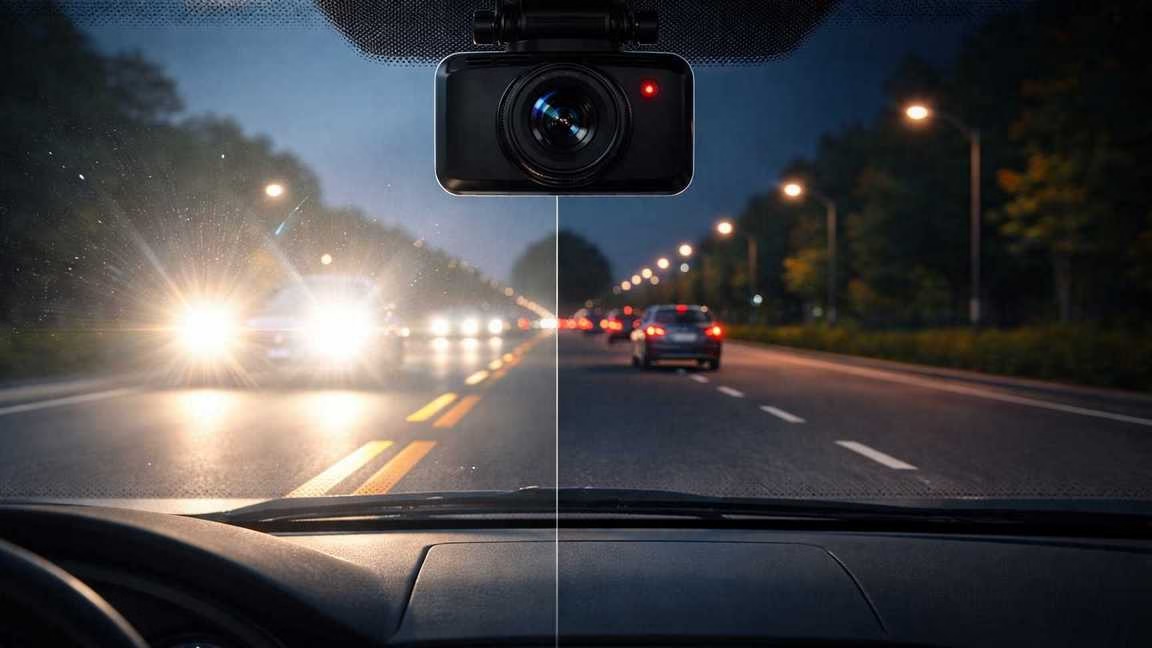
Resolution is only one piece of video quality. At night, the limiting factors usually aren’t “how many pixels,” but how much light the sensor can capture per frame and how fast the camera can expose without smearing motion.
License plates are a perfect storm target: they’re reflective, they’re often at an angle, and they move relative to you—sometimes very quickly. To compensate for darkness, many dash cams lengthen exposure (slower shutter). That makes the scene brighter, but it also turns fast-moving details into blur. Add oncoming headlights (or the car behind you) and the camera’s exposure gets overwhelmed—washing out the exact text you wanted.
So the goal of this article isn’t to “turn your dash cam into night-vision surveillance.” It’s to help you get the best possible real-world results: clearer motion, less glare, and a higher chance of capturing a usable frame when it matters.
Section 1: Why Night Footage Looks Bad (Before Fixing Anything)
Before you touch settings, it helps to understand the “why.” This is where most frustration disappears—because you realize your camera isn’t “broken.” It’s hitting limits.
Small sensors (dash cams) vs. what you’re used to (phones)
Most consumer dash cams use relatively small image sensors. Smaller sensors collect less light per frame, which forces the camera to compensate with longer exposure, heavier noise reduction, or both. Your smartphone can look incredible at night because it often uses multi-frame processing and stabilization that assumes you’re mostly still. A dash cam can’t do the same thing when everything is moving.
Reflective plates don’t behave like normal objects
Many license plates are retroreflective: they’re designed to bounce headlight beams back toward drivers. That helps humans see plates at night—but it can cause “plate bloom” in cameras. The plate becomes a glowing white rectangle while the letters disappear, especially if exposure is trying to brighten the rest of the scene.
Headlight glare overwhelms exposure
At night your dash cam is constantly “choosing” what to expose for. If it exposes for the dark road, headlights blow out and flare. If it exposes for headlights, the road goes dark and details vanish. The camera is always compromising.
Resolution alone does not fix motion blur
Here’s the big myth: 4K does not solve blur. Blur is created during capture—when the shutter stays open too long for a moving subject. You can have 4K video that’s beautifully detailed… of a smeared plate. More pixels don’t help if the frame isn’t sharp to begin with.
Section 2: WDR vs HDR — What Actually Helps at Night
Dash cam menus love to throw in WDR and HDR, but the real-world impact depends on how your specific camera implements them.
What WDR usually means on dash cams
WDR (Wide Dynamic Range) in dash cams is typically tone mapping: the camera compresses highlights and lifts shadows so you can see more “overall” detail in mixed lighting. It’s not the same as the dramatic HDR you see on phones.
When WDR helps at night:
- Street-lit roads where headlights would otherwise blow out
- Parking lots or downtown scenes with bright signs + dark shadows
- Reducing “white-out” glare in the center of oncoming headlights
When WDR can make things worse:
- If it triggers heavier noise reduction that smears detail
- If it effectively pushes the camera toward longer exposure (more blur)
- If it creates halos and ghosting around lights
What HDR usually means on dash cams
HDR can mean anything from a different processing profile to multi-exposure blending. Multi-exposure HDR can improve highlight/shadow balance—but it can also create ghosting when vehicles move between exposures (which is basically always during driving).
Clear guidance (not vague)
- If you drive mostly in the city (lots of streetlights and headlights): start with WDR ON. If plates and taillights smear more, test WDR OFF on the same route.
- If you drive mostly on dark highways: WDR can brighten the scene, but sometimes increases blur. Try WDR ON first for overall visibility; switch OFF if it worsens motion clarity.
- If your camera has both HDR and WDR: don’t enable everything at once. Test one feature at a time, because stacked processing often increases artifacts at night.
One practical mindset shift: don’t judge WDR by “brightness.” Judge it by whether moving vehicles stay more defined and whether glare becomes less destructive.
Section 3: Exposure, ISO & Shutter — The Settings That Matter
This is the heart of dash cam night settings. Even if your camera doesn’t show “shutter speed” or “ISO” directly, your toggles (EV, night mode, frame rate, WDR) usually push the camera toward one side of the same trade-off.
Longer exposure: brighter video, blurrier plates
A longer exposure (slower shutter) lets the sensor gather more light. That makes the video look brighter and often “cleaner.” But it also captures motion during that longer window—so plates smear, taillights streak, and details soften.
Higher ISO: noisier video, sometimes sharper motion
ISO is amplification. If the camera raises ISO, it can often keep exposure shorter—reducing motion blur. The downside is noise (grain). Here’s the key: noisy footage can still be usable. Blurry footage often isn’t.
Best-practice starting points (realistic ranges)
1) Exposure Compensation (EV)
- Heavy headlight glare (city, traffic): try -0.3 to -1.0 EV. This can reduce bloom and keep plates from turning into pure white rectangles.
- Dark highways (few lights): start at 0 EV. Only go positive if your footage is so dark it loses the event context—and accept that blur may increase.
2) Frame rate (30fps vs 60fps)
- 60fps can reduce motion blur only if the camera uses faster shutter speeds. Some dash cams do; others compensate with higher ISO and aggressive noise reduction.
- Rule: test both at night on the same route and choose the one that preserves moving detail (lane lines, vehicle edges, plate region clarity), not the one that simply looks brighter.
3) Night mode / Low light mode
- Many “night modes” brighten by slowing shutter and smoothing noise. If your night mode makes plates worse, turn it off and accept a darker but sharper image.
If/Then troubleshooting you can actually use
- If headlights look like exploding stars and plates turn into white blobs, then reduce EV (more negative) and retest WDR ON vs OFF.
- If the scene looks bright but everything moving is smeared, then you’re likely getting slow shutter—try 60fps (if available) and disable night-mode smoothing.
- If your footage becomes grainier but moving objects look more defined, then you probably improved your odds. Grain is often preferable to blur.
One more reality check: judge changes using real driving clips, not a parked “driveway test.” Parked tests hide motion blur problems, which is the main issue at night.
Section 4: Headlight Glare — What Works and What’s a Scam
Glare isn’t just a “settings” problem. It’s also reflections, mounting angle, and glass cleanliness. This section is where a lot of people get the biggest improvement with the least effort.
Clean the inside of the windshield (seriously)
A thin film on the inside of the windshield—off-gassing, smoker haze, or cleaner residue—turns headlights into smeared light blobs. Clean the inside glass thoroughly and wipe dry. Also clean the camera lens gently. Tiny dust spots can create halos around every headlight.
Mounting height, distance, and tilt
- Mount high near the rearview mirror to reduce dashboard reflections and improve the viewing angle.
- Keep the camera close to the glass to reduce internal reflections.
- Tilt slightly downward so the camera isn’t “chasing” streetlights and bright sky areas, which can worsen exposure hunting.
If you’re running parking mode and hardwiring, make sure you do it safely so you’re not trading better footage for a drained battery. Two useful reads for that setup side are the correct way to hardwire any dash cam and how to set parking mode voltage cut-off to avoid battery drain.
CPL filters: useful, but not a night plate fix
A CPL (circular polarizing) filter can reduce certain reflections—especially daytime dashboard glare. But at night, a CPL can reduce incoming light, which may push the camera into slower shutter (more blur) or higher ISO (more noise).
What a CPL can help: dashboard reflections and some windshield glare (mainly daytime).
What a CPL cannot do: magically fix license plate blur at night, or erase headlight bloom when the sensor is overwhelmed.
Blunt truth: CPL filters do NOT magically fix night plates. If your footage gets darker or blurrier at night with a CPL, remove it for nighttime driving.
Section 5: License Plate Blur at Night — The Hard Truth
This is the part people don’t want to hear, but it’s essential for trust: night plates are often unreadable on consumer dash cams, and sometimes even on professional footage.
Why it happens (in plain terms):
- The camera needs more light, so it extends exposure.
- Cars are moving, so extended exposure creates blur.
- Plates are reflective, so headlights can wash them out.
- Noise reduction and compression can smear fine text even further.
Why marketing demos are misleading
Many demos are filmed under ideal conditions: close distance, similar speed, clean glass, perfect angle, and controlled lighting. Real traffic is messy: bumps, rain, dirty windshields, uneven lighting, and fast closing speeds.
When plates are realistically readable at night
Night plate readability usually requires a “stack” of helpful conditions:
- Close range (plate occupies more pixels)
- Similar speed (less relative motion)
- Moderate lighting (not pitch black, not pure headlight blast)
- Short stable moments (braking at a light, slow traffic, smoother road)
A healthier expectation: a dash cam is an evidence tool. Its best value is documenting what happened—lane position, signals, impacts, and behavior—so fault is clear. Plates are sometimes a bonus capture, not a guaranteed outcome.
Section 6: Camera Hardware That Actually Helps (If You’re Upgrading)
If you’ve optimized setup and dash cam night settings and still hate the result, you may be hardware-limited. Here’s what matters most—features, not brands.
Sensor quality and size matters more than “4K”
A better low-light sensor can outperform higher resolution. You’ll often get clearer motion from a camera with a strong sensor and good processing than from a “4K” model that relies on heavy smoothing.
STARVIS / STARVIS 2 (high-level explanation)
Sony STARVIS sensors are designed for better low-light sensitivity. STARVIS 2 generally improves dynamic range and low-light performance, which can help preserve more usable detail in night scenes and reduce some highlight blowout. It still won’t guarantee plates in every scenario, but it can improve the odds in the margins.
If you want a deeper, practical explanation of what changes and what doesn’t, read Sony STARVIS 1 vs. STARVIS 2: is the upgrade worth it? and the broader overview best dash cam for night vision: the “Starvis 2” truth.
Bitrate and compression: the silent quality killer
At night, noise and contrast stress video compression. Low bitrate turns headlights, shadows, and moving detail into blocky mush. Higher bitrate (paired with good encoding) helps preserve edges and reduce the “smearing” that destroys plate region clarity.
Rear cameras are usually worse at night
Rear cams often look worse because they’re filming through tinted glass, and the brightest light source (headlights) is directly behind you. Expect rear plate capture at night to be even less reliable than front capture.
Section 7: Practical Setup Checklist (Action-Only)
Use this as your “do this tonight” list. Make one change at a time, then test on a repeatable route.
Mounting
- Mount high near the rearview mirror
- Press mount firmly close to the windshield (reduce reflections)
- Tilt slightly downward (avoid sky/streetlights dominating exposure)
- Make sure the horizon is reasonable (not too high)
Cleaning
- Clean the inside windshield thoroughly (film causes glare smearing)
- Clean the lens carefully (dust creates halos)
- Reduce interior reflections where possible (bright screens can reflect)
Dash cam night settings to test
- WDR: ON vs OFF (same route, same conditions)
- EV: try -0.3, -0.7, -1.0 if glare is severe; 0 on dark highways
- Frame rate: 30 vs 60 (choose clearer moving detail)
- Night mode: disable if it increases smear
Reliability checks (don’t skip)
- Use an endurance microSD card and format periodically (see dash cam SD card guide: endurance vs regular)
- If you get recording failures, fix that first (see how to fix dash cam “card error” and loop recording failures)
- If hardwired, confirm safe parking mode settings (see parking mode voltage cut-off and battery drain prevention)
How to test (the right way)
- Pick a 10–15 minute night route you can repeat
- Include oncoming headlights, a stoplight, and a passing vehicle
- Review footage on a computer screen, not only a phone
- Compare clips side-by-side and judge moving detail, not brightness
Conclusion: Realistic Expectations, Better Results
If you came here looking for a magic switch that makes every night plate readable, I won’t waste your time: it doesn’t exist. Motion + darkness + headlights is a brutal combination for small-sensor cameras, and “4K” doesn’t override physics.
But you can still improve dash cam night footage in meaningful ways. The biggest wins come from:
- Reducing reflections and glare (clean glass, smart mounting, careful tilt)
- Using WDR/HDR intentionally (not automatically)
- Adjusting exposure (often slightly negative EV to control bloom)
- Choosing motion clarity over “bright but smeared” video
Finally, remember what dash cams are best at: they’re evidence tools. They capture the sequence of events, lane position, and behavior—often enough to settle fault quickly. Optimize your setup, run a few real-world tests, and then stop obsessing. If you do the basics well, your camera will be far more useful when it counts.
If you’re still shopping or deciding whether an upgrade is worth it, you may also find it helpful to browse a broader “what actually matters” overview like best dash cam 2026: the “one size fits none” guide—not to chase specs, but to understand which features solve which real problems.