Phomemo D420D
Shipping Label Printer
The compact thermal printer with a smart interactive touchscreen and built-in label bin — designed to streamline your small business shipping.
Pays for itself in ~3 weeks vs. outsourcing labels
FREE 30-Day Returns | Ships from Amazon As an Amazon Associate, we earn from qualifying purchases.
Core Specifications
Key Features
Interactive Touchscreen
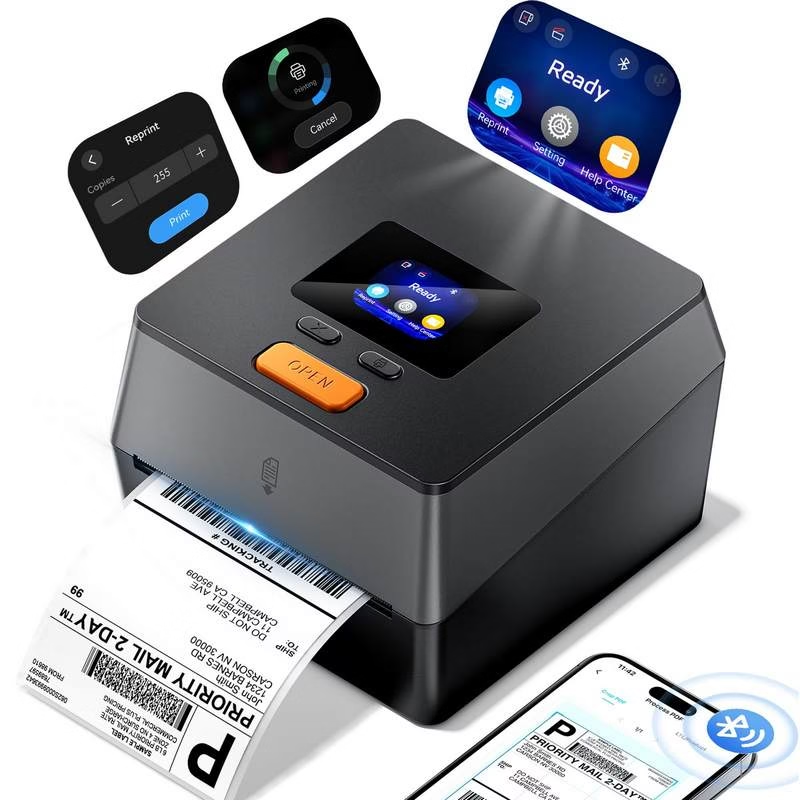
First-of-its-kind smart screen for monitoring print status, one-click reprinting, and factory resets — right on the device.
Integrated Label Bin
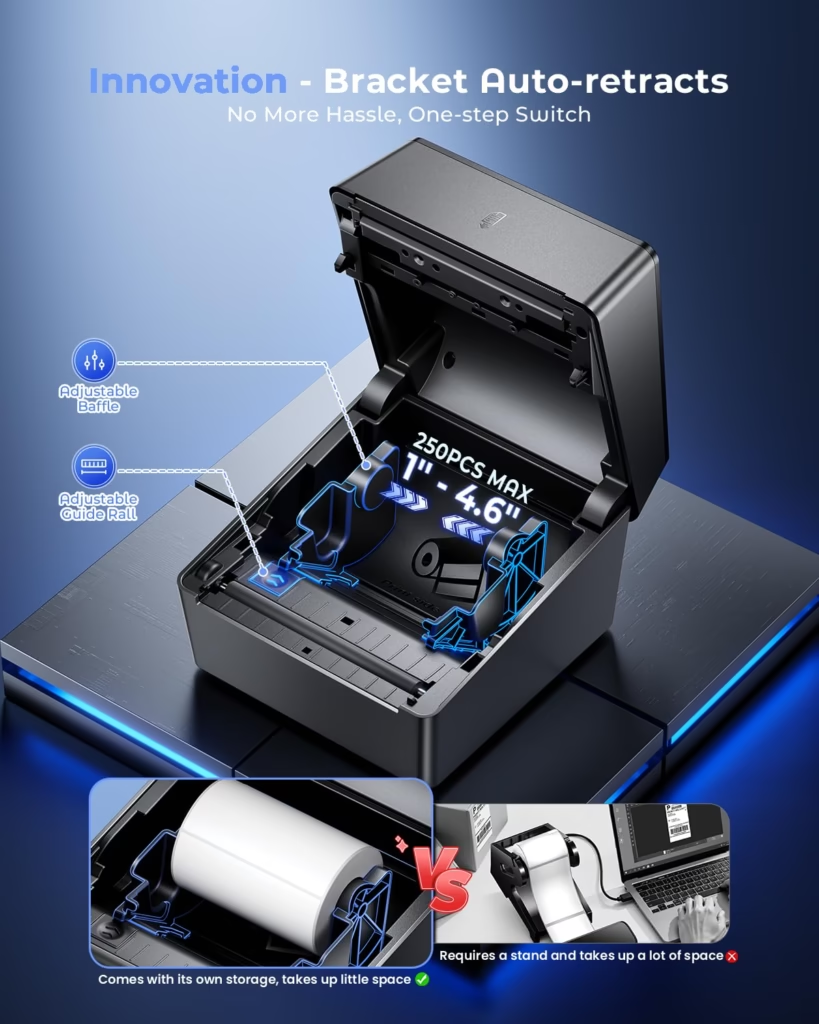
Telescopic built-in holder fits up to 250 4×6 roll labels, eliminating bulky external hardware.
Versatile Media Support
Handles label widths from 1″ to 4.6″ — perfect for barcodes, retail pricing, and shipping labels.
Platform Compatibility
Seamlessly integrates with USPS, UPS, FedEx, Amazon, TikTok Shop, Shopify, Etsy & eBay.
Works with your favorite platforms:
What Users Are Saying
👍 Pros
- Easy Bluetooth setup — works right out of the box
- Compact, space-saving design (50% smaller footprint)
- Crisp, professional print quality at 203 DPI
- Reliable paper feeding — no jams reported
🤔 Note
- Internal bin requires labels on a roll
- Roll labels may have slight curling vs. fanfold labels
Secure checkout | FREE 30-Day Returns
Running a small business is exciting. But shipping can drain your time fast.
You print labels. You pack orders. You check addresses. You tape boxes. Then something jams. Or the label prints blurry. Or your ink runs out right when orders pile up.
That is the kind of small mess that can slow your whole day.
A good thermal printer can fix much of that. It prints labels without ink. It saves space. It makes shipping faster. And it helps your packages look clean and professional.
But not every printer is right for a small shop. Some are bulky. Some need extra label holders. Some are hard to connect. Some look cheap but cost more in stress.
That is why the Phomemo D420D stands out.
It is compact, fast, and built for small business shipping. It works with Bluetooth and USB. It has a smart touchscreen. It also has a built-in label bin, so your desk stays cleaner.
If you are looking for the best mini thermal printer for shipping labels, this model deserves a close look.
Let’s break it down in plain language.
Quick Verdict: Is the Phomemo D420D the Best Mini Thermal Printer?
Yes, the Phomemo D420D is a strong pick for small business owners who need a compact label printer.
It is not just small. It is useful in the right ways.
It prints fast. It does not need ink or toner. It works with common selling and shipping platforms. It supports label widths from 1 inch to 4.6 inches. That makes it useful for shipping labels, barcode labels, price labels, QR code labels, and simple business stickers.
Its size is a major win. The printer measures 7.3 inches deep, 6.3 inches wide, and 5.35 inches tall. That is small enough for a home office, desk corner, packing shelf, or tight work table.
The built-in label bin is another smart touch. Many shipping label printers need an external label holder. That adds clutter. The D420D keeps the roll inside the machine. It can hold up to 250 4×6 roll labels.
That makes the whole setup feel neat.
The printer also has a touchscreen. You can check print status, reprint with one tap, and reset the device more easily. That may sound simple. But when you are packing twenty orders in a rush, simple matters.
The Phomemo D420D is best for sellers who want a shipping label printer for small business use. It is ideal for Etsy, Shopify, Amazon, eBay, TikTok Shop, and other online stores.
It is not perfect for everyone. If you need full-color sticker prints, this is not the right printer. It prints in black only because it uses direct thermal printing. If you only print one label a month, it may also be more than you need.
But for daily or weekly shipping, it offers a great mix of speed, size, and ease.
Why Small Businesses Need a Good Thermal Printer
A small business needs tools that save time.
That sounds obvious. But it is easy to ignore shipping tools until they start causing pain.
Many new sellers begin with a normal home printer. That can work at first. You print a label on paper. You cut it out. You tape it to the package. Then you do it again. And again.
That process feels fine when you have two orders.
It does not feel fine when you have twenty.
A good thermal printer changes the whole flow. You print the label. You peel it. You stick it on the box. Done.
No scissors. No tape. No ink. No slow drying. No smudged text.
That is why many sellers call a thermal printer one of their first real business upgrades.
A thermal printer can also lower daily costs. Since it does not use ink or toner, you do not have to keep buying cartridges. You only need compatible thermal labels.
It can also reduce mistakes. Clear labels are easier to scan. Clean barcodes help carriers process packages faster. A sharp label also makes your brand feel more serious.
This matters for small shops. A customer may never see your packing table. But they do see the package. A clean shipping label gives a better first impression.
A good thermal printer also helps during busy seasons. Think holiday orders, flash sales, product launches, or weekend shipping rushes. A slow printer can become a bottleneck. A fast label printer keeps things moving.
For many sellers, the best thermal printer for small business is not the biggest one. It is the one that fits their space, works with their devices, and keeps printing without drama.
That is the space where the Phomemo D420D fits well.
Phomemo D420D Overview
The Phomemo D420D is a direct thermal shipping label printer. That means it prints without ink, toner, or ribbons.
It uses heat to print on thermal label paper. This makes it simple to run and easy to maintain.
The printer supports Bluetooth 5.0 and USB. You can use Bluetooth with iOS, Android, Windows, and macOS. You can also connect by USB when you want a wired setup.
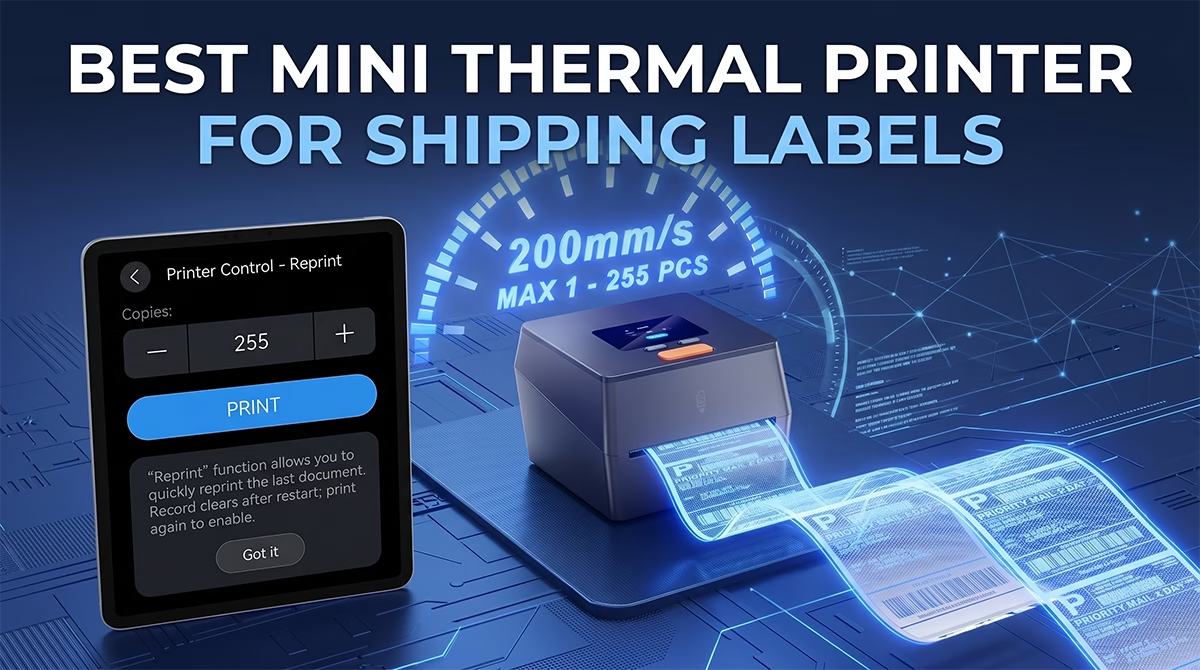
It prints at 200 mm per second. In simple terms, that is fast. It can print about 72 labels per minute under the right setup.
The print resolution is 203 DPI. That is a common and practical level for shipping labels. It is clear enough for addresses, barcodes, QR codes, product labels, and price labels.
The D420D supports label widths from 1 inch to 4.6 inches. This is helpful if you print more than standard 4×6 shipping labels. You can also print smaller labels for products, shelves, packaging, or barcode systems.
One of its best features is the integrated label bin. The built-in telescopic holder can fit up to 250 4×6 roll labels. You do not need to place a label roll behind the printer. You do not need a separate stand. You do not need extra space just to feed labels.
The design is clean and space-saving.
The touchscreen is another feature that helps it stand out. Most label printers are simple boxes with a few lights or buttons. The D420D gives you a smarter way to see what is happening.
It works with many popular platforms, including USPS, UPS, FedEx, Amazon, TikTok, Shopify, Etsy, and eBay.
That makes it a strong best shipping label printer choice for sellers who use more than one sales channel.
What Makes It One of the Best Thermal Printers for Shipping Labels?
A shipping label printer needs to do a few things well.
It should print clearly. It should print quickly. It should not jam all the time. It should fit your workspace. It should connect without giving you a headache.
The Phomemo D420D checks many of these boxes.
It is fast enough for busy sellers. It is small enough for home offices. It supports many label types. It works with modern devices. It does not need ink. It also keeps the label roll inside the printer.
These features help make it one of the best thermal printers for shipping labels in the mini printer category.
Fast 200 mm/s Printing Speed
Speed matters more than many sellers think.
If you print one label, speed is not a big deal. But when you print many labels, every second adds up.
The Phomemo D420D prints at 200 mm per second. That gives it enough power for daily order packing. It can handle shipping labels quickly, so you are not stuck waiting by the printer.
This matters during busy hours.
Maybe your courier pickup is coming soon. Maybe your shop had a strong weekend. Maybe a sale just ended. You want to pack, print, and move.
A slow printer makes that harder.
A fast printer helps you stay in rhythm. Print. Peel. Stick. Pack. Repeat.
That smooth flow can save real time each week.
Inkless Direct Thermal Printing
The D420D uses direct thermal printing. This is one of the biggest reasons small businesses choose thermal label printers.
You do not buy ink.
You do not buy toner.
You do not replace ribbons.
You do not worry about dry cartridges.
That alone can make life easier.
Ink can be expensive. It can also run out at the worst time. If you are shipping orders, that can create stress you do not need.
Thermal printing removes that problem. You only need thermal labels that work with the printer.
This also keeps your workspace cleaner. There are fewer supplies to store. There are fewer parts to replace. There is less mess overall.
For a small business, that kind of simplicity is valuable.
Compact Design for Small Workspaces
Not every seller has a warehouse.
Many small business owners work from a bedroom, kitchen table, spare room, garage shelf, or tiny office corner. Space matters.
The Phomemo D420D is 50% smaller than many traditional models. That makes it a smart choice if you want the best mini thermal printer for a tight setup.
It does not dominate your desk. It does not need a large label stand behind it. It does not force you to change your whole packing area.
You can place it near your laptop, scale, boxes, mailers, or packing supplies.
This may sound basic. But a cleaner workspace can improve how fast you work. It can also make shipping feel less chaotic.
Small tools that work well can make a small space feel much bigger.
Built-In Label Bin
The built-in label bin is one of the best parts of the D420D.
Many thermal printers use external label rolls. The roll sits behind the printer. Sometimes it sits on a holder. Sometimes it rolls around the desk. Sometimes it takes more room than the printer itself.
The D420D solves that with an integrated label holder.
The built-in telescopic bin fits up to 250 4×6 roll labels. That gives you a clean, all-in-one setup.
This is a big benefit for small business owners. You do not need to buy an extra holder. You do not need to clear more desk space. You do not have to deal with a messy label roll behind the machine.
The labels stay inside the unit. The setup looks cleaner. The workflow feels simpler.
There is one thing to note.
The internal bin works with roll labels. If you prefer fanfold labels, this may not be your ideal setup. Roll labels can also have a slight curl compared to fanfold labels.
That is not a dealbreaker for most shipping labels. But it is worth knowing before you buy.
Smart Touchscreen Control
The touchscreen gives the D420D a more modern feel.
Most label printers are very basic. You may get one button and a few lights. If something goes wrong, you often have to guess what the issue is.
The D420D gives you more control.
You can monitor print status. You can use one-click reprinting. You can also do factory resets more easily.
That makes the printer feel less frustrating.
A touchscreen may not sound like a must-have feature. But it becomes useful when you are busy. If a label needs to print again, one-tap reprint is handy. If the printer status is clear, you spend less time guessing.
For small business owners, less guessing is always good.
Best Mini Thermal Printer for Small Business Owners
The Phomemo D420D is made for small business workflows.
It suits sellers who print shipping labels often. It is also useful for people who sell across different platforms.
If you run an Etsy shop, this printer can help you print labels faster. If you sell on Shopify, it can help speed up daily fulfillment. If you use Amazon, eBay, or TikTok Shop, the wide platform support is a big plus.
It also works well for small retail brands.
You can print price labels, barcode labels, QR code labels, and packaging labels. You can use it for return address labels or stock labels. You can use it to organize products, bins, or shelves.
That makes it more than a shipping label printer.
It becomes part of your business system.
A best thermal label printer for small business should feel easy to use. It should not need constant fixes. It should save space. It should keep up with real orders.
The D420D does that well.
It is especially useful for home-based sellers. Many home businesses do not have room for a large shipping station. This printer gives you a neat setup without taking over the room.
It is also a good option for growing sellers. If you are moving from paper-and-tape labels to real adhesive shipping labels, this is a strong upgrade.
Platform Compatibility
One of the strengths of the Phomemo D420D is its platform support.
It works with major carriers and selling platforms, including USPS, UPS, FedEx, Amazon, TikTok, Shopify, Etsy, and eBay.
That matters because many sellers do not use just one platform.
You may sell handmade goods on Etsy. You may run a Shopify store. You may test products on TikTok Shop. You may also ship through different carriers based on price and speed.
A printer that fits this kind of mixed setup is helpful.
You do not want a printer that works well with one platform but creates trouble with another. You want a tool that can follow your business as it grows.
The D420D gives you that flexibility.
It can work in many common shipping workflows. That makes it easier to print labels from the tools you already use.
This is one reason it can compete as a best thermal printer for shipping labels.
Can You Use the Phomemo D420D as the Best Thermal Printer for Stickers?
Yes, but with a clear limit.
The Phomemo D420D can print sticker-style labels. It is useful for simple business stickers. But it is not a color sticker printer.
It prints in black on thermal label paper. That means it is great for practical sticker labels, not colorful art stickers.
You can use it for:
Shipping Stickers
It is mainly built for shipping labels. Standard 4×6 labels are a natural fit.
Barcode Stickers
The 203 DPI print quality is enough for most barcode labels. This is useful for stock, warehouse bins, retail items, and packaging.
QR Code Labels
You can print QR codes for product pages, return instructions, discounts, menus, or customer support links.
Price Stickers
Small shops can use it to print retail pricing labels or sale labels.
Product Information Labels
You can print size labels, SKU labels, batch labels, warning labels, or care labels.
Packaging Labels
You can print simple thank-you labels, return address labels, or brand packaging labels in black and white.
So, is it the best thermal printer for stickers?
It depends on the kind of stickers you need.
If you need black-and-white business stickers, it is a strong option. If you need bright logo stickers, waterproof vinyl stickers, or decorative art stickers, you should look at a different type of printer.
This is an important point. A thermal printer can be great, but it has limits. It is best for function, speed, and low running costs. It is not best for colorful design work.
Print Quality: Is 203 DPI Good Enough?
The Phomemo D420D prints at 203 DPI.
For most shipping labels, that is enough.
Addresses look clear. Barcodes scan well when the label design is clean. QR codes can print sharply enough for normal use. Product labels and price tags also look neat.
Many small business owners do not need more than 203 DPI for shipping. Carriers care about clear text and scannable codes. The D420D can handle that.
Still, it helps to be realistic.
If you print very tiny text, detailed logos, or complex graphics, a higher resolution printer may be better. A 300 DPI printer can create sharper detail for small designs.
But for normal 4×6 shipping labels, 203 DPI is practical. It gives you a good balance of speed, clarity, and cost.
The key is to use good label files and proper label size settings. A poor file can look bad on any printer. A clean file will print better.
For shipping, barcodes, prices, and simple stickers, the D420D gives clear output.
That is why it fits the “good thermal printer” category for small business use.
Bluetooth and USB Setup
Connection is another area where this printer feels modern.
The Phomemo D420D supports Bluetooth 5.0 and USB.
Bluetooth is great if you print from a phone or tablet. This is useful for sellers who manage orders on mobile apps. It also keeps your workspace free from extra wires.
USB is useful when you want a stable wired connection. Many desktop users prefer USB for regular printing from Windows or macOS.
This gives you two practical choices.
You can print wirelessly when you want freedom. You can plug in when you want a simple desk setup.
The Bluetooth support is especially helpful for small sellers who use phones for daily business tasks. Many sellers take photos, manage orders, reply to customers, and buy postage from mobile devices. Being able to print from mobile can save steps.
Easy setup matters because no one wants to waste hours fixing a printer. The D420D gets positive early feedback for simple Bluetooth setup. That is a strong point for users who do not love tech problems.
A printer should help your work, not become your work.
Pros and Cons of the Phomemo D420D
No product is perfect. A fair review should cover both sides.
The Phomemo D420D has many strong points. It also has a few limits that you should know.
Pros
The compact size is a major advantage. It fits well in small work areas and home offices.
The print speed is strong. At 200 mm per second, it can handle busy shipping days.
It does not need ink or toner. That helps reduce running costs and removes one more thing from your shopping list.
It supports both Bluetooth and USB. This gives you more freedom in how you print.
The built-in label bin keeps your setup neat. You do not need an external label holder.
The touchscreen makes control easier. You can check status and reprint with less hassle.
It supports many platforms. This is helpful for sellers who use USPS, UPS, FedEx, Amazon, TikTok, Shopify, Etsy, or eBay.
The 203 DPI print quality is clear enough for most shipping labels, barcodes, QR codes, and product labels.
Early user feedback is strong, with a 4.8 out of 5-star rating based on early reviews.
Users also report easy setup, crisp print quality, compact design, and reliable paper feeding.
Cons
The internal bin needs roll labels. If you prefer fanfold labels, this may not fit your normal workflow.
Roll labels may have a slight curl. This is common and may not bother most users, but it is still worth noting.
It does not print in color. So it is not the right choice for colorful decorative stickers.
The 203 DPI resolution may not be ideal for very detailed graphics or tiny text.
The price is higher than some basic thermal label printers. But the extra features help explain the cost.
Phomemo D420D vs Traditional Shipping Label Printers
Many shipping label printers do the same basic job. They print labels.
But the details can change your daily experience.
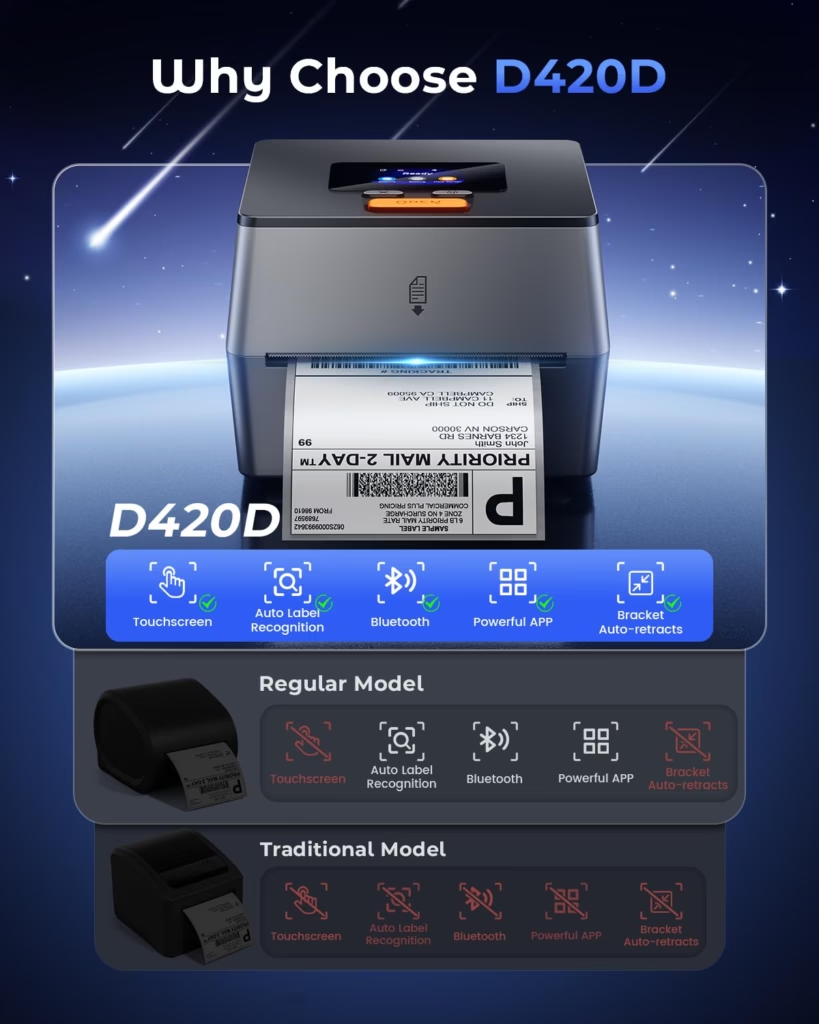
The D420D offers a cleaner, more compact setup than many traditional label printers.
Space
Traditional printers often need label rolls to sit outside the printer. That means you need more desk space.
The D420D stores the roll inside. This keeps your shipping station cleaner.
For small desks, that is a real benefit.
Setup
Older or basic printers may rely only on USB. That can be fine for desktop users. But it is less flexible for mobile sellers.
The D420D gives you Bluetooth and USB. You can use it with phones, tablets, laptops, and desktops.
That makes it more flexible.
Speed
At 200 mm per second, the D420D is fast enough for most small business shipping needs.
It can keep up with daily labels and busy packing sessions.
Design
The touchscreen makes it feel more advanced than many plain label printers.
It also helps with quick actions, like checking status or reprinting labels.
Label Storage
The built-in holder is a big design win.
It removes the need for an extra label stand. It also makes the whole printer look more like a complete system.
This is one reason the D420D feels like a polished option, not just another box on your desk.
Who Should Buy the Phomemo D420D?
The Phomemo D420D is a good fit for many small business users.
It is best for people who print labels often and want a simple, clean, inkless setup.
You should consider it if you run an online shop and ship products weekly. It is also a smart pick if you are tired of cutting and taping paper labels.
It is a good match for Etsy sellers, Shopify store owners, Amazon sellers, eBay sellers, TikTok Shop sellers, home-based brands, boutique stores, handmade shops, and small warehouses.
It also works for sellers who print different label sizes. The width range from 1 inch to 4.6 inches gives you room to use smaller labels for products and packaging.
The printer is also a strong pick if you care about desk space. If your packing station is small, the built-in label bin and compact body are useful.
You may not need this printer if you only print one or two labels a month. In that case, your current setup may be enough for now.
You should also skip it if you need full-color stickers. This is not a photo printer or color sticker printer.
It may also not be right if your business depends on fanfold labels. The internal label bin is made for roll labels.
But for most small business shipping needs, it is a strong and practical choice.
Is the Phomemo D420D Worth the Price?
The Phomemo D420D has a prime price of $179.99, down from its $199.99 list price. Payment plans may also be available at $45 every two weeks with 0% APR.
It also ships from and is sold by Amazon, with free 30-day returns.
So, is it worth the price?
For the right user, yes.
This is not the cheapest label printer. But cheap is not always the best value.
A low-cost printer can become expensive if it jams, prints poorly, needs extra accessories, or slows your workflow.
The D420D gives you several features that basic models may not offer. You get Bluetooth, USB, a touchscreen, fast printing, compact size, wide label support, and a built-in label bin.
Those features can make daily shipping smoother.
If you ship often, the time savings can matter more than the upfront price. You may also save money over time because there is no ink or toner to buy.
It is easy to forget how much time shipping takes. A better printer can reduce the small delays that pile up each week.
For a growing small business, that can be worth it.
If your business ships orders several times a week, the D420D is a smart investment. If shipping is part of your daily routine, it makes even more sense.
Want to lower what each package costs to send? See our guide to ways to cut shipping costs.
How the Phomemo D420D Helps Your Daily Shipping Flow
A good shipping process should feel simple.
You should not have to fight your tools.
The Phomemo D420D helps create a cleaner flow from order to package.
First, you create or download your shipping label from your platform. Then you send it to the printer. The label prints fast. You peel it. You apply it. Then you move to the next order.
That sounds basic. But the value is in the speed and smoothness.
No paper cutting. No tape. No waiting for ink. No messy label sheets. No external roll stand taking up room.
This matters most when your order count grows.
A small business can feel easy at five orders a week. It feels very different at fifty. The right tools help you grow without feeling buried.
The D420D supports that growth.
It helps you build a more professional shipping station without needing a large space or complex setup.
Best Uses for the Phomemo D420D
The D420D works well for many label tasks.
Its main job is shipping labels. But it can do more.
You can use it for 4×6 shipping labels for orders. You can print barcode labels for inventory. You can make QR code labels for packaging. You can print simple product labels in black and white.
You can also print return address labels, price stickers, carton labels, storage labels, and product ID labels.
This makes it useful across different parts of a small business.
For example, a candle seller can print shipping labels, batch labels, and price labels. A clothing seller can print SKU labels and package labels. A small warehouse can label bins, shelves, and outgoing parcels.
The more labels you print, the more useful the printer becomes.
That is why it can be called one of the best thermal label printer for small business options in its class.
Tips to Get the Best Results
A thermal printer works best when your setup is clean and simple.
Use the right label size for your shipping platform. For most shipping labels, that means 4×6 labels.
Make sure your label roll fits the printer. Since the D420D uses an internal bin, roll labels are the best match.
Check your print settings before printing a batch. This helps avoid wasted labels.
Use clear label files. Poor files can print fuzzy, even on a good printer.
Keep the printer clean. Dust and label residue can affect print quality over time.
Store thermal labels away from heat and direct sunlight. Thermal labels react to heat, so storage matters.
Print a test label when you change label sizes. This helps you catch alignment issues before printing many labels.
These small habits can help your printer last longer and print better.
Common Mistakes to Avoid
Many new thermal printer users make the same mistakes.
The first mistake is buying the wrong label type. Direct thermal printers need direct thermal labels. Not all labels are the same.
The second mistake is expecting color prints. The D420D prints in black only. It is great for business labels, not colorful stickers.
The third mistake is ignoring label size settings. If your label prints too small, too large, or off-center, the setting may be wrong.
The fourth mistake is using low-quality label files. A blurry label file will print blurry.
The fifth mistake is placing the printer where labels cannot feed well. Even with an internal bin, you want the printer on a stable surface.
Avoiding these issues can make your experience much better.
Final Verdict: Best Mini Thermal Printer for Small Business Shipping
The Phomemo D420D is a strong choice if you want the best mini thermal printer for shipping labels.
It is compact, fast, and easy to fit into a small workspace. It prints without ink or toner. It supports Bluetooth and USB. It works with major shipping and selling platforms. It also has a smart touchscreen and a built-in label bin.
Those features make it feel built for real small business use.
It is especially useful for Etsy sellers, Shopify store owners, TikTok Shop sellers, Amazon sellers, eBay sellers, home businesses, and small retail brands.
It is not the right printer for full-color stickers. It is also not ideal if you only use fanfold labels. But for black-and-white shipping labels, barcodes, QR codes, product labels, and price stickers, it is a practical and polished option.
At $179.99, it costs more than some basic models. But the extra features make sense if you ship often.
If you want a clean, compact, inkless label printer that can keep up with your small business, the Phomemo D420D is worth considering.
FAQs About the Best Mini Thermal Printer
What is the best mini thermal printer for shipping labels?
The Phomemo D420D is a strong option for small business shipping. It is compact, fast, inkless, and supports Bluetooth and USB printing.
Is a thermal printer good for small business shipping?
Yes. A thermal printer can save time and reduce printing costs. It does not need ink or toner, and it makes label printing much faster.
Can the Phomemo D420D print stickers?
Yes, it can print black-and-white thermal sticker labels. It works well for barcodes, QR codes, price labels, shipping stickers, and product labels. It does not print full-color decorative stickers.
Is 203 DPI enough for shipping labels?
Yes. 203 DPI is enough for most shipping labels, addresses, barcodes, and QR codes. If you need tiny text or detailed graphics, a higher resolution printer may be better.
Does the Phomemo D420D work with Shopify and Etsy?
Yes. It works with platforms like Shopify, Etsy, Amazon, TikTok, eBay, USPS, UPS, and FedEx.
Does this printer need ink?
No. The Phomemo D420D uses direct thermal printing. It does not need ink, toner, or ribbons.
Is the Phomemo D420D good for home businesses?
Yes. Its compact size and built-in label bin make it a great fit for home offices and small packing stations.
What labels does the Phomemo D420D support?
It supports label widths from 1 inch to 4.6 inches. This includes common 4×6 shipping labels and smaller labels for products, barcodes, pricing, and packaging.
What is the main downside of the Phomemo D420D?
The main downside is that the internal bin is designed for roll labels. If you prefer fanfold labels, this may not be the best fit. Roll labels may also curl slightly.
Is the Phomemo D420D worth buying?
Yes, if you print shipping labels often. It offers a strong mix of speed, compact size, wireless printing, touchscreen control, and built-in label storage. For small business shipping, that makes it a smart upgrade.