
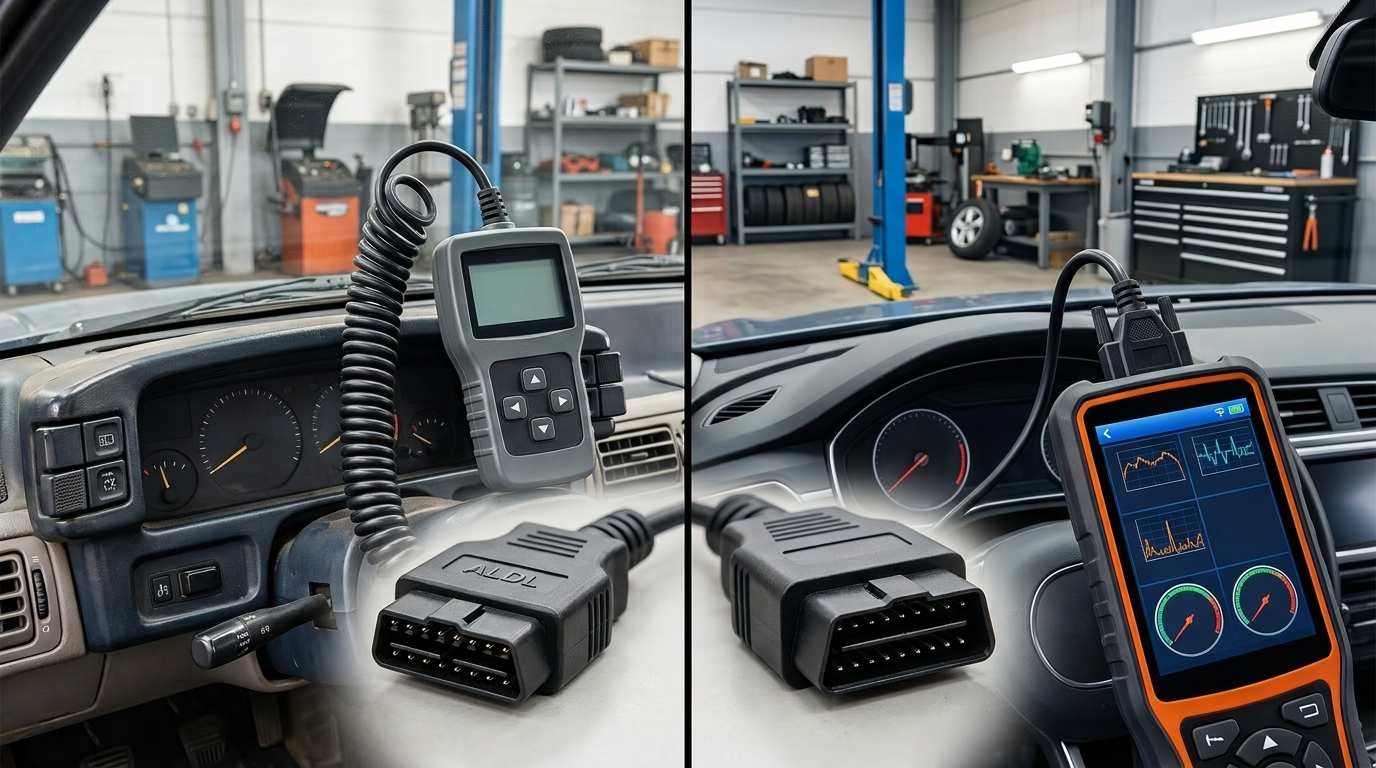
The main OBD1 vs OBD2 difference is simple. OBD1 is old and brand-specific. OBD2 is newer and follows one shared standard.
Most cars made before 1996 use OBD1. Most US cars from 1996 onward use OBD2. OBD2 also gives you more data and works with common scan tools. You might interested to read Best OBD2 Scanner for the Money.
If you own an older car, this difference matters. It tells you which scanner and repair steps you need.
Quick Answer
OBD1 was the first form of onboard car checks. Each car brand used its own plugs, codes, and test steps.
OBD2 is the second form. It uses a common 16-pin port and shared fault codes. It can also show live engine data and emissions test status.
Here is the short version:
- OBD1: Older, basic, and brand-specific
- OBD2: Newer, more detailed, and widely shared
- Main changeover year: 1996 in the United States
- Best way to check: Read the label under the hood
- Scanner rule: Match the scanner to your exact car
OBD1 vs OBD2 Comparison
| Feature | OBD1 | OBD2 |
|---|---|---|
| Common years | Mainly before 1996 | Mainly 1996 and newer |
| Main use | Basic engine and emissions checks | Wider engine and emissions checks |
| Port design | Varies by brand | Standard 16-pin port |
| Port location | Varies by car | Usually below the dash |
| Fault codes | Often brand-specific | Shared and brand-specific codes |
| Scan tools | Special tool often needed | Basic tools work on many cars |
| Live data | Limited or absent | Common on most vehicles |
| Freeze-frame data | Rare | Common |
| Readiness monitors | Usually not available | Built into the system |
| Phone app support | Rare | Widely available |
| Ease of use | More research needed | Easier for most owners |
The 1996 date is a useful guide. Still, it does not cover every car.
Some 1994 and 1995 cars came with early OBD2 systems. Some cars also have a 16-pin port but lack full OBD2 support.
So, never trust the model year alone.
What Is OBD?
OBD means On-Board Diagnostics. It is your car’s built-in fault check system.
The system watches key engine and emissions parts. If it finds a fault, it may turn on the Check Engine light.
It can also save a fault code. That code helps you find the source of the issue.
OBD may track parts such as:
- Fuel injectors
- Airflow sensors
- Oxygen sensors
- Ignition parts
- Exhaust parts
- Engine temperature sensors
- Emissions controls
Keep one point in mind. OBD does not always name the bad part.
It reports what the car saw. You still need to test the cause.
What Is OBD1?
OBD1 is the first main form of onboard car checks. It became common during the late 1980s and early 1990s.
The system helped car makers track basic engine faults. It also helped them meet new emissions rules.
Yet OBD1 lacked one shared design. Each brand could use its own setup.
A Ford system could differ from a Honda system. Two models from the same brand could also differ.
How OBD1 Works
An OBD1 car uses its engine computer to watch sensors and wires. The computer saves a code when it sees an odd signal.
The way you read that code depends on the car.
You may need to:
- Plug in a brand-specific scan tool
- Join two test pins with a wire
- Turn the key in a set order
- Count flashes from the Check Engine light
- Read codes from a dash display
- Follow steps from the repair manual
For example, one long flash and two short flashes may mean code 12. Yet that code may mean something else on another brand.
That is why the correct repair guide matters.
Common OBD1 Limitations
OBD1 can help with basic faults. Still, it has clear limits.
Common issues include:
- No shared port shape
- No fixed port location
- Different codes across brands
- Few live sensor readings
- Little stored fault data
- Special cables for many cars
- Hard-to-find old scan tools
- Vague code meanings
- Weak phone app support
Some OBD1 systems only find open or shorted wires. They may miss a weak part that still sends a signal.
This can make fault checks slow. You often need a meter and a repair guide.
Advantages of OBD1
OBD1 was useful for its time. It gave repair shops a faster way to find engine faults.
It still offers a few benefits:
- Some cars show codes without a scanner.
- The systems are often simple.
- Basic engine faults may be easy to trace.
- Factory tools may show useful brand data.
- Owners can often run basic checks at home.
OBD1 is not bad. It is just less uniform than OBD2.
What Is OBD2?
OBD2 is the second form of onboard car checks. It fixed many of OBD1’s weak points.
US passenger cars and light trucks had to support it from 1996. Other areas brought in similar rules at different times.
OBD2 set shared rules for:
- The scan port
- Basic fault codes
- Scan tool links
- Live engine data
- Emissions checks
- Warning light use
- Test status reports
This means one basic OBD2 reader can work with many car brands.
Still, it may only read engine and emissions data. Full car access may need a better tool.
OBD2 Connector and Pinout
Most OBD2 cars use a 16-pin port. The port has a wide top and a narrow base.
You can often find it below the steering wheel. It may sit behind a small trim panel.
Common places include:
- Below the driver’s side dash
- Near the hood release
- Beside the fuse box
- Behind a small dash cover
- Near the center console
You should not need tools to reach the port. Yet some car makers hide it well.
Key OBD2 Pins
Each pin has a set role. Some pins may have no metal contact.
The main pins include:
- Pin 4: Chassis ground
- Pin 5: Signal ground
- Pin 6: CAN High [main data wire]
- Pin 14: CAN Low [second data wire]
- Pin 16: Battery power
- Pins 2 and 10: Used by some older systems
- Pins 7 and 15: Used by some older systems
Pins 1, 3, 8, 9, 11, 12, and 13 may serve brand-specific needs.
Do not place wires into random pins. A short may harm a fuse or car module.
Common OBD2 Communication Protocols
A protocol is the way your car and scanner talk.
Older OBD2 cars used several types:
- SAE J1850 PWM
- SAE J1850 VPW
- ISO 9141-2
- ISO 14230-4
- ISO 15765-4 CAN
CAN means Controller Area Network [a fast car data link].
US cars began using CAN for OBD2 from the 2008 model year. This made tool support much easier.
Most new scan tools find the protocol on their own. You do not need to set it by hand.
What Information Can OBD2 Provide?
OBD2 gives you far more data than OBD1. The exact data depends on your car and scan tool.
A basic tool may show:
- Stored fault codes
- Pending fault codes
- Permanent fault codes
- Check Engine light status
- Test readiness status
- Freeze-frame data
- Engine speed
- Car speed
- Coolant temperature
- Engine load
- Throttle position
- Fuel trim
- Airflow readings
- Oxygen sensor data
- Battery voltage
- Vehicle details
Live data shows what the sensors report right now.
Freeze-frame data shows key readings when the fault first set.
This data can add useful context. For example, you may see that a fault began on a cold start.
Still, your car may not support every reading. OBD2 sets a base standard, not one full data list.
OBD2 Diagnostic Modes
OBD2 sorts its data into service modes. Each mode handles a certain task.
You may not see these mode names on a basic scanner. The tool may use plain menu labels instead.
Mode 01: Current Data
This mode shows live engine and sensor data.
You may see:
- Engine speed
- Car speed
- Coolant temperature
- Fuel trim
- Engine load
- Throttle angle
- Airflow
- Oxygen sensor readings
Live data helps you check how a sensor acts. It can also show changes during a road test.
Mode 02: Freeze-Frame Data
This mode shows a saved view of the engine data.
The car records it when certain faults appear. It may include speed, engine load, and temperature.
This can help you recreate the same fault.
Mode 03: Stored Fault Codes
This mode shows confirmed emissions fault codes.
These codes may cause the Check Engine light to turn on. They stay saved until cleared or resolved.
Mode 04: Clear Codes
This mode clears emissions fault codes. It may also turn off the Check Engine light.
It also resets freeze-frame data and readiness monitors.
Do not clear codes before you save the data. You may erase useful clues.
Mode 05: Oxygen Sensor Test Data
This mode shows test data from some oxygen sensors.
It mainly applies to older OBD2 systems. Newer CAN cars often show this data elsewhere.
Mode 06: Monitor Test Results
This mode shows results from the car’s own tests.
It may include checks for:
- Misfires
- Oxygen sensors
- Catalytic converters
- Fuel vapor leaks
- Other emissions parts
Mode 06 may spot a weak part before the warning light comes on. Yet its results can be hard to read.
Mode 07: Pending Fault Codes
This mode shows faults found during the current or last drive.
A pending code has not met all rules for a full warning. It may clear if the fault does not return.
Mode 08: System Control
This mode lets a scan tool run certain tests.
Support varies by car. Basic readers may not offer this feature.
Mode 09: Vehicle Information
This mode may show:
- Vehicle identification number
- Software details
- Engine control unit details
- Emissions test counts
Not all cars show every item.
Mode 0A: Permanent Fault Codes
This mode shows permanent emissions codes.
You cannot clear these codes with a normal reset. The car clears them after it confirms the repair.
Understanding OBD2 Trouble Codes
OBD2 fault codes often use five letters and numbers. One example is P0301.
Each part of the code has a meaning.
First Character: System
The first letter tells you the main system.
- P: Powertrain [engine and gearbox]
- B: Body
- C: Chassis
- U: Network or data link
Most basic code readers focus on P codes.
Second Character: Code Type
The second character helps show who defined the code.
- 0: Usually a shared code
- 1: Usually a brand-specific code
- 2 or 3: Use may vary by code group
A shared code has the same basic meaning across brands.
A brand-specific code may need the correct car repair guide.
Remaining Characters
The last three digits show the fault group and issue.
Common examples include:
- P0300: Random or many engine misfires
- P0301: Misfire in cylinder one
- P0171: Fuel mix too lean on Bank 1
- P0420: Low catalyst output on Bank 1
Bank 1 means the engine side with cylinder one.
A code is a starting point. It is not an order to replace a part.
For example, an oxygen sensor code may not mean a bad sensor. The cause could be:
- Damaged wires
- A vacuum leak
- An exhaust leak
- Low fuel pressure
- A dirty airflow sensor
- A weak oxygen sensor
Read the code first. Then test the full system.
Readiness Monitors
Readiness monitors are built-in emissions tests.
They tell you if the car has checked each emissions system. A scanner may show each test as ready, not ready, or unsupported.
Common monitors include:
- Misfire
- Fuel system
- Main engine parts
- Catalytic converter
- Oxygen sensors
- Oxygen sensor heaters
- Fuel vapor control
- Air injection
- Exhaust gas control
- Diesel filter systems
Some tests run all the time. Others need set road and weather conditions.
A test may need:
- A cold engine start
- A set fuel level
- Steady road speed
- A warm engine
- A period at idle
- Slow coast-down
- More than one trip
Clearing codes resets many monitors. A battery change may do the same.
Your car may then need a drive cycle. That is a set mix of driving steps.
Do not clear codes just before an emissions test. The car may fail because its monitors are not ready.
Can an OBD2 Scanner Read Every Vehicle System?
No. A basic OBD2 scanner does not read every part of your car.
It mainly covers shared engine and emissions data.
It may not reach these systems:
- Anti-lock brakes
- Airbags
- Climate control
- Power steering
- Body controls
- Tire pressure
- Parking brake
- Security system
- Driver aid systems
- Hybrid battery controls
- Full gearbox data
A more advanced scanner may reach these systems. Yet support still varies by make and model.
The 16-pin port is only the access point. It does not mean each tool has full access.
Can You Use an OBD2 Scanner on an OBD1 Car?
Usually, you cannot use it on its own.
An adapter may let the plug fit. It may not help the scanner talk to the car.
The scanner must also support the car’s:
- Data format
- Signal type
- Fault codes
- Test commands
- Engine computer
A cheap plug adapter does not change the data. It only changes the plug shape.
You need a scanner with support for that exact OBD1 car. You may also need the right cable.
Check all four details:
- Car brand
- Model year
- Engine type
- Diagnostic connector
Missing one detail can lead to the wrong tool.
How to Tell Whether a Car Has OBD1 or OBD2
Start with the model year. Then check the port and emissions label.
Do not use just one clue.
Check the Model Year
Use this quick guide:
- 1996 or newer US car: Usually OBD2
- 1995 or older US car: Usually OBD1
- 1994 or 1995 car: Could use either type
- Car from another market: Rules may differ
The build year and model year are not always the same. Use the model year for this check.
Inspect the Connector
Look below the dashboard near the steering wheel.
A 16-pin, wide-top port often means OBD2. Still, some early cars use that shape without full support.
OBD1 plugs come in many shapes. You may find them under the hood or near the fuse box.
Read the Emissions Label
Open the hood and look for the emissions label.
Search for text such as:
- OBD II certified
- OBD II compliant
- Meets OBD II rules
This label is often the best clue.
Test With a Scanner
Connect a known working OBD2 scanner.
Turn the ignition on, but do not start the engine unless needed.
If the scanner cannot link, check:
- The port fuse
- Power at pin 16
- Ground at pins 4 and 5
- Bent or dirty pins
- The ignition switch
- Scanner support
- Car battery voltage
A failed link does not always mean the car uses OBD1.
The OBD port may share a fuse with the power socket. A blown fuse can stop the scanner from turning on.
Does OBD2 Improve Engine Performance?
OBD2 does not add power by itself.
It watches the engine and reports faults. It can help you find issues that harm how the car runs.
These faults may reduce:
- Engine power
- Fuel use
- Idle quality
- Start quality
- Throttle response
- Emissions control
Fixing a real fault may restore lost power. That gain comes from the repair, not the OBD2 system.
Be wary of cheap “power chips” that plug into the OBD port. Many make bold claims with little clear proof.
Which Scanner Should You Buy?
Choose a tool by what you need to check.
A low-cost tool may work well for engine codes. It may not read brakes, airbags, or body systems.
Always check support for your exact car.
For an OBD1 Vehicle
Look for these points:
- Support for your car brand
- Support for the exact model year
- Support for your engine
- The correct cable
- Clear code meanings
- Live data, if your car offers it
- Access to a good repair guide
Old factory tools can work well. Yet they may cost more or be hard to find.
Some newer shop scanners also support old cars. They may need extra cables and software.
For an OBD2 Vehicle
Your best tool type depends on the job.
Basic Code Reader
A basic reader works well for simple checks.
It can often:
- Read engine codes
- Clear engine codes
- Show readiness status
- Show basic freeze-frame data
This is enough for many Check Engine light checks.
Bluetooth or Wi-Fi Adapter
A wireless adapter links the car to your phone.
It may offer:
- Live data
- Data logs
- Custom gauges
- Code reading
- Test status
- Trip data
App support matters as much as the adapter. Check car support before you rely on it.
Avoid leaving a poor-quality adapter plugged in. It may drain the battery or cause data link issues.
Enhanced Scan Tool
An enhanced tool can reach more car systems.
Depending on the car, it may support:
- Brake fault codes
- Airbag fault codes
- Service light resets
- Battery setup
- Parking brake service
- Live gearbox data
- Active part tests
- Steering angle setup
An active test lets the tool switch a part on or off.
Even so, no scanner covers every car in the same way. Read the tool’s vehicle list with care.
Common Myths
OBD systems can seem simple. Yet several myths lead to bad repairs.
“All Cars After 1996 Use Exactly the Same Diagnostics”
They share the basic OBD2 rules. They do not share every code or feature.
Car makers can add their own:
- Fault codes
- Live data
- Control modules
- Test steps
- Service tasks
A basic reader may work on the engine but miss other systems.
“The Scanner Tells You Which Part to Replace”
A scanner gives you clues. It does not prove which part has failed.
Test the wires, power, ground, and related parts first.
Replacing parts based on a code can waste time and money.
“Clearing the Code Fixes the Problem”
Clearing a code only removes saved data.
It may turn off the warning light for a short time. The light will return if the fault remains.
You also lose freeze-frame data and reset the monitors.
“A 16-Pin Port Always Means Full OBD2 Support”
Most full OBD2 cars use a 16-pin port. Yet the port shape alone proves little.
Some early vehicles used the same shape with limited support.
Check the emissions label and test the link.
“OBD2 Covers Every Electronic System”
Generic OBD2 mainly covers engine and emissions faults.
Other systems may need brand-level scan access.
This includes brakes, airbags, steering, and body controls.
Final Verdict
The OBD1 vs OBD2 choice depends on the car. You cannot upgrade the system by changing the scanner.
OBD1 works well enough for many older cars. Yet you need the right code list, cable, and repair guide.
OBD2 gives you a shared port and more useful data. It also makes basic fault checks much easier across different brands.
Use these three rules:
- Check the model year and emissions label.
- Match the scanner to the exact vehicle.
- Treat fault codes as clues, not final answers.
That approach will save you from wrong tools and rushed repairs.